
AWS Cost Explorer helps you visualize, analyze, and manage AWS costs and usage over time using default and custom reports. It enables teams to identify waste, understand spending trends, and forecast future cloud costs effectively.
- Visualizes AWS cost and usage data across services and time periods.
- Provides default and customizable reports for detailed cost analysis.
- Helps identify unused or underutilized resources to reduce waste.
- Supports cost forecasting and better financial planning.
Core Features
- Visualize Costs: View data for up to the last 13 months.
- Forecast: Predict how much you are likely to spend for the next 12 months.
- Granular Filtering: Filter by Service, Region, Instance Type, Tag, and more.
- RI/SP Recommendations: Get specific recommendations to purchase Reserved Instances or Savings Plans based on your usage history.
Cost Explorer vs. AWS Budgets
A common point of confusion is the difference between these two tools.
| Feature | AWS Cost Explorer | AWS Budgets |
|---|---|---|
| Purpose | Analysis & Discovery. "Where did my money go last month?" | Monitoring & Alerting. "Stop me if I spend more than $100." |
| Timeframe | Historical (Last 13 months) + Forecast. | Future-looking (Current month/quarter). |
| Action | Provides insights and recommendations. | Sends alerts (SNS/Email) when thresholds are breached. |
| Granularity | Deep dive into daily/hourly usage. | High-level tracking against a fixed number. |
How AWS Cost Explorer Works?
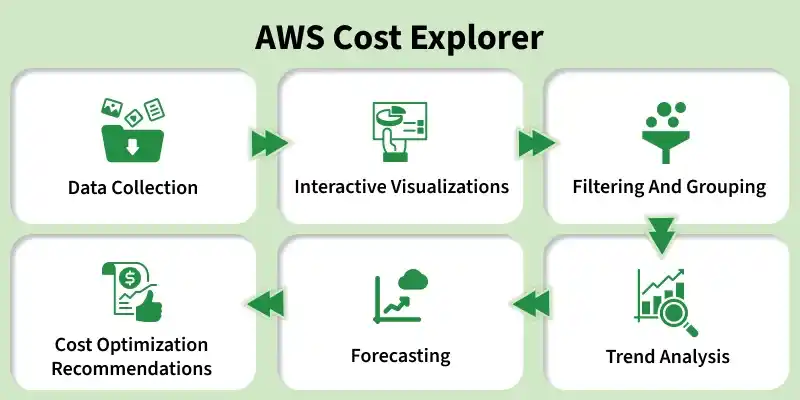
AWS Cost Explorer is a tool that helps you visualize and manage your AWS costs. Here's a brief overview of how it operates:
- Data Collection: It automatically gathers detailed data about your AWS usage and expenses.
- Interactive Visualizations: Presents your cost data through easy-to-understand graphs and charts.
- Filtering and Grouping: Allows you to filter costs by services, accounts, regions or tags to focus on specific areas.
- Trend Analysis: Helps you identify spending patterns, cost spikes or unusual trends over time.
- Forecasting: Uses historical data to predict future costs, aiding in budgeting and financial planning.
- Cost Optimization Recommendations: Provides insights to optimize spending, such as identifying cost optimization opportunities or suggesting Savings Plans.
Mastering Filters and Grouping
The real power of Cost Explorer lies in its ability to slice and dice data.
1. Group By
Grouping allows you to stack your costs to see what is driving the total.
- Group by Service: Shows you the breakdown (e.g., EC2 vs. RDS vs. S3).
- Group by Region: Shows costs by geographic location (e.g., US-East-1 vs. EU-West-1).
- Group by Usage Type: The most granular view. It shows exactly what you paid for (e.g., BoxUsage:t3.micro or DataTransfer-Out-Bytes).
2. Filtering
Filtering allows you to isolate specific datasets.
- Tag Filters: If you tag your resources (e.g., Project: BetaApp), you can filter to see only the costs for that project.
- Service Filters: Look exclusively at "EC2" costs to debug a spike in compute spending.
Note: To find "Phantom Costs" (costs from resources you thought you deleted), Group by Region and Filter by Service. You might find an idle DynamoDB table in a region you never use!
AWS Savings Plan
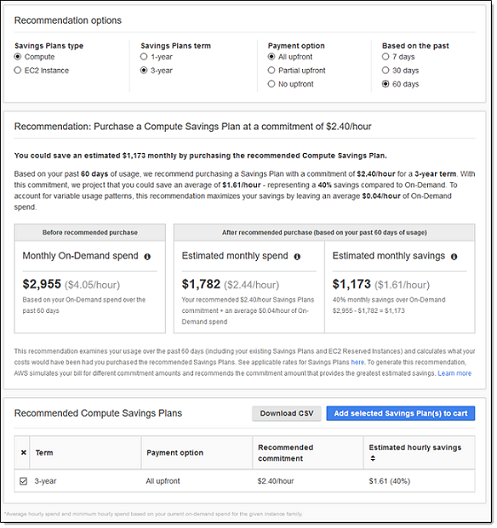
Savings Plans provide discounted pricing in exchange for a consistent usage commitment over a 1 or 3 year term. Savings Plans and enterprise programs are the commercial pieces whereas other things are a bit more technical and so AWS encourages you to start here first if you haven't done any kind of cost optimization & monitoring yet.
Exploring Your Data Using Cost Explorer
Navigate to the Cost Explorer dashboard to access an overview of your current months approximate costs view graphs of your daily expenditures also see predictions for your monthly spending, Analyze your top five cost trends and review a list of your recently viewed reports.
1. Understanding Your Monthly Costs
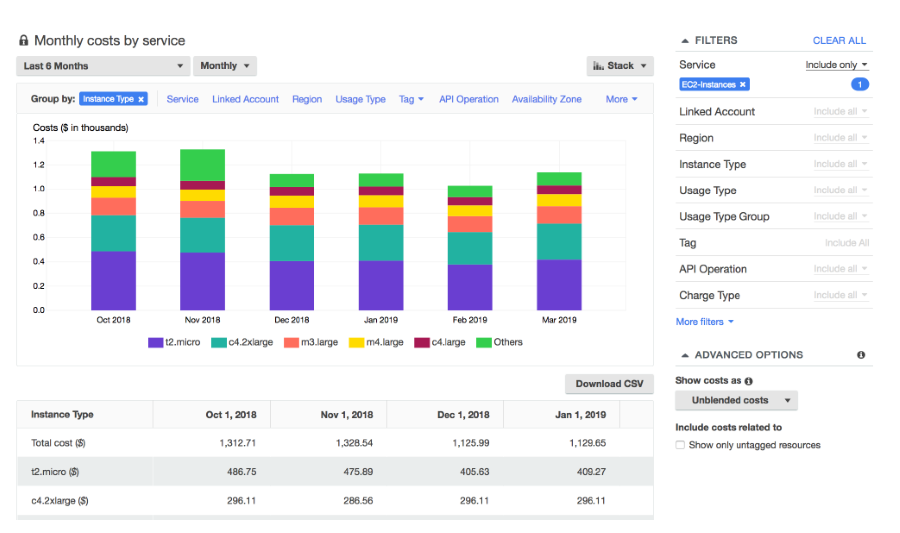
When you access the Cost Explorer dashboard, you'll find a comprehensive overview of your AWS expenses. Key components include:
- Month-to-Date Costs: Monitor your actual spending so far this month and compare it against your projected budget. This real-time insight helps you stay on track financially. You can also compare current costs with the same period from the previous month to spot changes in spending patterns.
- Forecasted End-of-Month Costs: Get an estimate of what your total AWS bill might be by month end based on current usage trends. This forecast assists in budgeting and financial planning, allowing you to anticipate expenses before they occur.
- Daily and Monthly Unblended Costs: Visualize your spending with detailed graphs that display daily expenditures. Unblended costs reflect the charges without any blended rates, providing a clear and straightforward view of your expenses. You can customize these charts by selecting Explore costs to adjust parameters and apply filters that suit your analysis needs.
2. Analyzing Cost Trends
AWS Cost Explorer highlights significant cost trends to help you understand where your money is going:
- Top Cost Drivers: The "This Month's Trends" section showcases the services or resources that are contributing most to your AWS costs. Identifying these areas allows you to focus on optimizing the biggest cost factors.
- Detailed Trend Reports: Clicking on a specific trend takes you to an in-depth report. Here you can examine the underlying data that constitutes the trend, such as increased usage of a particular service or resource. This detailed insight aids in pinpointing causes of cost fluctuations.
3. Evaluating Reserved Instance Costs
For those utilizing Reserved Instances (RIs) AWS Cost Explorer provides tools to assess their financial impact:
- Amortized Costs Analysis: Understand how the upfront and recurring costs of your Reserved Instances are allocated over time. This helps you evaluate the true cost-effectiveness of your RIs and make informed decisions about future reservations.
- Usage Efficiency: Review reports that indicate how effectively you are utilizing your Reserved Instances. Identifying underused RIs can highlight opportunities to adjust your resource planning for better cost savings.
4. Customizing Your Cost Exploration
AWS Cost Explorer offers flexibility to tailor your cost analysis
- Filtering and Grouping: Apply filters based on services, accounts, regions or tags to focus on specific areas of interest. Group your costs by different dimensions to gain insights aligned with your organizational structure.
- Adjustable Time Frames: Select custom date ranges to analyze costs over specific periods. Whether you are looking at daily fluctuations or monthly trends, this feature allows for both granular and high-level analysis.
5. Leveraging Insights for Cost Optimization
By exploring your data thoroughly you can
- Identify Savings Opportunities: Detect idle resources, over-provisioned services or areas where you can benefit from cost-saving programs like Savings Plans or Spot Instances.
- Improve Budgeting Accuracy: Use historical data and forecasts to create more precise budgets and financial forecasts enhancing your organization's financial planning.
- Enhance Operational Efficiency: Make informed decisions about resource allocation and usage patterns aligning your AWS expenditures with business objectives.
Getting Started with AWS Cost Explorer
1. You can start using Cost Explorer by opening the Billing and Cost Management console and choosing Launch Cost Explorer. Hereby Sign in to the AWS Management Console and open the Billing and Cost Management console. In the navigation pane, choose Cost Explorer.
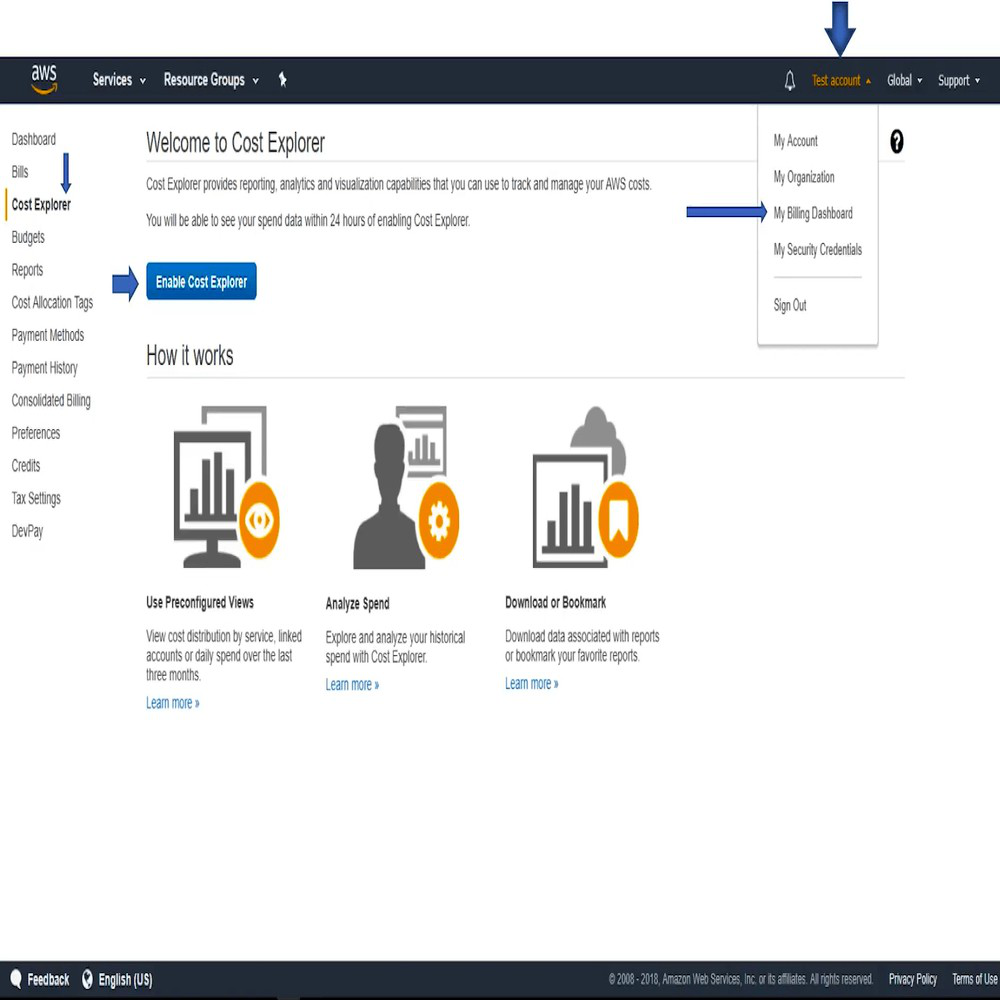
On the Cost Explorer page, choose Enable Cost Explorer. Cost Explorer opens to the Monthly Amazon EC2 running hours costs and usage saved report.
It displays Cost and usage Information in bar format about the Cost for used Service and the number of hours the service was used.
Here some of the tools helpful for estimating, tracking, and Monitoring against costs plans in the AWS cloud
Category | Tool/Feature |
|---|---|
Estimating Costs | TCO (Total Cost of Ownership) Calculator |
Pricing Calculator | |
Tracking Costs | Billing Dashboard |
Cost Allocation Tags | |
Cost and Usage Reports | |
Cost Explorer | |
Monitoring Against Cost Plans | Billing Alarms |
Budgets |
Advanced Features
1. Forecasting
Cost Explorer uses machine learning on your historical data to predict future spend.
- Use Case: You can see if your current growth trend will cause you to exceed your annual budget in 6 months.
- Confidence Interval: You can view a prediction range (80% confidence) to see best-case and worst-case scenarios.
2. Savings Plans & RI Reports
Cost Explorer analyzes your past usage to recommend commitment-based discounts.
- Coverage Report: Shows what percentage of your usage is covered by RIs/Savings Plans.
- Utilization Report: Shows if you are actually using the RIs you bought. (A wasted RI is money down the drain).
Best Practices
- Enable Cost Allocation Tags: You cannot fix what you cannot measure. Tag everything (Environment, CostCenter, Owner).
- Check Anomaly Detection Daily: Set up SNS alerts so you get an email the moment a spike occurs.
- Review "Unblended" Costs: If you have a consolidated billing family (AWS Organizations), make sure you are looking at Unblended costs to see the true usage of individual accounts.