
Jenkins is an open-source tool that automates various stages of the software development lifecycle. It supports building, testing, and deploying applications across multiple environments, making it a critical component in CI/CD pipelines.
- Automation: Automates repetitive tasks such as builds, tests, and deployments.
- Extensibility: Over 1,800+ plugins to integrate with various tools like Docker, Kubernetes, Selenium, and Git.
- Technology Agnostic: Supports multiple programming languages and tech stacks, including Java, Python, JavaScript, and more.
- Ease of Setup: Provides a user-friendly web-based GUI for configuration.
- Master-Slave Architecture: Enables distributed builds for improved performance and scalability.
Jenkins Architecture and Core Concepts
Jenkins follows a master-slave architecture, where the Jenkins server (master) manages build jobs and delegates their execution to agent nodes (slaves). This setup ensures efficient resource utilization and parallel execution.
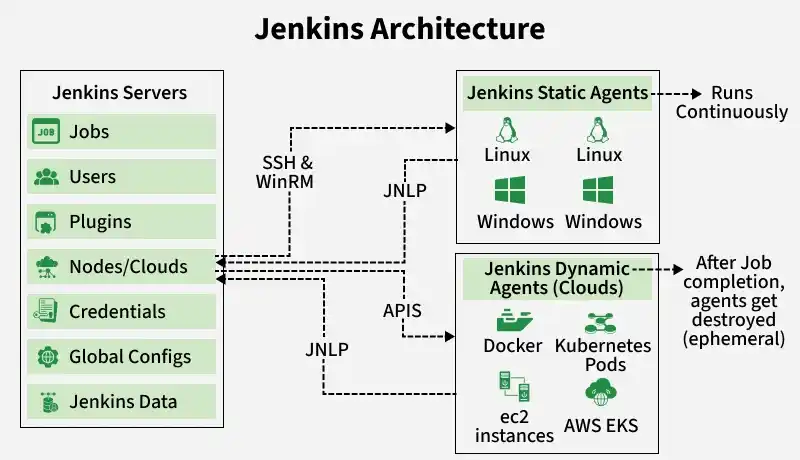
Master Slave Architecture
1. Jenkins Controller(Formerly Master)
The Jenkins Controller serves as the central system for managing a Jenkins instance, often referred to as its "heart." It oversees agents and their connections, determining the tasks they should perform. Additionally, the Jenkins Controller loads plugins and ensures that jobs run in the correct sequence.
2. Jenkins Agent(Formerly Slave)
Jenkins Agent is a machine that performs tasks like running scripts, executing tests, or building components, etc. These tasks are assigned by the Jenkins Controller. Each agent can have its setup, like different operating systems, software, or hardware. This helps Jenkins handle many types of tasks and work faster by spreading the load.
There are two main types of agents:
- Permanent Agents: These are always ready and connected to Jenkins. They’re like dedicated workers who are always on standby.
- Ephemeral Agents: These are temporary. Jenkins starts them only when needed, usually in the cloud or using tools like Docker. When the job is done, they’re shut down.
3. Jenkins Node
A Jenkins Node is a term that is used in Jenkins 2.0 to mean any system that can run Jenkins jobs. This is mainly used in Controllers and Agents and sometimes used instead of those terms. A node is a machine that Jenkins uses to run jobs like building and testing projects. If a node isn’t performing well or its health drops below a certain threshold level, Jenkins will take that node offline to prevent any problems.
4. Jenkins Job
Jenkins jobs are used to perform the work in the Jenkins system. A jenkins jobs is an automated job that you set up in jenkins to do things like build, test or deploy your code. Instead of doing these steps manually every time, Jenkins can do them for you whenever there’s a change in your code. This helps save time and reduces mistakes.
5. Jenkins Plugins
Jenkins provides 2000+ community contributed Jenkins plugins which developers can use for building, deploying and automating any project. You can connect to GitHub, Slack, AWS, Docker, and more—instantly amplifying Jenkins’ power.. You can easily install and upgrade these available plugins easily from the Jenkins Dashboard.
6. Jenkins Pipeline
DevOps professionals mostly work with pipelines because pipelines can automate the processes like building, testing, and deploying the application. With the help of Continuous Integration / Continuous Deployment (CI/CD) Pipeline scripts we can automate the whole process which will increase productivity and save lots of time for the organization and can deliver quality applications to the end users.
Jenkins Workflow
Jenkins automates the entire CI/CD process through pipelines, which are structured as a series of stages.
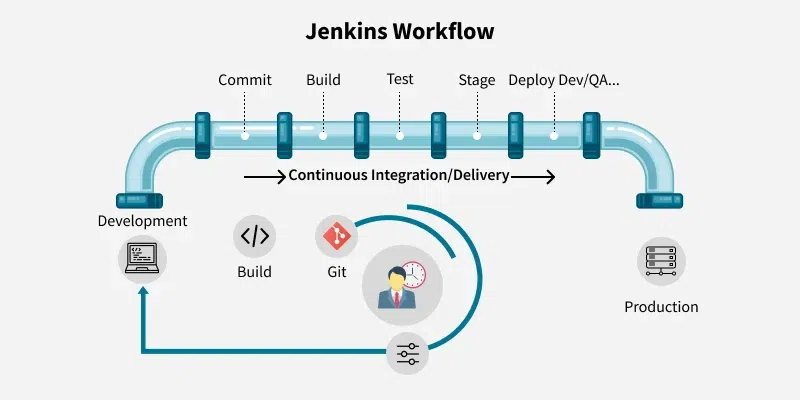
Code Commit
Developers push changes to a version control system like Git.
Build
Jenkins compiles the code and generates artifacts.
Testing
Executes automated tests (unit, integration, or system tests).
Deployment
Deploys the tested build to staging or production environments.
Quality Gates
Verifies code quality at each stage to ensure standards are met.
Key Features of Jenkins
1. Pipelines
- Automate CI/CD workflows with declarative or scripted pipelines.
- Ensure smooth transitions from code commit to production deployment.
Plugin Support
- Plugins for source control (Git), build tools (Maven), and cloud integrations (AWS, Docker, Kubernetes).
Cross-Platform Compatibility
- Works across operating systems (Linux, Windows, macOS).
- Supports integration with cloud-based services.
Master-Slave Setup
- Ensures distributed execution for improved performance.
Support for Multiple Languages
- Compatible with Java, Python, Node.js, and more.
Scalability
- Efficient for both small projects and enterprise-level applications.
Jenkins Use Cases
Build Automation
- Compile code, create build artifacts, and package applications.
Test Automation
- Integrates with Selenium, TestNG, JUnit, and other tools to run automated tests.
Continuous Deployment
- Automates the deployment process to various environments, including staging and production.
Reporting
- Generates reports for test results, code coverage, and build statuses.
Integration with Cloud Services
- Supports AWS, Azure, and Google Cloud for scalable CI/CD workflows.
How Jenkins Integrates into CI/CD
Jenkins plays a pivotal role in CI/CD pipelines by enabling teams to automate and streamline the entire software delivery process.
1. Continuous Integration
Merges code changes frequently and triggers automated builds and tests.
2. Continuous Delivery
Keeps the code in a deployable state with manual approval for production deployment.
3. Continuous Deployment
Fully automates deployment to production upon successful test completion.