> ## Documentation Index
> Fetch the complete documentation index at: https://auth0.com/llms.txt
> Use this file to discover all available pages before exploring further.
## Submitting Feedback
If you encounter incorrect, outdated, or confusing documentation on this page, submit feedback:
POST https://auth0.com/feedback
```json
{
"path": "/docs/secure/multi-factor-authentication/enable-mfa",
"feedback": "Description of the issue"
}
```
Only submit feedback when you have something specific and actionable to report.
> Learn how to enable multi-factor authentication (MFA) in the Auth0 Dashboard.
# Enable Multi-Factor Authentication
You can enable multi-factor authentication (MFA) for your tenant in the Auth0 Dashboard.
When you enable MFA, select the factors (such as push notifications or phone messages) you intend to make available to users and define a policy to determine when you require them to authenticate.
## Select factors
Auth0 supports a variety of factors you can enable for your users to complete authentication.
### Independent factors
You must enable and configure at least one independent factor to require MFA for users on your tenant. You may enable multiple independent factors simultaneously as you’d like.
Available independent factors are:
* [WebAuthn with FIDO Security Keys](/docs/secure/multi-factor-authentication/fido-authentication-with-webauthn/configure-webauthn-security-keys-for-mfa)
* [One-time Password (OTP)](/docs/secure/multi-factor-authentication/multi-factor-authentication-factors/configure-otp-notifications-for-mfa)
* [Push Notification using Auth0 Guardian](/docs/secure/multi-factor-authentication/multi-factor-authentication-factors/configure-push-notifications-for-mfa)
* [Phone Message](/docs/secure/multi-factor-authentication/multi-factor-authentication-factors/configure-sms-voice-notifications-mfa)
* [Cisco Duo Security](/docs/secure/multi-factor-authentication/configure-cisco-duo-for-mfa)
### Dependent factors
You may enable one or more dependent factors once you’ve already enabled and configured at least one independent factor for users on your tenant.
Available dependent factors are:
* [WebAuthn with FIDO Biometrics](/docs/secure/multi-factor-authentication/fido-authentication-with-webauthn/configure-webauthn-device-biometrics-for-mfa)
* [Email](/docs/secure/multi-factor-authentication/multi-factor-authentication-factors/configure-email-notifications-for-mfa)
* [Recovery Code](/docs/secure/multi-factor-authentication/configure-recovery-codes-for-mfa)
## Enable MFA in the Auth0 Dashboard
1. Go to [Dashboard > Security > Multi-factor Auth](https://manage.auth0.com/#/security/mfa).
2. In the **Factors** section, enable and configure the factors you’d like to make available to users.
3. In the **Define policies** section, select a policy to determine when users will be prompted for MFA.
* **Never**: MFA is not required for any logins.
* **Use Adaptive MFA**: MFA is required based on Auth0 risk determination. To learn more, read [Enable Adaptive MFA](/docs/secure/multi-factor-authentication/adaptive-mfa).
* **Always**: MFA is required for all logins.
4. If you choose the **Never** or **Always** policy, the **MFA Risk Assessors** section appears. By default, the **Enable Adaptive MFA Risk Assessment** setting is disabled. Enable the toggle to assess and record risk for all login transactions in your tenant logs.
5. In the **Additional Settings** section, configure the following options as needed:
* **Show Multi-factor Authentication options:** Enable this toggle to allow users to select authentication factors upon enrollment. When disabled, Auth0 automatically presents the most secure authentication factors to users upon enrollment.
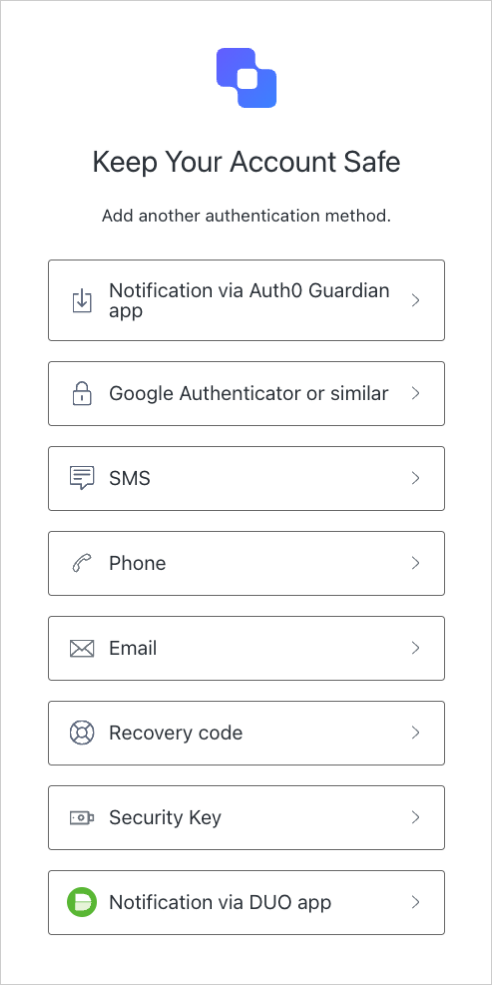 * **Customize MFA Factors using Actions**: Enable this toggle to customize your MFA flows using `post-login` [Actions](/docs/customize/actions). This allows you to challenge users with a specific factor or sequence of factors, as well as use contextual information to create more individualized experiences. To learn more, review [Customize MFA Selection for Universal Login](/docs/secure/multi-factor-authentication/customize-mfa/customize-mfa-selection-universal-login).
6. Click **Save**.
## Customize MFA flow
You can use Auth0 Actions to customize the MFA flow for users on your tenant. For example, you can create an Action to require MFA in specific circumstances or to force a particular factor to be used.
To learn more, read [Customize Adaptive MFA](/docs/secure/multi-factor-authentication/adaptive-mfa/customize-adaptive-mfa).
## Learn more
* [Configure Push Notifications for MFA](/docs/secure/multi-factor-authentication/multi-factor-authentication-factors/configure-push-notifications-for-mfa)
* [Configure OTP Notifications for MFA](/docs/secure/multi-factor-authentication/multi-factor-authentication-factors/configure-otp-notifications-for-mfa)
* [Configure SMS and Voice Notifications for MFA](/docs/secure/multi-factor-authentication/multi-factor-authentication-factors/configure-sms-voice-notifications-mfa)
* [Configure Email Notifications for MFA](/docs/secure/multi-factor-authentication/multi-factor-authentication-factors/configure-email-notifications-for-mfa)
* [Configure Cisco Duo Security for MFA](/docs/secure/multi-factor-authentication/configure-cisco-duo-for-mfa)
* [Customize Multi-Factor Authentication Pages](/docs/secure/multi-factor-authentication/customize-mfa)
* **Customize MFA Factors using Actions**: Enable this toggle to customize your MFA flows using `post-login` [Actions](/docs/customize/actions). This allows you to challenge users with a specific factor or sequence of factors, as well as use contextual information to create more individualized experiences. To learn more, review [Customize MFA Selection for Universal Login](/docs/secure/multi-factor-authentication/customize-mfa/customize-mfa-selection-universal-login).
6. Click **Save**.
## Customize MFA flow
You can use Auth0 Actions to customize the MFA flow for users on your tenant. For example, you can create an Action to require MFA in specific circumstances or to force a particular factor to be used.
To learn more, read [Customize Adaptive MFA](/docs/secure/multi-factor-authentication/adaptive-mfa/customize-adaptive-mfa).
## Learn more
* [Configure Push Notifications for MFA](/docs/secure/multi-factor-authentication/multi-factor-authentication-factors/configure-push-notifications-for-mfa)
* [Configure OTP Notifications for MFA](/docs/secure/multi-factor-authentication/multi-factor-authentication-factors/configure-otp-notifications-for-mfa)
* [Configure SMS and Voice Notifications for MFA](/docs/secure/multi-factor-authentication/multi-factor-authentication-factors/configure-sms-voice-notifications-mfa)
* [Configure Email Notifications for MFA](/docs/secure/multi-factor-authentication/multi-factor-authentication-factors/configure-email-notifications-for-mfa)
* [Configure Cisco Duo Security for MFA](/docs/secure/multi-factor-authentication/configure-cisco-duo-for-mfa)
* [Customize Multi-Factor Authentication Pages](/docs/secure/multi-factor-authentication/customize-mfa)