> ## Documentation Index
> Fetch the complete documentation index at: https://auth0.com/llms.txt
> Use this file to discover all available pages before exploring further.
## Submitting Feedback
If you encounter incorrect, outdated, or confusing documentation on this page, submit feedback:
POST https://auth0.com/feedback
```json
{
"path": "/docs/secure/multi-factor-authentication/step-up-authentication",
"feedback": "Description of the issue"
}
```
Only submit feedback when you have something specific and actionable to report.
> Describes how step-up authentication works for APIs and web apps to verify that the user has logged in using MFA and if not, require the user to step-up to access certain resources.
# Add Step-up Authentication
With step-up authentication, applications that allow access to different types of resources can require users to authenticate with a stronger authentication mechanism to access sensitive resources.
You can add step-up authentication to your app with Auth0's extensible multi-factor authentication (MFA) support. Your app can verify that the user has logged in using MFA and, if not, require the user to step-up to access certain resources.
## How it works
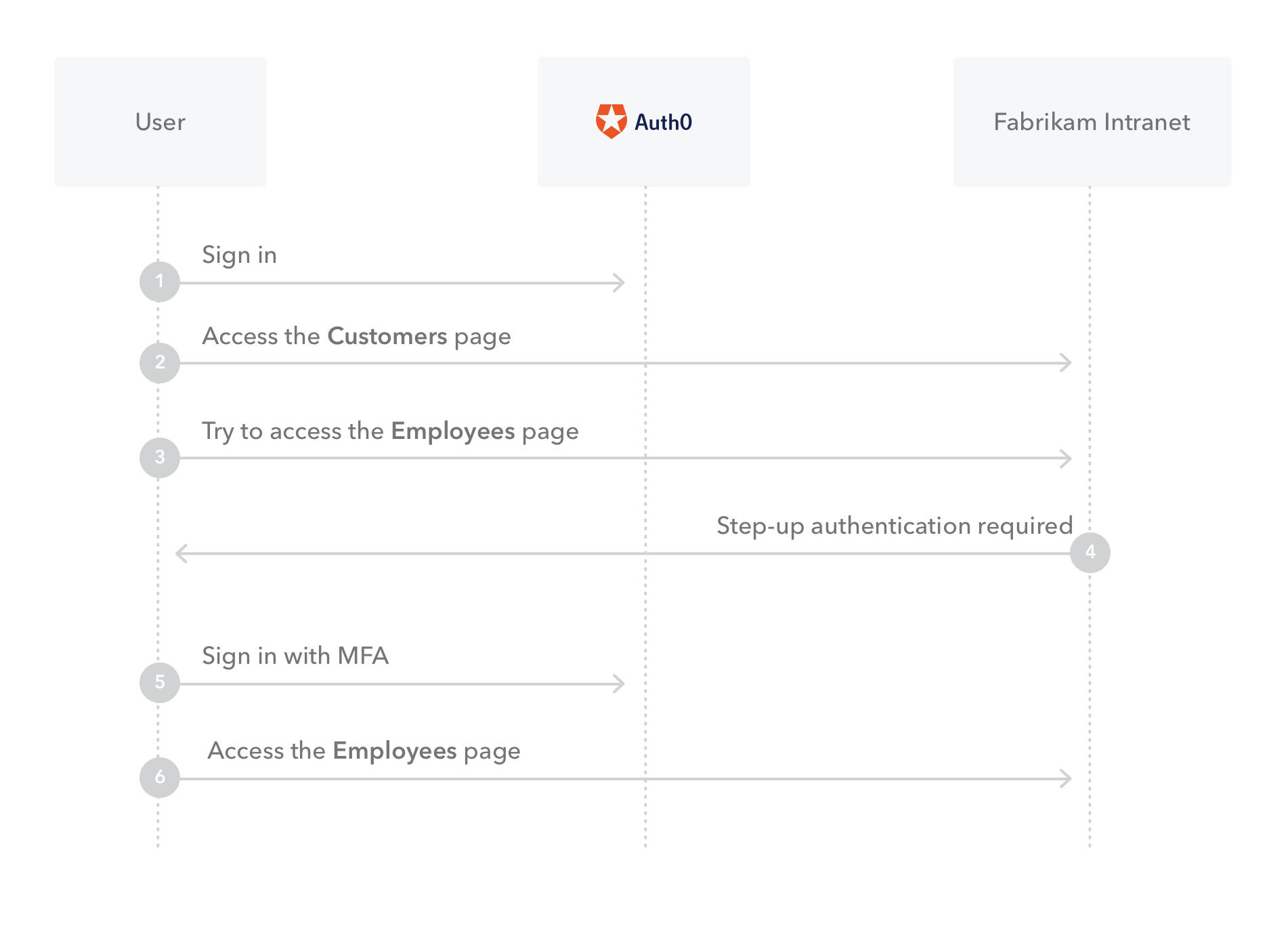
As an example, Fabrikam's Intranet requires users to authenticate with their username and password to access customer data. However, a request for access to employee data (which may contain sensitive salary information) triggers a stronger authentication mechanism like MFA.
 ## Step-up Authentication for APIs
When your audience is an API, you can implement step-up authentication with Auth0 using [scopes](/docs/get-started/apis/scopes), [access tokens](/docs/secure/tokens/access-tokens), and [Actions](/docs/customize/actions). You can use an Action to trigger the step-up authentication mechanism (for example, prompt MFA) whenever the user requests scopes that map to sensitive resources.
In our example, a user signs into Fabrikam's web app. The standard login gives to this user the ability to interact with their API and fetch the user's account list. This means that the access token that the application receives after the user authentication contains a scope like `read:accounts`.
Now the user wishes to transfer funds from one account to another, which is deemed a high-value transaction. In order to perform this action, the API requires the scope `transfer:funds`.
The user's current access token does not include this scope and the application knows it (because the application knows the set of scopes it requested in the initial authentication call). The application performs another authentication call, but this time it requests the scope `transfer:funds`. The browser redirects to Auth0. Per Fabrikam's Action, Auth0 challenges the user to authenticate with MFA because a high-value scope was requested. Once the user successfully authenticates with MFA, Auth0 generates and sends a new access token that includes the high-value scope. The application passes the access token to the API, which discards it after verification, thereby treating it as a single-use token.
To learn more, read [Configure Step-up Authentication for APIs](/docs/secure/multi-factor-authentication/step-up-authentication/configure-step-up-authentication-for-apis).
## Step-up Authentication for web apps
If it is a web app that verifies the authentication level, and not an API, then you do not have an access token. In this case, you can check if a user has logged in with MFA by reviewing the contents of their ID token. You can then configure your application to deny access to pages with sensitive information if the ID token indicates that the user did not log in with MFA, and use an Action to trigger the step-up authentication mechanism (for example, prompt MFA). For example, you might have an employee app that authenticates users with usernames and passwords, but if a user wants to access salary information, they have to provide a second factor such as a mobile push notification.
You can implement this by checking the ID token when the user tries to access that page. If the claims show that the user already has authenticated with MFA then display the sensitive information. Otherwise, trigger authentication again and, using an Action, prompt the user to authenticate with MFA.
To learn more, read [Configure Step-up Authentication for Web Apps](/docs/secure/multi-factor-authentication/step-up-authentication/configure-step-up-authentication-for-web-apps).
## Learn more
* [Configure Step-up Authentication for APIs](/docs/secure/multi-factor-authentication/step-up-authentication/configure-step-up-authentication-for-apis)
* [Configure Step-up Authentication for Web Apps](/docs/secure/multi-factor-authentication/step-up-authentication/configure-step-up-authentication-for-web-apps)
## Step-up Authentication for APIs
When your audience is an API, you can implement step-up authentication with Auth0 using [scopes](/docs/get-started/apis/scopes), [access tokens](/docs/secure/tokens/access-tokens), and [Actions](/docs/customize/actions). You can use an Action to trigger the step-up authentication mechanism (for example, prompt MFA) whenever the user requests scopes that map to sensitive resources.
In our example, a user signs into Fabrikam's web app. The standard login gives to this user the ability to interact with their API and fetch the user's account list. This means that the access token that the application receives after the user authentication contains a scope like `read:accounts`.
Now the user wishes to transfer funds from one account to another, which is deemed a high-value transaction. In order to perform this action, the API requires the scope `transfer:funds`.
The user's current access token does not include this scope and the application knows it (because the application knows the set of scopes it requested in the initial authentication call). The application performs another authentication call, but this time it requests the scope `transfer:funds`. The browser redirects to Auth0. Per Fabrikam's Action, Auth0 challenges the user to authenticate with MFA because a high-value scope was requested. Once the user successfully authenticates with MFA, Auth0 generates and sends a new access token that includes the high-value scope. The application passes the access token to the API, which discards it after verification, thereby treating it as a single-use token.
To learn more, read [Configure Step-up Authentication for APIs](/docs/secure/multi-factor-authentication/step-up-authentication/configure-step-up-authentication-for-apis).
## Step-up Authentication for web apps
If it is a web app that verifies the authentication level, and not an API, then you do not have an access token. In this case, you can check if a user has logged in with MFA by reviewing the contents of their ID token. You can then configure your application to deny access to pages with sensitive information if the ID token indicates that the user did not log in with MFA, and use an Action to trigger the step-up authentication mechanism (for example, prompt MFA). For example, you might have an employee app that authenticates users with usernames and passwords, but if a user wants to access salary information, they have to provide a second factor such as a mobile push notification.
You can implement this by checking the ID token when the user tries to access that page. If the claims show that the user already has authenticated with MFA then display the sensitive information. Otherwise, trigger authentication again and, using an Action, prompt the user to authenticate with MFA.
To learn more, read [Configure Step-up Authentication for Web Apps](/docs/secure/multi-factor-authentication/step-up-authentication/configure-step-up-authentication-for-web-apps).
## Learn more
* [Configure Step-up Authentication for APIs](/docs/secure/multi-factor-authentication/step-up-authentication/configure-step-up-authentication-for-apis)
* [Configure Step-up Authentication for Web Apps](/docs/secure/multi-factor-authentication/step-up-authentication/configure-step-up-authentication-for-web-apps)