
An array is a collection of elements of the same data type stored in contiguous memory locations. It allows multiple values to be stored under a single name and accessed using an index.
- Java arrays can hold both primitive types (like int, char, boolean, etc.) and objects (like String, Integer, etc.)
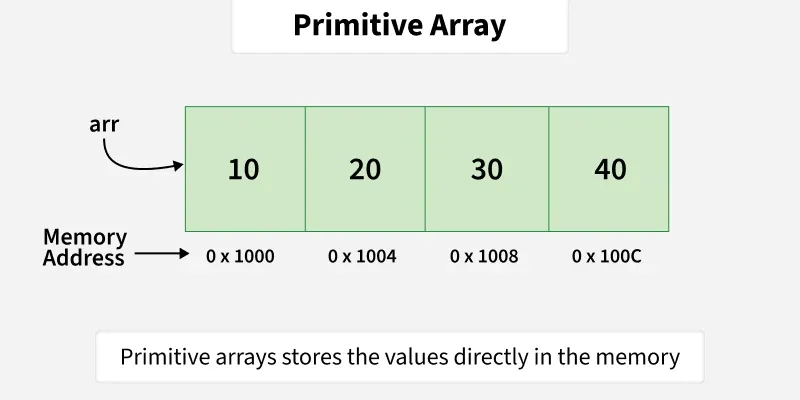
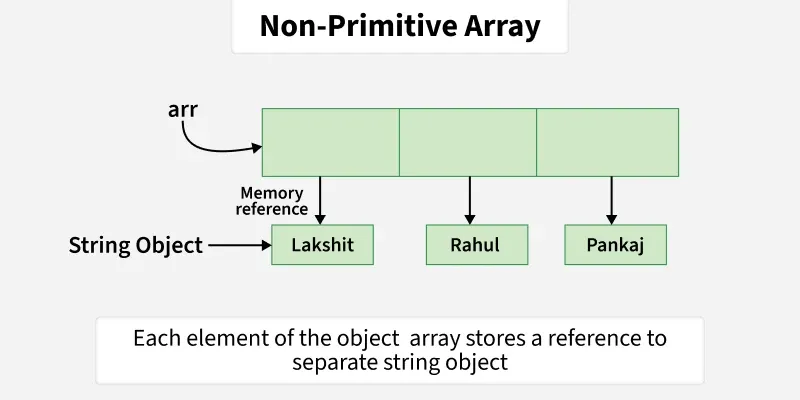
- When we use arrays of primitive types, the elements are stored in contiguous locations. For non primitive types, references to items are stored at contiguous locations.
- The first element of the array is at index 0.
- After creating an array, its size is fixed; we can not change it.
public class Geeks{

    public static void main(String[] args){

        // Primitive array
        int[] arr = {10, 20, 30, 40};
        int n = arr.length;

        System.out.print("Primitive Array -> ");
        for (int i = 0; i < n; i++)
            System.out.print(arr[i] + " ");

        System.out.println();

        // Non-primitive array (String objects)
        String[] names = {"Lakshit", "Rahul", "Pankaj"};

        System.out.print("Non-Primitive Array -> ");
        for (int i = 0; i < names.length; i++)
            System.out.print(names[i] + " ");
    }
}
Output
Primitive Array -> 10 20 30 40
Non-Primitive Array -> Lakshit Rahul Pankaj
Explanation:
- The primitive array stores integer values and is traversed using a loop.
- The non-primitive array stores
Stringobjects and is printed in the same way using its length property.
Declaring an Array
In Java, an array is declared by specifying the data type, followed by the array name, and empty square brackets [].
dataType[] arrayName;
or
dataType arrayName[];
Initialization an Array
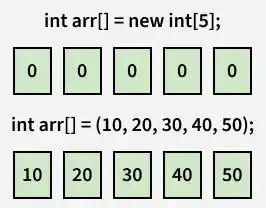
When an array is declared, only a reference is created. Memory is allocated using the new keyword by specifying the array size.
int arr[] = new int[size];
- Once an array is created, its size is fixed and cannot be changed. For collections that can grow or shrink dynamically, Java provides classes like ArrayList or Vector.
- Memory for arrays is always allocated on the heap in Java.
- The elements in the array allocated by new will automatically be initialized to zero (for numeric types), false (for boolean) or null (for reference types).
Initialization using Array Literal
You can use array literals to initialize an array when declaring it. In this case, the new keyword is not required-
Example:
int[] arr = {1, 2, 3};
- The length of this array determines the length of the created array.
- There is no need to write the new int[] part in the latest versions of Java.
Operations on Array Elements
1. Access Array Elements
Elements of an array can be accessed by their position, called the index. In Java, array indexing starts from 0 (not 1). To access an element, provide the index inside square brackets [] along with the array name.
class GFG{

    public static void main(String[] args){

        int[] arr = {2, 4, 8, 12, 16};

        // Accessing fourth element
        System.out.print(arr[3] + " ");

        // Accessing first element
        System.out.print(arr[0]);
    }
}
Output
12 2
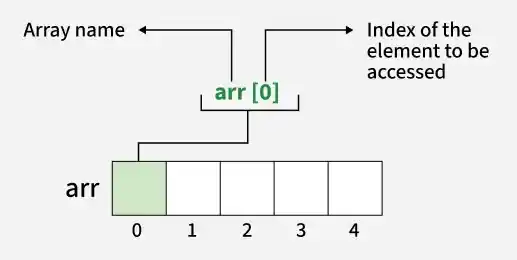
Note: It is important to note that index cannot be negative or greater than size of the array minus 1. (0 ≤ index ≤ size - 1). Also, it can also be any expression that results in valid index value.
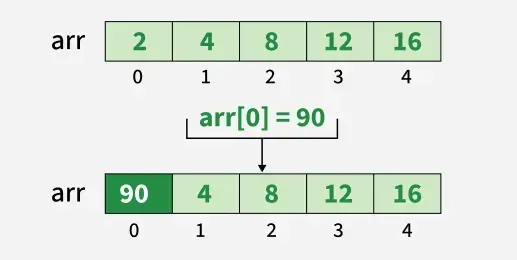
2. Update Array Elements
To update an element at a specific index in an array, use the assignment operator = while accessing the array element and assign a new value.
class GFG{

    public static void main(String[] args){

        int[] arr = {2, 4, 8, 12, 16};

        // Updating first element
        arr[0] = 90;
        System.out.println(arr[0]);
    }
}
Output
90
3. Traverse Array
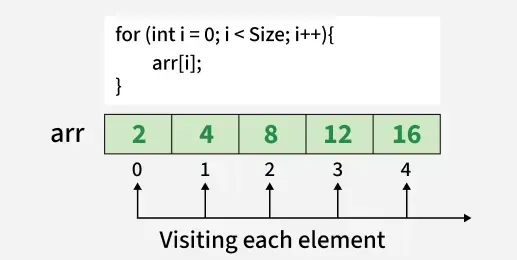
Traversing an array means accessing each element one by one. In Java, arrays can be easily traversed using a loop where the loop variable runs from 0 to array.length - 1.
class GFG{

    public static void main(String[] args){

        int[] arr = {2, 4, 8, 12, 16};

        // Traversing and printing array
        for (int i = 0; i < arr.length; i++) {
            System.out.print(arr[i] + " ");
        }
    }
}
Output
2 4 8 12 16
4. Size of Array
The size of an array refers to the number of elements it can hold. To find the size of array java provides a built-in property called length.
class GFG{

    public static void main(String[] args){

        int[] arr = {2, 4, 8, 12, 16};
        System.out.println("Size of array: " + arr.length);
    }
}
Output
Size of array: 5
Arrays of Objects in Java
An array of objects is created like an array of primitive-type data items
Example: Create an array of five Student objects by instantiating each Student using its constructor and storing their references in the array.
class Student {
    public int roll_no;
    public String name;

    Student(int roll_no, String name){
        this.roll_no = roll_no;
        this.name = name;
    }
}

public class Geeks {
    public static void main(String[] args){

        // declares an Array of Student
        Student[] arr;

        // allocating memory for 5 objects of type Student.
        arr = new Student[5];

        // initialize the elements of the array
        arr[0] = new Student(1, "aman");
        arr[1] = new Student(2, "vaibhav");
        arr[2] = new Student(3, "shikar");
        arr[3] = new Student(4, "dharmesh");
        arr[4] = new Student(5, "mohit");

        // accessing the elements of the specified array
        for (int i = 0; i < arr.length; i++)
            System.out.println("Element at " + i + " : { "
                               + arr[i].roll_no + " "
                               + arr[i].name+" }");
    }
}
Output
Element at 0 : { 1 aman }
Element at 1 : { 2 vaibhav }
Element at 2 : { 3 shikar }
Element at 3 : { 4 dharmesh }
Element at 4 : { 5 mohit }
What happens if we try to access elements outside the array size?
JVM throws ArrayIndexOutOfBoundsException to indicate that the array has been accessed with an illegal index. The index is either negative or greater than or equal to the size of an array.
public class Geeks {
    public static void main(String[] args)
    {
        int[] arr = new int[4];
        arr[0] = 10;
        arr[1] = 20;
        arr[2] = 30;
        arr[3] = 40;

        System.out.println(
            "Trying to access element outside the size of array");
        System.out.println(arr[5]);
    }
}
Output:

Passing Arrays to Methods
Like variables, we can also pass arrays to methods. For example, the below program passes the array to method sum to calculate the sum of the array's values.
public class Geeks {
    // Driver method
    public static void main(String args[])
    {
        int arr[] = { 3, 1, 2, 5, 4 };

        // passing array to method m1
        sum(arr);
    }

    public static void sum(int[] arr)
    {
        // getting sum of array values
        int sum = 0;

        for (int i = 0; i < arr.length; i++)
            sum += arr[i];

        System.out.println("sum of array values : " + sum);
    }
}
Output
sum of array values : 15
Explanation
- This Java program demonstrates how to pass an array to a method.
- An integer array arr is declared and initialized in the main method.
- The sum() method is called with arr as an argument.
- Inside the sum() method, all array elements are added using a for loop.
- The final sum is then printed to the console.
Returning Arrays from Methods
As usual, a method can also return an array. For example, the below program returns an array from method m1.
class Geeks {
    // Driver method
    public static void main(String args[])
    {
        int arr[] = m1();

        for (int i = 0; i < arr.length; i++)
            System.out.print(arr[i] + " ");
    }

    public static int[] m1()
    {
        // returning  array
        return new int[] { 1, 2, 3 };
    }
}

Output
1 2 3
Advantages of Java Arrays
- Efficient Access: Accessing an element by its index is fast and has constant time complexity, O(1).
- Memory Management: Arrays have fixed size, which makes memory management straightforward and predictable.
- Data Organization: Arrays help organize data in a structured manner, making it easier to manage related elements.
Disadvantages of Java Arrays
- Fixed Size: Once an array is created, its size cannot be changed, which can lead to memory waste if the size is overestimated or insufficient storage if underestimated.
- Type Homogeneity: Arrays can only store elements of the same data type, which may require additional handling for mixed types of data.
- Insertion and Deletion: Inserting or deleting elements, especially in the middle of an array, can be costly as it may require shifting elements.