
This tutorial guides you through building a Quiz App with a timer using HTML, CSS, and JavaScript, helping you understand core web development concepts through a practical project. It allows users to answer multiple-choice questions within a limited time.
- Includes a timer to add challenge and track quiz duration.
- Tracks user scores based on selected answers.
- Uses HTML for structure, CSS for styling, and JavaScript for logic and interactivity.
Approach
- Quiz Interface: We will create a user-friendly interface displaying questions and answer options.
- Timer: A countdown timer will be integrated that decreases as the quiz progresses.
- Score Tracking: The app will track the user’s score as they answer questions correctly.
- Restart Functionality: After the quiz ends, users will be able to restart the quiz with a fresh set of questions.
- Responsive Design: The app will be styled in such a way that it looks good on both desktop and mobile devices.
Preview
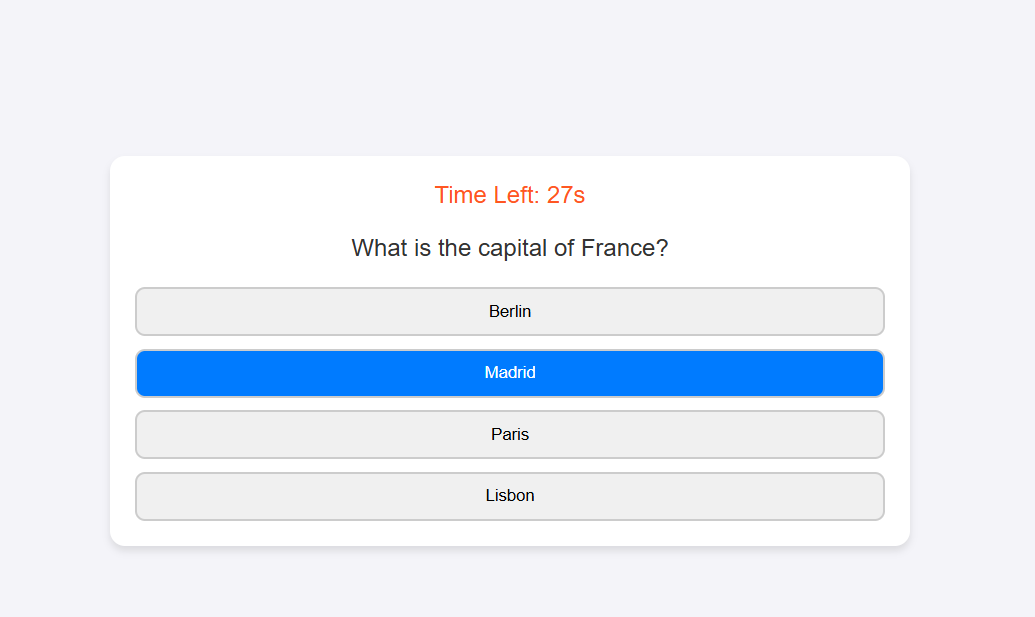
Quiz App with Timer - HTML and CSS Code
This quiz application features a responsive design with a countdown timer, multiple-choice questions, and a real-time score display. It provides an engaging user experience with interactive styling and animations.
<html>
    <style src="style.css"></style>
<body>
    <div class="quiz-container">
        <div class="timer">Time Left: <span id="time">30</span>s</div>
        <div class="question">Question will appear here</div>
        <div class="options"></div>
        <div class="result">Your score: <span id="score">0</span></div>
        <button class="restart-btn">Restart Quiz</button>
    </div>
</body>
<script src="script.js"></script>
</html>
body {
            font-family: Arial, sans-serif;
            background-color: #f4f4f9;
            color: #333;
            margin: 0;
            padding: 0;
            display: flex;
            justify-content: center;
            align-items: center;
            height: 100vh;
        }

        .quiz-container {
            background: #fff;
            border-radius: 12px;
            box-shadow: 0 4px 6px rgba(0, 0, 0, 0.1);
            width: 90%;
            max-width: 600px;
            padding: 20px;
            text-align: center;
            box-sizing: border-box;
        }

        .question {
            font-size: 1.2em;
            margin-bottom: 20px;
        }

        .options {
            display: flex;
            flex-direction: column;
            gap: 10px;
        }

        .option {
            padding: 10px;
            border: 2px solid #ccc;
            border-radius: 8px;
            cursor: pointer;
            transition: background-color 0.3s, color 0.3s;
        }

        .option:hover {
            background-color: #007bff;
            color: #fff;
        }

        .timer {
            font-size: 1.2em;
            margin-bottom: 20px;
            color: #ff5722;
        }

        .result {
            font-size: 1.5em;
            color: #4caf50;
            display: none;
        }

        .restart-btn {
            background-color: #007bff;
            color: #fff;
            border: none;
            padding: 10px 20px;
            font-size: 1em;
            border-radius: 8px;
            cursor: pointer;
            margin-top: 20px;
            display: none;
        }

        .restart-btn:hover {
            background-color: #0056b3;
        }
const quizData = [
            {
                question: "What is the capital of France?",
                options: ["Berlin", "Madrid", "Paris", "Lisbon"],
                answer: "Paris"
            },
            {
                question: "Which language is used for web development?",
                options: ["Python", "HTML", "Java", "C++"],
                answer: "HTML"
            },
            {
                question: "Who wrote 'Hamlet'?",
                options: ["Charles Dickens", "William Shakespeare", "Mark Twain", "Jane Austen"],
                answer: "William Shakespeare"
            },
            {
                question: "What is the largest planet in our solar system?",
                options: ["Earth", "Mars", "Jupiter", "Saturn"],
                answer: "Jupiter"
            },
            {
                question: "Which country is known as the Land of the Rising Sun?",
                options: ["China", "Japan", "South Korea", "India"],
                answer: "Japan"
            }
        ];

        let currentQuestion = 0;
        let score = 0;
        let timeLeft = 30;
        let timerInterval;
        const timerEl = document.getElementById('time');
        const questionEl = document.querySelector('.question');
        const optionsEl = document.querySelector('.options');
        const resultEl = document.querySelector('.result');
        const scoreEl = document.getElementById('score');
        const restartBtn = document.querySelector('.restart-btn');

        // Function to load the question
        function loadQuestion() {
            if (currentQuestion >= quizData.length) {
                endQuiz();
                return;
            }
            clearInterval(timerInterval);
            timeLeft = 30;
            timerEl.textContent = timeLeft;
            startTimer();
            const currentQuiz = quizData[currentQuestion];
            questionEl.textContent = currentQuiz.question;
            optionsEl.innerHTML = ''; // Clear previous options
            currentQuiz.options.forEach(option => {
                const button = document.createElement('button');
                button.classList.add('option');
                button.textContent = option;
                button.onclick = () => checkAnswer(option);
                optionsEl.appendChild(button);
            });
        }

        // Check the answer
        function checkAnswer(selectedOption) {
            if (selectedOption === quizData[currentQuestion].answer) {
                score++;
            }
            currentQuestion++;
            loadQuestion();
        }

        // Start the timer
        function startTimer() {
            timerInterval = setInterval(() => {
                timeLeft--;
                timerEl.textContent = timeLeft;
                if (timeLeft <= 0) {
                    clearInterval(timerInterval);
                    endQuiz();
                }
            }, 1000);
        }

        // End the quiz and show the results
        function endQuiz() {
            clearInterval(timerInterval);
            questionEl.style.display = 'none';
            optionsEl.style.display = 'none';
            resultEl.style.display = 'block';
            scoreEl.textContent = score;
            restartBtn.style.display = 'block';
        }

        // Restart the quiz
        restartBtn.addEventListener('click', () => {
            // Reset variables
            currentQuestion = 0;
            score = 0;
            timeLeft = 30;
            timerEl.textContent = timeLeft;

            // Reset the display
            questionEl.style.display = 'block';
            optionsEl.style.display = 'flex'; // Ensure options are displayed correctly
            resultEl.style.display = 'none';
            restartBtn.style.display = 'none';

            // Load the first question
            loadQuestion();
        });

        // Initialize the quiz with the first question
loadQuestion();
- Layout and Centering: The body uses flexbox to center the quiz container on the screen with a light background and Arial font.
- Quiz Container: .quiz-container styles the main quiz area with a white background, rounded corners, and a shadow.
- Question and Options: The .question and .options classes define the question's appearance and stack options vertically with gaps.
- Options Style: .option adds padding, borders, and hover effects for interactive buttons.
- Timer, Result, Restart: The .timer shows the countdown, .result displays the score after the quiz, and .restart-btn is hidden until the quiz ends.
Quiz App with Timer - JavaScript Code
This script manages the functionality of a quiz app, including loading questions, checking answers, timing, and displaying results.
const quizData = [
            {
                question: "What is the capital of France?",
                options: ["Berlin", "Madrid", "Paris", "Lisbon"],
                answer: "Paris"
            },
            {
                question: "Which language is used for web development?",
                options: ["Python", "HTML", "Java", "C++"],
                answer: "HTML"
            },
            {
                question: "Who wrote 'Hamlet'?",
                options: ["Charles Dickens", "William Shakespeare", "Mark Twain", "Jane Austen"],
                answer: "William Shakespeare"
            },
            {
                question: "What is the largest planet in our solar system?",
                options: ["Earth", "Mars", "Jupiter", "Saturn"],
                answer: "Jupiter"
            },
            {
                question: "Which country is known as the Land of the Rising Sun?",
                options: ["China", "Japan", "South Korea", "India"],
                answer: "Japan"
            }
        ];

        let currentQuestion = 0;
        let score = 0;
        let timeLeft = 30;
        let timerInterval;
        const timerEl = document.getElementById('time');
        const questionEl = document.querySelector('.question');
        const optionsEl = document.querySelector('.options');
        const resultEl = document.querySelector('.result');
        const scoreEl = document.getElementById('score');
        const restartBtn = document.querySelector('.restart-btn');

        // Function to load the question
        function loadQuestion() {
            if (currentQuestion >= quizData.length) {
                endQuiz();
                return;
            }
            clearInterval(timerInterval);
            timeLeft = 30;
            timerEl.textContent = timeLeft;
            startTimer();
            const currentQuiz = quizData[currentQuestion];
            questionEl.textContent = currentQuiz.question;
            optionsEl.innerHTML = ''; // Clear previous options
            currentQuiz.options.forEach(option => {
                const button = document.createElement('button');
                button.classList.add('option');
                button.textContent = option;
                button.onclick = () => checkAnswer(option);
                optionsEl.appendChild(button);
            });
        }

        // Check the answer
        function checkAnswer(selectedOption) {
            if (selectedOption === quizData[currentQuestion].answer) {
                score++;
            }
            currentQuestion++;
            loadQuestion();
        }

        // Start the timer
        function startTimer() {
            timerInterval = setInterval(() => {
                timeLeft--;
                timerEl.textContent = timeLeft;
                if (timeLeft <= 0) {
                    clearInterval(timerInterval);
                    endQuiz();
                }
            }, 1000);
        }

        // End the quiz and show the results
        function endQuiz() {
            clearInterval(timerInterval);
            questionEl.style.display = 'none';
            optionsEl.style.display = 'none';
            resultEl.style.display = 'block';
            scoreEl.textContent = score;
            restartBtn.style.display = 'block';
        }

        // Restart the quiz
        restartBtn.addEventListener('click', () => {
            // Reset variables
            currentQuestion = 0;
            score = 0;
            timeLeft = 30;
            timerEl.textContent = timeLeft;

            // Reset the display
            questionEl.style.display = 'block';
            optionsEl.style.display = 'flex'; // Ensure options are displayed correctly
            resultEl.style.display = 'none';
            restartBtn.style.display = 'none';

            // Load the first question
            loadQuestion();
        });

        // Initialize the quiz with the first question
loadQuestion();
- Quiz Data: The quiz questions, options, and correct answers are stored in an array called quizData.
- Load Question: The loadQuestion() function displays the current question and options on the screen. It updates the displayed options dynamically.
- Check Answer: The checkAnswer() function compares the selected option with the correct answer. If the answer is correct, the score increases.
- Timer: The startTimer() function starts a countdown timer. If the time reaches zero, the quiz ends.
- Restart: The restartBtn button resets the quiz, clearing the score and timer, and starts the quiz again from the first question.
Quiz App with Timer - Complete code
<html>
<head>
    <style>
        body {
            font-family: Arial, sans-serif;
            background-color: #f4f4f9;
            color: #333;
            margin: 0;
            padding: 0;
            display: flex;
            justify-content: center;
            align-items: center;
            height: 100vh;
        }

        .quiz-container {
            background: #fff;
            border-radius: 12px;
            box-shadow: 0 4px 6px rgba(0, 0, 0, 0.1);
            width: 90%;
            max-width: 600px;
            padding: 20px;
            text-align: center;
            box-sizing: border-box;
        }

        .question {
            font-size: 1.2em;
            margin-bottom: 20px;
        }

        .options {
            display: flex;
            flex-direction: column;
            gap: 10px;
        }

        .option {
            padding: 10px;
            border: 2px solid #ccc;
            border-radius: 8px;
            cursor: pointer;
            transition: background-color 0.3s, color 0.3s;
        }

        .option:hover {
            background-color: #007bff;
            color: #fff;
        }

        .timer {
            font-size: 1.2em;
            margin-bottom: 20px;
            color: #ff5722;
        }

        .result {
            font-size: 1.5em;
            color: #4caf50;
            display: none;
        }

        .restart-btn {
            background-color: #007bff;
            color: #fff;
            border: none;
            padding: 10px 20px;
            font-size: 1em;
            border-radius: 8px;
            cursor: pointer;
            margin-top: 20px;
            display: none;
        }

        .restart-btn:hover {
            background-color: #0056b3;
        }
    </style>
</head>

<body>
    <div class="quiz-container">
        <div class="timer">Time Left: <span id="time">30</span>s</div>
        <div class="question">Question will appear here</div>
        <div class="options"></div>
        <div class="result">Your score: <span id="score">0</span></div>
        <button class="restart-btn">Restart Quiz</button>
    </div>
    <script>
        const quizData = [
            {
                question: "What is the capital of France?",
                options: ["Berlin", "Madrid", "Paris", "Lisbon"],
                answer: "Paris"
            },
            {
                question: "Which language is used for web development?",
                options: ["Python", "HTML", "Java", "C++"],
                answer: "HTML"
            },
            {
                question: "Who wrote 'Hamlet'?",
                options: ["Charles Dickens", "William Shakespeare", "Mark Twain", "Jane Austen"],
                answer: "William Shakespeare"
            },
            {
                question: "What is the largest planet in our solar system?",
                options: ["Earth", "Mars", "Jupiter", "Saturn"],
                answer: "Jupiter"
            },
            {
                question: "Which country is known as the Land of the Rising Sun?",
                options: ["China", "Japan", "South Korea", "India"],
                answer: "Japan"
            }
        ];

        let currentQuestion = 0;
        let score = 0;
        let timeLeft = 30;
        let timerInterval;
        const timerEl = document.getElementById('time');
        const questionEl = document.querySelector('.question');
        const optionsEl = document.querySelector('.options');
        const resultEl = document.querySelector('.result');
        const scoreEl = document.getElementById('score');
        const restartBtn = document.querySelector('.restart-btn');

        // Function to load the question
        function loadQuestion() {
            if (currentQuestion >= quizData.length) {
                endQuiz();
                return;
            }
            clearInterval(timerInterval);
            timeLeft = 30;
            timerEl.textContent = timeLeft;
            startTimer();
            const currentQuiz = quizData[currentQuestion];
            questionEl.textContent = currentQuiz.question;
            optionsEl.innerHTML = ''; // Clear previous options
            currentQuiz.options.forEach(option => {
                const button = document.createElement('button');
                button.classList.add('option');
                button.textContent = option;
                button.onclick = () => checkAnswer(option);
                optionsEl.appendChild(button);
            });
        }

        // Check the answer
        function checkAnswer(selectedOption) {
            if (selectedOption === quizData[currentQuestion].answer) {
                score++;
            }
            currentQuestion++;
            loadQuestion();
        }

        // Start the timer
        function startTimer() {
            timerInterval = setInterval(() => {
                timeLeft--;
                timerEl.textContent = timeLeft;
                if (timeLeft <= 0) {
                    clearInterval(timerInterval);
                    endQuiz();
                }
            }, 1000);
        }

        // End the quiz and show the results
        function endQuiz() {
            clearInterval(timerInterval);
            questionEl.style.display = 'none';
            optionsEl.style.display = 'none';
            resultEl.style.display = 'block';
            scoreEl.textContent = score;
            restartBtn.style.display = 'block';
        }

        // Restart the quiz
        restartBtn.addEventListener('click', () => {
            // Reset variables
            currentQuestion = 0;
            score = 0;
            timeLeft = 30;
            timerEl.textContent = timeLeft;

            // Reset the display
            questionEl.style.display = 'block';
            optionsEl.style.display = 'flex'; // Ensure options are displayed correctly
            resultEl.style.display = 'none';
            restartBtn.style.display = 'none';

            // Load the first question
            loadQuestion();
        });

        // Initialize the quiz with the first question
        loadQuestion();
    </script>
</body>

</html>
Output: