
Dragon’s World is a simple action game where one dragon tries to survive by jumping over an approaching dragon. Each successful jump increases the score, and the game logic is handled using JavaScript with structure and styling provided by HTML and CSS.
- HTML is used to create the game structure and layout.
- CSS handles the visual styling and animations.
- JavaScript controls gameplay logic, movement, and score updates.
File structure:
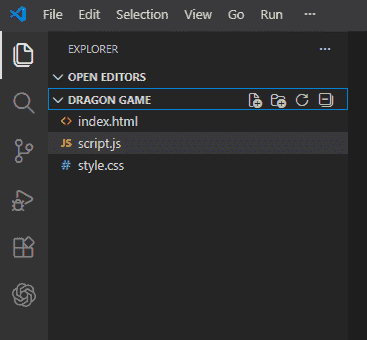
HTML Code:
- Heading portion: It will show the name of the game.
- Game over portion: It will be shown when you lose the game.
- Obstacle portion: It will contain the obstacle from which the dragon has to save itself.
- Dragon portion: It will contain the dragon which has to be saved from the obstacle i.e. the other dragon.
- Score portion: It will show the current score of the game.
index.html
<!DOCTYPE html>
<html>

<head>
    <meta charset="UTF-8">
    <meta name="viewport" content=
        "width=device-width, initial-scale=1.0">

    <link rel="stylesheet" href=
        "style.css?_cacheOverride=1606401798626">

    <link href=
"https://fonts.googleapis.com/css2?family=Ubuntu:ital,
        wght@0, 300;1, 700&display=swap"
        rel="stylesheet">
</head>

<body>
    <h1 id="gameName">Welcome to Dragon's world</h1>
    <div class="container">
        <div class="gameover">Game Over</div>
        <div id="scorecount">Your score : 0</div>
        <div class="obstacle animateobstacle"></div>
        <div class="dragon" style="left: 426px;"></div>
    </div>
</body>

</html>
CSS code:
- Positioning the game's name: The name of the game is positioned by the absolute property of CSS.
- Background image styling: In the container class, we have put the background image of the game with the background-size set to cover.
- Score Card styling: We have positioned the scorecard to top right of the page and also provided it with a suitable background color to make it attractive. The text in it would be shown in white.
- Obstacle image styling: We have positioned the obstacle to bottom left of the page and provided animation to it so that it could move towards left.
- Dragon's styling: We have positioned the dragon to bottom left of the page and provide animation to it so that it could jump up and save himself.
- Game Over Styling: We have positioned the game over portion to the center of the page and it will appear when the dragon is hit by the obstacle.
style.css
/* CSS Reset */
*{
    margin:0px;
    padding:0px;
}
body {
    /* Hides the  bottom scrollbar */
    overflow: hidden;
}
/* Styling of the Game's Name */
#gameName {
    position: absolute;
    top:30vh;
    left:38vw;
}
/* Background image styling */
.container {
    background-image: url(cover.png);
    background-size: cover;
    width:100vw;
    height:100vh;
}
/* ScoreCard Styling */
#scorecount {
    position: absolute;
    top:20px;
    right:20px;
    background-color: black;
    padding: 28px;
    border-radius: 20px;
    color: white;
}
/* Obstacle image styling and positioning */
.obstacle {
    background-image: url(obstacle.png);
    background-size: cover;
    width:154px;
    height: 126px;
    position: absolute;
    bottom:0px;
    right:120px;
}
/* Applying animation to the obstacle
 so that it can move towards left */
.animateobstacle {
    animation: aniob 5s linear infinite;
}
@keyframes aniob {
    0% {
        left:100vw;
    }
    100% {
        left:-10vw;
    }
}
/* Dragon's styling */
.dragon {
    background-image: url(dragon.png);
    background-size: cover;
    width: 194px;
    height: 126px;
    position: absolute;
    bottom:0px;
    left:90px;
}
/* Applying animation to the dragon so
that it can save himself by jumping up */
.animatedragon {
    animation: ani 1s linear;
}
@keyframes ani {
    0% {
        bottom:0px;
    }
    25% {
        bottom:150px;
    }
    50% {
        bottom:300px;
    }
    75% {
        bottom:211px;
    }
    100% {
        bottom:0px;
    }
}
/* gameover styling and positioning */
.gameover {
    visibility: hidden;
    font-family: 'Ubuntu', sans-serif;
    position: absolute;
    top: 50vh;
    left: 35vw;
    color: red;
    font-weight: bold;
    font-size: 6rem;
    background-color: firebrick;
    border-radius: 20px;
}
JavaScript Code:
1. Movement of the dragon: This is provided by the onkeydown event.
document.onkeydown = function(e) {
    console.log(e.keyCode);
    if (e.keyCode == 38) {
        dragon = document.querySelector('.dragon');
        dragon.classList.add('animatedragon');
        setTimeout(() => {
            dragon.classList.remove('animatedragon');
        }, 700);
    }
    if (e.keyCode == 37) {
        dragon = document.querySelector('.dragon');
        dragonx = parseInt(window.getComputedStyle(dragon, null)
            .getPropertyValue('left'));
        dragon.style.left = dragonx - 112 + "px";
    }
    if (e.keyCode == 39) {
        dragon = document.querySelector('.dragon');
        dragonx = parseInt(window.getComputedStyle(
            dragon, null).getPropertyValue('left'));
        dragon.style.left = dragonx + 112 + "px";
    }
}
- Up arrow key: On pressing it, the dragon will jump upwards (animation provide by CSS).
- Left arrow key: On pressing it, the dragon will move to the left (animation provide by CSS).
- Right arrow key: On pressing it, the dragon will move to the left (animation provide by CSS).
2. Updating the score: The score increases only when the dragon successfully avoids the obstacle. We track their positions and use a cross flag to ensure the score updates correctly for each safe pass.
setInterval(() => {
    dragon = document.querySelector('.dragon');
    gameover = document.querySelector('.gameover');
    obstacle = document.querySelector('.obstacle');

    dx = parseInt(window.getComputedStyle(
        dragon, null).getPropertyValue('left'));

    dy = parseInt(window.getComputedStyle(
        dragon, null).getPropertyValue('bottom'));

    ox = parseInt(window.getComputedStyle(
        obstacle, null).getPropertyValue('left'));

    oy = parseInt(window.getComputedStyle(
        obstacle, null).getPropertyValue('bottom'));

    offsetx = Math.abs(dx - ox);
    offsety = Math.abs(dy - oy);

    console.log(offsetx, offsety);

    if (offsetx < 120 && offsety <= 144) {
        gameover.style.visibility = 'visible';
        obstacle.classList.remove('animateobstacle');
    } else if (offsetx < 125 && cross) {
        score += 1;
        updateScore(score);
        cross = false;
        setTimeout(() => {
            cross = true;
        }, 1000);
        setInterval(() => {
            obsanidur = parseFloat(window
                .getComputedStyle(obstacle, null)
                .getPropertyValue('animation-duration'));

            obstacle.style.animationDuration
                = obsanidur - 0.01 + 's';
        }, 500);
    }
}, 10);

function updateScore(score) {
    scorecount.innerHTML = "Your score : " + score;
}
- Calculate the left and bottom positions of both the dragon and the obstacle to detect a safe cross.
- Use a cross variable (set to true) to allow scoring only once per obstacle pass.
- After a successful cross, temporarily set cross to false (≈1 second) and gradually increase obstacle speed to raise difficulty.
script.js
<script>
    cross = true;
    score = 0;
    document.onkeydown = function(e) {
        console.log(e.keyCode);
        if (e.keyCode == 38) {
            dragon = document.querySelector('.dragon');

            dragon.classList.add('animatedragon');

            setTimeout(() => {
                dragon.classList.remove('animatedragon');
            }, 700);
        }
        if (e.keyCode == 37) {
            dragon = document.querySelector('.dragon');

            dragonx = parseInt(window.getComputedStyle(
                dragon, null).getPropertyValue('left'));

            dragon.style.left = dragonx - 112 + "px";
        }
        if (e.keyCode == 39) {
            dragon = document.querySelector('.dragon');

            dragonx = parseInt(window.getComputedStyle(
                dragon, null).getPropertyValue('left'));

            dragon.style.left = dragonx + 112 + "px";
        }
    }
    setInterval(() => {
        dragon = document.querySelector('.dragon');
        gameover = document.querySelector('.gameover');
        obstacle = document.querySelector('.obstacle');

        dx = parseInt(window.getComputedStyle(
            dragon, null).getPropertyValue('left'));

        dy = parseInt(window.getComputedStyle(
            dragon, null).getPropertyValue('bottom'));

        ox = parseInt(window.getComputedStyle(
            obstacle, null).getPropertyValue('left'));

        oy = parseInt(window.getComputedStyle(
            obstacle, null).getPropertyValue('bottom'));

        offsetx = Math.abs(dx - ox);
        offsety = Math.abs(dy - oy);

        console.log(offsetx, offsety);

        if (offsetx < 120 && offsety <= 144) {
            if (score != 0)
                scorecount.innerHTML = "Your score : " + score;
            gameover.style.visibility = 'visible';
            obstacle.classList.remove('animateobstacle');
        } else if (offsetx < 125 && cross) {
            score += 1;
            updateScore(score);
            cross = false;
            setTimeout(() => {
                cross = true;
            }, 1000);
            setInterval(() => {
                obsanidur = parseFloat(window
                .getComputedStyle(obstacle, null)
                .getPropertyValue('animation-duration'));

                obstacle.style.animationDuration
                    = obsanidur - 0.01 + 's';
            }, 500);
        }
    }, 10);

    function updateScore(score) {
        scorecount.innerHTML = "Your score : " + score;
    }
</script>