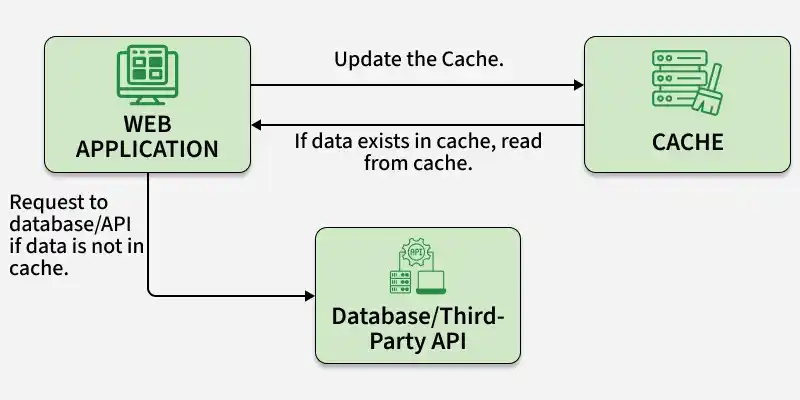
Django caching improves performance by storing frequently used data and reducing repeated database queries.
- Stores commonly accessed data for faster retrieval.
- Reduces database load and unnecessary queries.
- Improves response time for users.
- Helps build faster and more reliable Django applications.
Sending Data Using Cache in Django
Consider a project named 'core' having an app named 'src'.
File Structure:
core/
├── core/
│   ├── settings.py
│   ├── urls.py
├── src/
│   ├── models.py
│   ├── views.py
│   ├── admin.py
│   ├── templates/
│   │   ├── home.html
│   │   └── view.html
└── manage.py
Install Required Packages
pip install django-redis
Redis is an in-memory data store used in Django as a high-performance caching backend to enable fast data access and reduce database load.
Note: Redis must be installed and running on the system before using caching features.
Register the app in settings.py
INSTALLED_APPS = [
    "django.contrib.admin",
    "django.contrib.auth",
    "django.contrib.contenttypes",
    "django.contrib.sessions",
    "django.contrib.messages",
    "django.contrib.staticfiles",
    "src",
]
Configure Cache in settings.py
CACHES = {
    "default": {
        "BACKEND": "django_redis.cache.RedisCache",
        "LOCATION": "redis://127.0.0.1:6379/1",
        "OPTIONS": {
            "CLIENT_CLASS": "django_redis.client.DefaultClient",
        }
    }
}

CACHE_TTL = 300
Define Models
In src/models.py:
from django.db import models

class Category(models.Model):
    category_name = models.CharField(max_length=100)

    def __str__(self):
        return self.category_name

class Recipe(models.Model):
    category = models.ForeignKey(Category, on_delete=models.CASCADE)
    image = models.CharField(max_length=100)
    recipe_name = models.CharField(max_length=100)
    recipe = models.TextField()

    def __str__(self):
        return self.recipe_name
The models define the database structure. Category stores recipe categories, and Recipe stores recipe details linked to a category.
Register Models in Admin
In src/admin.py:
from django.contrib import admin
from .models import Category, Recipe

admin.site.register(Category)
admin.site.register(Recipe)
This enables model management through the Django admin panel.
Create Views with Caching
In src/views.py:
from django.shortcuts import render, redirect
from django.core.cache import cache
from django.conf import settings
from .models import Recipe

CACHE_TTL = getattr(settings, "CACHE_TTL", 300)

def home(request):
    recipes = Recipe.objects.all()
    return render(request, "home.html", {"recipes": recipes})

def view_recipe(request, id):
    cache_key = f"recipe:{id}"
    recipe = cache.get(cache_key)

    if not recipe:
        try:
            recipe = Recipe.objects.get(id=id)
            cache.set(cache_key, recipe, CACHE_TTL)
        except Recipe.DoesNotExist:
            return redirect("/")

    return render(request, "view.html", {"recipe": recipe})
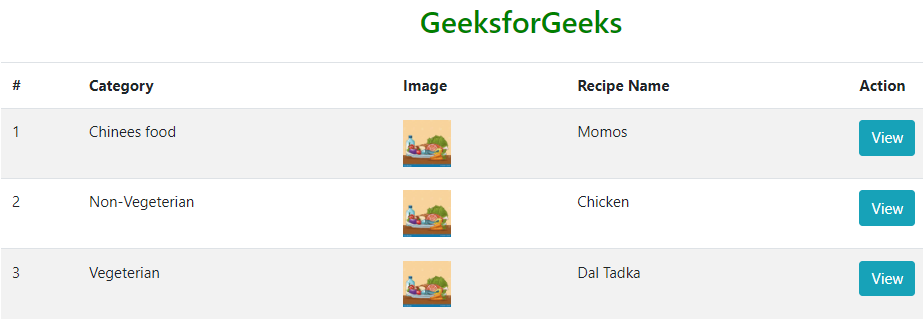
The home view retrieves all recipes from the database. The view_recipe view checks the cache first and fetches data from the database only if it is not already cached.
Configure URLs
from django.contrib import admin
from django.urls import path
from src.views import home, view_recipe

urlpatterns = [
    path("", home),
    path("recipes/<int:id>/", view_recipe, name="view_recipe"),
    path("admin/", admin.site.urls),
]
URLs defined at the project level route requests to views inside the src app.
Creating GUI
In src/templates/home.html: This HTML page is used to view the home page of the project.
<!DOCTYPE html>
<html lang="en">
<head>
    <meta charset="UTF-8">
    <meta name="viewport" content="width=device-width, initial-scale=1.0">
    <title>Document</title>
    <!-- Add Bootstrap CSS -->
    <link rel="stylesheet" href="https://maxcdn.bootstrapcdn.com/bootstrap/4.5.2/css/bootstrap.min.css">
</head>
<body>

   <div class="container">
    <h2 class="text-center mt-5" style="color: green;">GeeksforGeeks</h2>
    <!-- Create a container div for content -->
    <table class="table table-striped mt-4">
        <thead>
            <tr>
                <!-- Table header row with column headings -->
                <th>#</th>
                <th>Category</th>
                <th>Image</th>
                <th>Recipe Name</th>
                <th>Action</th>
            </tr>
        </thead>
        <tbody>
            <!-- Loop through the 'recipes' list provided by Django -->
            {% for recipe in recipes %}
            <tr>
                <!-- Table row for each recipe -->
                <td>{{forloop.counter}}</td>
                <!-- Display the recipe's category name -->
                <td>{{recipe.category.category_name}}</td>
                <!-- Display the recipe's image with a defined height -->
                <td><img src="{{recipe.image}}" style="height: 50px;" class="img-fluid img-responsive" alt=""> </td>
                <!-- Display the recipe name -->
                <td>{{recipe.recipe_name}}</td>
                <!-- Create a button to view the recipe with a link to the 'view_recipe' URL -->
                <td><a href="{% url 'view_recipe' recipe.id %}" class="btn btn-info">View</a> </td>
            </tr>
            {% endfor %}
        </tbody>
    </table>
   </div>

    <!-- Add Bootstrap JavaScript (Optional, if needed for certain Bootstrap features) -->
    <script src="https://code.jquery.com/jquery-3.5.1.slim.min.js"></script>
    <script src="https://cdn.jsdelivr.net/npm/@popperjs/core@2.5.3/dist/umd/popper.min.js"></script>
    <script src="https://maxcdn.bootstrapcdn.com/bootstrap/4.5.2/js/bootstrap.min.js"></script>
</body>
</html>
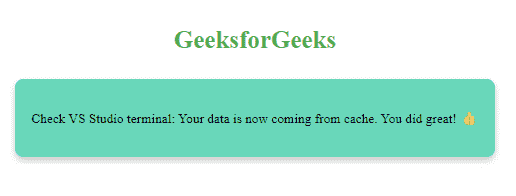
In src/templates/view.html: This HTML file is used to present the data which is being saved by the cache.
<!DOCTYPE html>
<html lang="en">
<head>
<meta charset="UTF-8">
<meta name="viewport" content="width=device-width, initial-scale=1.0">
<title>GeeksforGeeks</title>
<!-- Define inline CSS styles for the page -->
<style>
/* CSS styles for the entire body */
body {
display: flex;
flex-direction: column;
align-items: center;
height: 100vh;
margin: 0;
}
/* CSS styles for the title text */
.title {
margin-top: 6%;
font-size: 30px;
font-weight: bold;
color: #4CAF50; /* GeeksforGeeks green color */
margin-bottom: 30px;
}
/* CSS styles for the box containing text */
.box {
text-align: center;
padding: 20px;
background-color: rgb(105, 215, 186); /* GeeksforGeeks green color */
color: black;
border-radius: 10px;
box-shadow: 0 4px 8px rgba(0, 0, 0, 0.2);
}
/* CSS styles for the emoji */
.emoji {
font-size: 40px;
margin-top: 10px;
}
</style>
</head>
<body>
<!-- Start of the HTML body -->
<div class="title">
GeeksforGeeks <!-- Display the title -->
</div>
<div class="box">
<!-- Display a box with text -->
<p>Check VS code terminal: Your data is now coming from cache. You did great! 👍</p>
<!-- Display a celebratory emoji -->
</div>
</body>
</html>
Apply Migrations
python manage.py makemigrations
python manage.py migrate
Run the Server
python manage.py runserver
Output