
Automating Git commands with Python involves using Python scripts to execute Git operations programmatically, reducing manual effort and improving workflow efficiency.
- Uses Python modules like
subprocessor libraries such as GitPython - Helps automate repetitive tasks like commits, pulls, and pushes
- Enables integration of Git workflows into scripts and applications
- Improves consistency and reduces human errors in version control operations
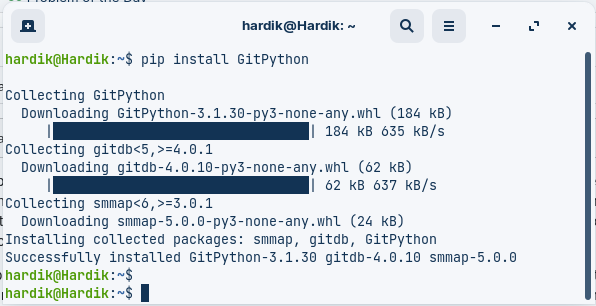
To start automating Git commands with Python, you will first need to install GitPython by running the following command:
pip install GitPythonOutput:
Automate Git Commands with Python
1. Initialize and open a local repository
- To initialize a new repository
from git import Repo
new_repo = Repo.init('/path/to/new/repo_directory')
- To Open the Existing local repository
from git import Repo
existing_repo = Repo('path/to/existing/repo')
2. Clone a remote Repository
To create a local copy of the repository at the specified local_path directory, using the repository URL repo_url
import git
repo = gitRepo.clone_from('https://github.com/username/repository', '/path/to/local/directory')
Example:
import git

# Clone a remote repository
repo_url = "https://github.com/Hardik-Kushwaha/GIT_Python_Automation"
local_path = "/home/hardik/GFG_Temp/Cloned_Repo"
repo = git.Repo.clone_from(repo_url, local_path)
print(f'Repository Cloned at location: {local_path}')
Output:
Repository Cloned at location: /home/hardik/GFG_Temp/Cloned_RepoVerify: Go to the location where you cloned the repository to verify it.

3. Add and Commit files
Add the specified files to the index, preparing them to be committed.
repo.index.add(['file1', 'file2'])Create a new commit in the local repository with the specified commit message.
repo.index.commit('Your Commit Message')Example:
import git
repo = git.Repo('/home/hardik/GFG_Temp/Cloned_Repo')

# Do some changes and commit
file1 = 'test-sample.jpg'
file2 = 'input.txt'
repo.index.add([file1,file2])
print('Files Added Successfully')
repo.index.commit('Initial commit on new branch')
print('Commited successfully')
Output:
Files Added Successfully
Commited successfully

4. Push to a remote Repository
Push the local commits to the remote repository
origin = repo.remote(name='origin')
origin.push()
Example:
import git

repo = git.Repo("/home/hardik/GFG_Temp/Cloned_Repo")
origin = repo.remote(name='origin')

existing_branch = repo.heads['main']
existing_branch.checkout()

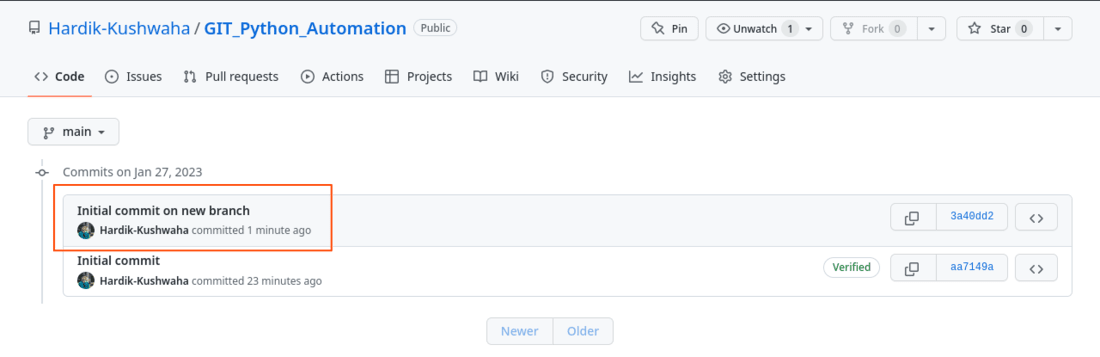
repo.index.commit('Initial commit on new branch')
print('Commited successfully')
origin.push()
print('Pushed changes to origin')
Output:
Commited successfully
Pushed changes to origin
Verify:
5. Create a new branch
To create a new branch, you can use the create_head() method of the Repo class, which creates a new branch with the specified name
new_branch = repo.create_head('new_branch')To checkout the new branch
new_branch.checkout()Example:
import git

# Initialize a new repository
repo = git.Repo.init('/home/hardik/GFG_Temp/Cloned_Repo')

# Create a new branch
new_branch = repo.create_head('new_branch')
print('New Branch Created')

# Checkout the new branch
new_branch.checkout()
print("Changed the current branch to new_branch")
Output:
First initialize a new repository using git.Repo.init() method. We then create a new branch called new_branch using the create_head() method. We then check out the new branch using the checkout() method.
New Branch Created
Changed the current branch to new_branch
To switch to an existing branch, you can use the heads attribute of the Repo class, which returns a list of branches, and then call the checkout method on the desired branch.
import git
repo = git.Repo('/home/hardik/GFG_Temp/Cloned_Repo')

# Select an existing branch
existing_branch = repo.heads['existing_branch']
existing_branch.checkout()
print('Branch Changed to an existing branch')
Output:
Branch Changed to an existing branch6. Pull from a remote repository
To update the local repository with the latest changes from the remote repository we use git pull command
Example:
import git
repo = git.Repo("/path/to/local/repo")
origin = repo.remote(name='origin')
origin.pull()
Output:
Pulled Changes from the originVerify: New file hacktoberfest_tree_cert.pdf got pulled from the origin and got saved to the local machine.
