
A CreateView in Django is a built-in class-based view used to create and save a new record in the database with less manual code than a function-based view.
- Specify the model that will be used for creating new records.
- Define the form fields that should appear on the page.
- Set a success URL to redirect after the record is saved.
- Django automatically manages form display, validation, and saving.
Example: Consider a project named 'geeksforgeeks' having an app named 'geeks', then create a model of which we will be creating instances through our view.
In geeks/models.py:
from django.db import models

# declare a new model with a name "GeeksModel"
class GeeksModel(models.Model):

    # fields of the model
    title = models.CharField(max_length = 200)
    description = models.TextField()

    # renames the instances of the model with their title name
    def __str__(self):
        return self.title
After creating this model, we need to run two commands in order to create Database for the same.
Python manage.py makemigrations
Python manage.py migrate
Class-Based Views automatically handle the entire setup process. It is only necessary to specify the model and the fields to be used. The CreateView class will then look for a template named app_name/modelname_form.html. Here, expected template path is geeks/templates/geeks/geeksmodel_form.html
In geeks/views.py:
from django.views.generic.edit import CreateView
from django.urls import reverse_lazy
from .models import GeeksModel

class GeeksCreate(CreateView):
    model = GeeksModel
    fields = ["title", "description"]
    #specify where to redirect after a successful POST
    success_url = '/'
Now, create a url path to map the view in geeks/urls.py:
from django.urls import path

# importing views from views..py
from .views import GeeksCreate
urlpatterns = [
    path('', GeeksCreate.as_view() ),
]
Create a template in templates/geeks/geeksmodel_form.html:
<form method="POST" enctype="multipart/form-data">

    <!-- Security token -->
    {% csrf_token %}

    <!-- Using the formset -->
    {{ form.as_p }}

    <input type="submit" value="Submit">
</form>
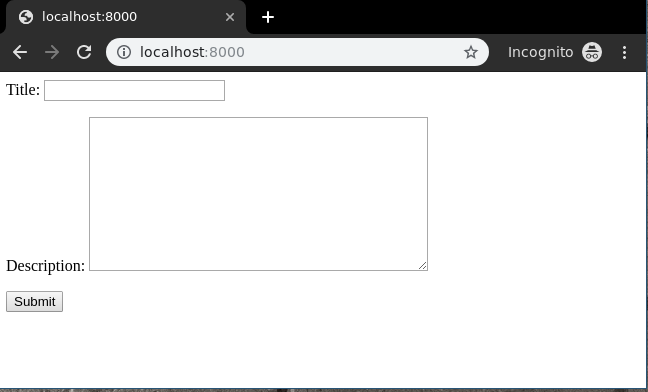
Now, visit on http://localhost:8000/
Now let's enter data in this form:
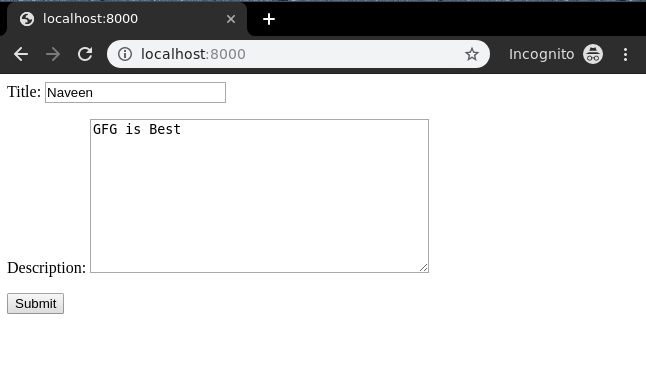
Now, CreateView is functioning as expected and its operation can be validated by inspecting the instance generated via the admin panel.
