
The response_model acts as a security gate and a data formatter between the internal logic (database, raw data) and the outside logic. Its main features are:
- Data Filtering: Automatically removes extra fields returned by your database that shouldn't be public.
- Type Conversion: Automatically converts data types (e.g., a UUID object or a Datetime object becomes a standard string in the JSON).
- Documentation: Your models are automatically reflected in the
/docs(Swagger UI), creating a clear contract for frontend developers. - Validation: If your code tries to return data that doesn't match the model (e.g., a
Nonewhere astris required), FastAPI will trigger a server error rather than sending "broken" data to the user.
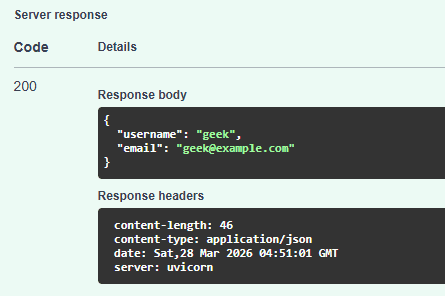
Without a response model, your API might accidentally leak sensitive information like hashed passwords, internal IDs, or "deleted_at" timestamps. By defining a response model, you tell FastAPI: "No matter what the function returns, only send these specific fields to the client."
Implementation Guide
1. Define Your Schemas: It is a best practice to separate your Input model (what the user sends) from your Output model (what the user sees).
from typing import List, Optional
from fastapi import FastAPI
from pydantic import BaseModel, EmailStr

app = FastAPI()

# Internal 'Database' representation (contains sensitive info)
class UserInDB(BaseModel):
    username: str
    hashed_password: str
    email: EmailStr
    is_active: bool = True

# Public 'Response' representation (hides the password)
class UserOut(BaseModel):
    username: str
    email: EmailStr
2. Apply the response_model: You apply the model in the path operation decorator, not in the function signature.
@app.post("/users/", response_model=UserOut)
async def create_user(user: UserInDB):
    # Even though we return the full UserInDB (with hashed_password),
    # FastAPI will filter it and only return what is in UserOut.
    return user
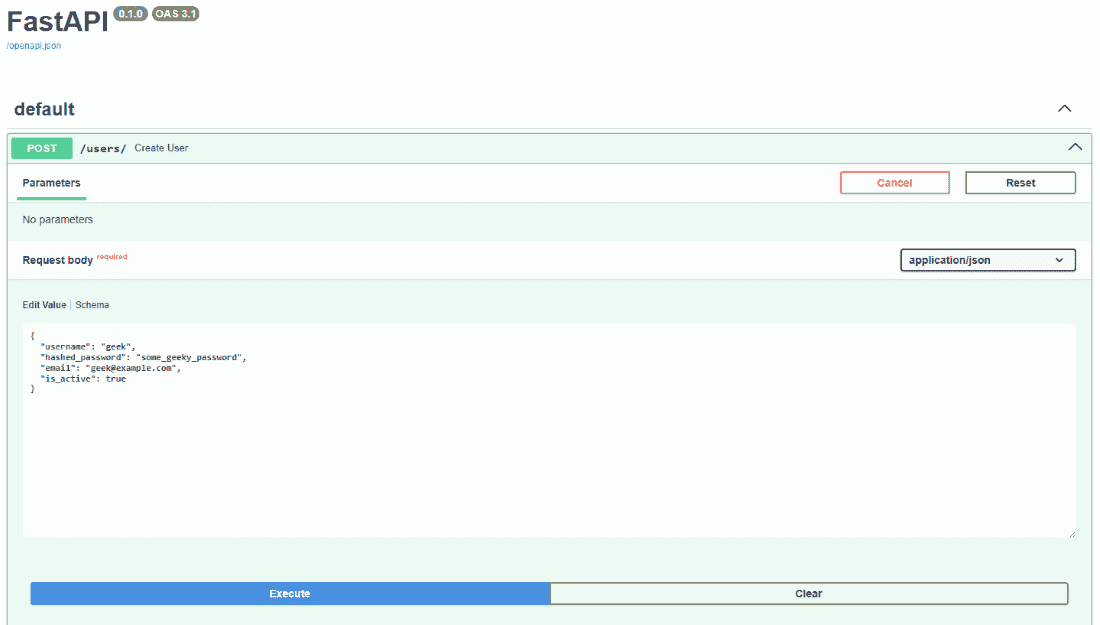
Input:
Output:
Advanced Control: Filtering Defaults
We can hide fields that haven't been changed or are empty (if required) by using the following decorator parameters:
| Parameter | Effect |
| response_model_exclude_unset | Only includes fields that were actually set in the code. |
| response_model_exclude_none | Removes any field with a null value from the final JSON. |