
The fileinput.input() function in Python is used to read lines from one or multiple files. It returns an iterable object that allows to process file content line by line. If no file is specified, it reads input from standard input (stdin).
Below is the sample.txt file used in this article, click here to download.
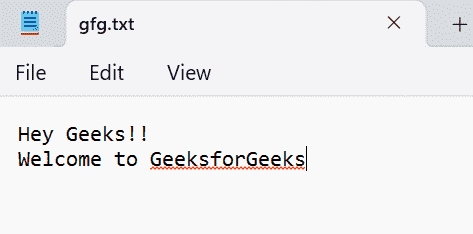
Example: In this example, a file is read line by line using fileinput.input() and its content is printed.
import fileinput
for line in fileinput.input(files='gfg.txt'):
    print(line, end='')
Output

Explanation:
- fileinput.input(files='gfg.txt') opens the file.
- The for line in ... loop reads the file line by line.
- print(line, end='') prints each line without adding extra newline.
Syntax
fileinput.input(files=None)
- Parameters: files - A filename or tuple of filenames to read from. If not provided, input is taken from stdin.
- Return Value: Returns an iterable object that yields lines from the file(s).
Examples
Example 1: In this example, we read content from multiple files and display them together.
import fileinput
for line in fileinput.input(files=('gfg.txt', 'data.txt')):
    print(line.strip())
Output
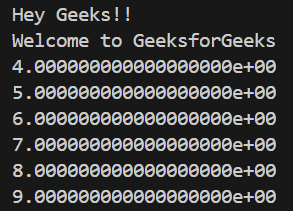
Explanation:
- files=('gfg.txt', 'data.txt') passes multiple files.
- fileinput.input() reads them sequentially.
- Each line is processed inside the loop.
Example 2: In this example, we count the total number of lines from a file using fileinput.input().
import fileinput

count = 0
for line in fileinput.input(files='gfg.txt'):
    count += 1

print(count)
Output
2
Explanation:
- The loop reads each line from gfg.txt.
- count += 1 increments the counter.
- print(count) displays total lines.
Example 3: In this example, we display the line number along with each line from a file using fileinput.input().
import fileinput
for line in fileinput.input(files='gfg.txt'):
    print(fileinput.lineno(), line.strip())
Output

Explanation:
- fileinput.input(files='gfg.txt') reads the file line by line.
- fileinput.lineno() returns the current line number.
- line.strip() removes extra spaces.
- Each line is printed with its corresponding number.