
Indentation is used to define blocks of code. It indicates to the Python interpreter that a group of statements belongs to the same block.
- All statements with the same level of indentation are treated as part of the same code block.
- Indentation is created using tabs or spaces and the commonly accepted convention is to use four spaces.
- Python expects the indentation level to be consistent within the same block. This inconsistency causes an IndentationError as shown in the below code.
print("I have no Indentation ")
    print("I have tab Indentation ")
ERROR!
Traceback (most recent call last):
File "<main.py>", line 2
print("I have tab Indentation ")
IndentationError: unexpected indent
Explanation:
- The first print statement has no indentation, so it is correctly executed.
- The second print statement has tab indentation, but it doesn't belong to a new block of code, that's why it throws IndentationError.
Indentation in Conditional Statements
All statements in a conditional block should have same alignment.
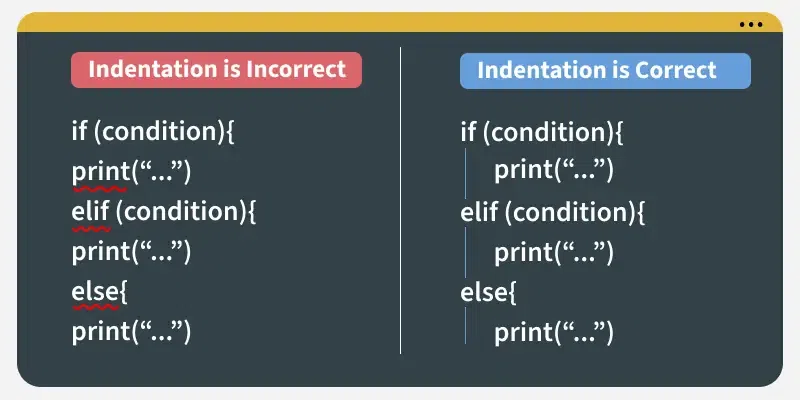
The code below demonstrate how we use indentation to define seperate scopes of if-else statements:
a =  20

if a >= 18:
    print('GeeksforGeeks...')
else:
    print('retype the URL.')
print('All set !')
Output
GeeksforGeeks...
All set !
Explanation: The statements under if and else are indented, forming two distinct blocks. Only one block executes based on the condition. The final print("Done") is outside the conditional structure, so it runs regardless of the condition
Indentation in Loops
Indentation defines the set of statements that are executed repeatedly inside a loop.
j = 1

while(j<= 5):
     print(j)
     j = j + 1
Output
1
2
3
4
5
Explanation: Both print(j) and j += 1 are indented and belong to the loop block which executes in each iteration until the condition becomes false.