
json.load() is a function from Python's built-in json module. It reads JSON data from a file and converts it into the corresponding Python object.
- JSON objects: dict
- JSON arrays: list
- JSON strings, numbers, booleans: Corresponding Python types
It requires a file opened in read ('r') mode and returns the parsed Python object.
Sample JSON File
Below is the sample JSON file name 'data.json' used in this article, click here to download.
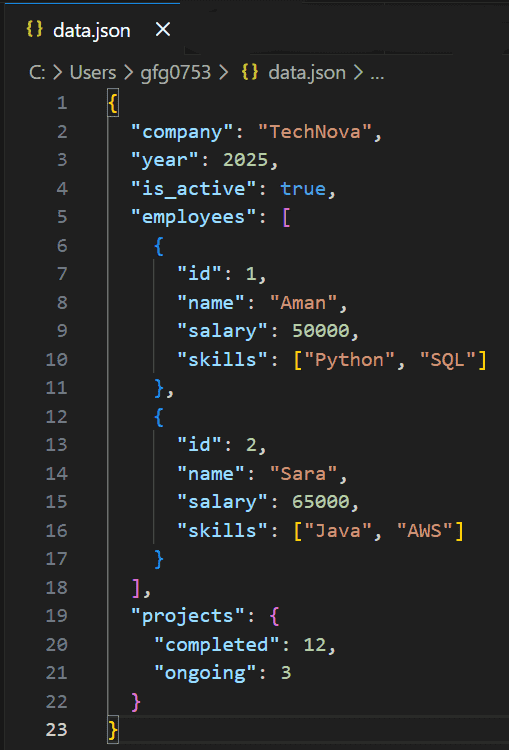
Example: This example reads the JSON file and prints the entire data.
import json

with open('data.json', 'r') as f:
    d = json.load(f)

print(d)
Output
{'company': 'TechNova', 'year': 2025, 'is_active': True, 'employees': [{'id': 1, 'name': 'Aman', 'salary': 50000, 'skills': ['Python', 'SQL']}, {'id': 2, 'name': 'Sara', 'salary': 65000, 'skills': ['Java', 'AWS']}], 'projects': {'completed': 12, 'ongoing': 3}}
Explanation:
- json.load(f) converts the JSON file into a Python dictionary.
- The complete structured data is stored in d.
Syntax
json.load(file_object)
- Parameters: file_object - File opened in text read mode ('r').
- Return Type: Returns a Python object (dict, list, etc.) representing the JSON data.
Examples
Example 1: This example reads the company name and year from the JSON file. It shows how to access a key-value pairs.
import json

with open('data.json', 'r') as f:
    d = json.load(f)

print(d['company'], d['year'])
Output
TechNova 2025
Explanation: d['company'] and d['year'] access top-level keys from the dictionary returned by json.load(f).
Example 2: This example calculates the total salary of all employees stored in the JSON file. It demonstrates working with nested lists and dictionaries.
import json

with open('data.json', 'r') as f:
    d = json.load(f)

total = sum(emp['salary'] for emp in d['employees'])
print(total)
Output
115000
Explanation: d['employees'] returns a list of dictionaries and emp['salary'] extracts salary from each employee before summing them.
Example 3: This example prints the number of completed and ongoing projects. It demonstrates accessing nested dictionary values.
import json

with open('data.json', 'r') as f:
    d = json.load(f)

print(d['projects']['completed'])
print(d['projects']['ongoing'])
Output
12
3
Explanation: d['projects'] accesses the nested dictionary and ['completed'] and ['ongoing'] retrieve specific project counts.