
cv2.ellipse() method in OpenCV is used to draw an ellipse on an image. It allows you to control the ellipse’s position, size, rotation, color and thickness making it useful for highlighting regions, marking detected objects or creating shapes in image processing tasks.
Note: For this article we will use a sample image "logo.png", to download click here.
Example: This example loads an image and draws a red ellipse with no rotation using minimal parameters.
import cv2

img = cv2.imread("logo.png")

center = (120, 100)
axes = (80, 40)
img = cv2.ellipse(img, center, axes, 0, 0, 360, (0, 0, 255), 3)

cv2.imshow("Ellipse", img)
cv2.waitKey(0)
cv2.destroyAllWindows()
Output

Explanation:
- cv2.ellipse(img, center, axes, ...): draws the ellipse on the image
- center: position of the ellipse
- axes: lengths of semi-major and semi-minor axes (half of the full width and height)
- 0, 0, 360: no rotation, full ellipse
- (0, 0, 255): red color (BGR)
- 3: border thickness
Syntax
cv2.ellipse(image, center, axes, angle, startAngle, endAngle, color, thickness)
Parameters:
- image: Image on which ellipse is drawn.
- center: Center of ellipse as (x, y).
- axes: Tuple containing semi-major and semi-minor axis lengths (half of the full axis lengths).
- angle: Rotation of ellipse in degrees.
- startAngle: Starting angle of arc.
- endAngle: Ending angle of arc.
- color: BGR color tuple.
- thickness: Border thickness (-1 fills the ellipse).
Note: The axes parameter takes semi-axis lengths (radii), not full axis lengths. For example, if the ellipse width is 200 pixels, the semi-major axis value should be 100.
Examples
Example 1: This example draws a filled blue ellipse with no rotation.
import cv2

img = cv2.imread("logo.png")

center = (100, 80)
axes = (70, 40)

img = cv2.ellipse(img, center, axes, 0, 0, 360, (255, 0, 0), -1)

cv2.imshow("Ellipse 1", img)
cv2.waitKey(0)
cv2.destroyAllWindows()
Output
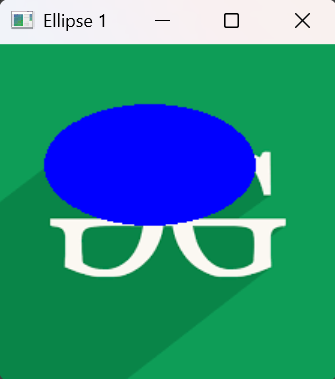
Explanation:
- -1: fills the ellipse
- (255, 0, 0): blue color
- 0 rotation: straight ellipse
Example 2: This example draws a rotated green ellipse at 45 degrees.
import cv2

img = cv2.imread("logo.png")

center = (150, 120)
axes = (90, 50)

img = cv2.ellipse(img, center, axes, 45, 0, 360, (0, 255, 0), 4)

cv2.imshow("Ellipse 2", img)
cv2.waitKey(0)
cv2.destroyAllWindows()
Output

Explanation:
- 45: rotates ellipse
- (0, 255, 0): green color
- 4: thicker border
Example 3: This example draws a partial red arc (not a full ellipse).
import cv2

img = cv2.imread("logo.png")

center = (120, 100)
axes = (100, 60)

img = cv2.ellipse(img, center, axes, 0, 0, 180, (0, 0, 255), 3)

cv2.imshow("Ellipse 3", img)
cv2.waitKey(0)
cv2.destroyAllWindows()
Output

Explanation:
- 0, 180: draws only half ellipse
- (0, 0, 255): red arc
- 3: border thickness