
DataFrame.fillna() is used to replace missing values (NaN) in a Pandas DataFrame with a specified value or using a filling method. It helps clean incomplete data so that analysis and calculations can be performed correctly.
Example: This example creates a DataFrame with missing values and replaces all NaN values with 0 using fillna().
import pandas as pd
df = pd.DataFrame({"A": [1, None, 3], "B": [None, 5, 6]})
r = df.fillna(0)
print(r)
Output
     A    B
0  1.0  0.0
1  0.0  5.0
2  3.0  6.0
Explanation:
- pd.DataFrame({...}) creates a DataFrame with some None values (treated as NaN).
- df.fillna(0) replaces all NaN values with 0.
Syntax
DataFrame.fillna(value=None, method=None, axis=None, inplace=False, limit=None)
Parameters:
- value: value used to replace NaN (number, string, dict, etc.)
- method (Filling method): 'ffill' -> fills using previous value, 'bfill' -> fills using next value and axis -> Fill along rows (0) or columns (1)
- inplace: True -> modifies original DataFrame and False -> returns new DataFrame
- limit: maximum number of NaN values to fill
Examples
Loading Dataset
This example reads the "nba.csv" file using pd.read_csv() and stores it in a DataFrame named nba, then displays the dataset to examine its contents including missing values.
Note: To download "nba.csv", click here.
import pandas as pd
nba = pd.read_csv("nba.csv")
print(nba)
Output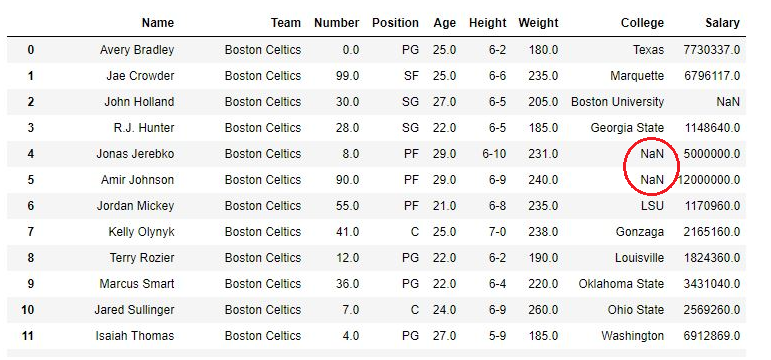
Fill NaN with Static Value
This example replaces missing values in the College column with a fixed text "No College" using fillna(). This is useful when you want to assign a default value to missing entries.
import pandas as pd
nba = pd.read_csv("nba.csv")
nba["College"].fillna("No College", inplace = True)
print(nba)
Output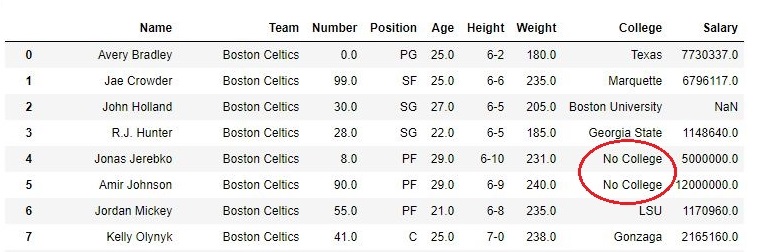
Explanation:
- nba["College"] selects the College column
- .fillna("No College") replaces all NaN values with "No College"
- inplace=True saves changes in the original DataFrame
Forward Fill Method (ffill)
This example uses forward fill to replace missing values with the previous valid value from the same column.
import pandas as pd
nba = pd.read_csv("nba.csv")
nba["College"].fillna( method ='ffill', inplace = True)
print(nba)
Output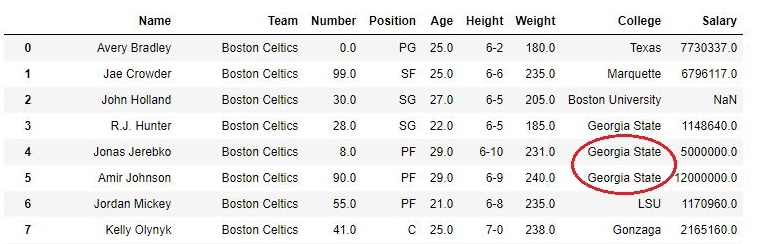
Explanation:
- .fillna(method="ffill") copies previous valid value to fill NaN
- inplace=True updates original data
Fill NaN with Limit
This example uses forward fill with a limit, so only a specific number of consecutive NaN values are replaced.
import pandas as pd
nba = pd.read_csv("nba.csv")
nba["College"].fillna(method ='ffill', limit = 1, inplace = True)
print(nba)
Output
As shown in the output, college column of 4th row was replaced but 5th one wasn't since the limit was set 1. 
Explanation:
- .fillna(method="ffill", limit=1) fills only 1 consecutive NaN
- Next NaN remains unchanged due to limit