
Game programming is very rewarding nowadays and it can also be used in advertising and as a teaching tool too. Game development includes mathematics, logic, physics, AI and much more and it can be amazingly fun. In python, game programming is done in
Python3
Output:
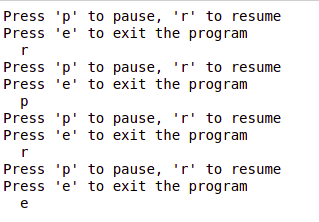 This code will also play the "song.mp3" file.
pygame and it is one of the best modules for doing so.
Note: For more information, refer to Introduction to pygame
In order to play music/audio files in pygame, pygame.mixer is used (pygame module for loading and playing sounds). This module contains classes for loading Sound objects and controlling playback. There are basically four steps in order to do so:
- Starting the mixer
mixer.init()
- Loading the song.
mixer.music.load("song.mp3") - Setting the volume.
mixer.music.set_volume(0.7)
- Start playing the song.
mixer.music.play()
from pygame import mixer

# Starting the mixer
mixer.init()

# Loading the song
mixer.music.load("song.mp3")

# Setting the volume
mixer.music.set_volume(0.7)

# Start playing the song
mixer.music.play()

# infinite loop
while True:

    print("Press 'p' to pause, 'r' to resume")
    print("Press 'e' to exit the program")
    query = input("  ")

    if query == 'p':

        # Pausing the music
        mixer.music.pause()
    elif query == 'r':

        # Resuming the music
        mixer.music.unpause()
    elif query == 'e':

        # Stop the mixer
        mixer.music.stop()
        break