
The set.symmetric_difference() method in Python returns a new set containing elements that are present in either of the two sets but not in both. It removes common elements and keeps only unique elements from each set. The original sets remain unchanged.
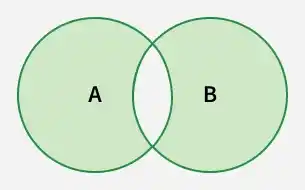
Example: In this example, elements that are present in either set but not common to both are found using symmetric_difference().
a = {1, 2, 3, 4, 5}
b = {6, 7, 3, 9, 4}
print(a.symmetric_difference(b))
Output
{1, 2, 5, 6, 7, 9}
Explanation: a.symmetric_difference(b) removes common elements 3 and 4. It returns elements unique to each set.
Syntax
set1.symmetric_difference(set2)
- Parameters: A single set or iterable whose elements will be compared with the first set.
- Return Value: Returns a new set containing elements present in either set but not in both.
Examples
Example 1: Here, symmetric difference is calculated between a set and a list.
a = {3, 5, 9, 8}
b = [4, 5, 2, 1]
print(a.symmetric_difference(b))
Output
{1, 2, 3, 4, 8, 9}
Explanation:
- a.symmetric_difference(b) accepts an iterable.
- Common element 5 is removed.
- Unique elements from both collections remain.
Example 2: In this example, the ^ operator is used as a shortcut for symmetric difference.
a = {"R", "G", "A"}
b = {"A", "R", "J"}
print(a ^ b)
Output
{'J', 'G'}
Explanation: a ^ b performs symmetric difference, common elements are removed.
Example 3: In this example, symmetric difference is performed when one set is empty to observe the result.
a = {10, 20, 30}
b = set()
print(a.symmetric_difference(b))
print(b.symmetric_difference(a))
Output
{10, 20, 30}
{10, 20, 30}
Explanation:
- a.symmetric_difference(b) returns all elements of a because b is empty.
- b.symmetric_difference(a) returns all elements of a for the same reason.
- When one set is empty, the result is the other set.