
Python's turtle module is a simple yet powerful way to create graphics using code. In this article, we demonstrate how to draw a Christmas tree, display a "Merry Christmas" greeting, and animate falling snow using Python Turtle graphics.
This example combines recursion, text rendering, and basic animation to create a festive scene.
Approach
- Set up the Turtle screen with background color and title
- Draw a Christmas tree using recursion
- Display a "Merry Christmas" message on the screen
- Create multiple snowflake objects
- Animate snowfall using an infinite loop
Complete Python Code
import turtle
import random

# Screen setup
screen = turtle.Screen()
screen.setup(width=1.0, height=1.0)
screen.title("Merry Christmas - Python Turtle")
screen.bgcolor("midnight blue")

# Tree configuration
tree_length = 120
turtle.speed("fastest")
turtle.left(90)
turtle.penup()
turtle.backward(tree_length * 2)
turtle.pendown()
turtle.color("dark green")

# Draw Christmas tree using recursion
def draw_tree(depth, length):
    if depth == 0:
        return
    turtle.forward(length)
    turtle.left(30)
    draw_tree(depth - 1, length * 0.75)
    turtle.right(60)
    draw_tree(depth - 1, length * 0.75)
    turtle.left(30)
    turtle.backward(length)

draw_tree(10, tree_length)

# Write greeting text
pen = turtle.Turtle()
pen.hideturtle()
pen.penup()
pen.color("gold")
pen.goto(-250, -250)
pen.write(
    "Merry Christmas!",
    font=("Arial", 36, "bold")
)

# Snowflake setup
snowflakes = []

def create_snow():
    for _ in range(40):
        snow = turtle.Turtle()
        snow.hideturtle()
        snow.penup()
        snow.color("white")
        snow.shape("circle")
        snow.goto(
            random.randint(-400, 400),
            random.randint(-300, 300)
        )
        snowflakes.append(snow)

def snowfall():
    for snow in snowflakes:
        snow.goto(
            random.randint(-400, 400),
            random.randint(-300, 300)
        )
        snow.dot(6)

create_snow()

# Animate snowfall
while True:
    snowfall()
Output:
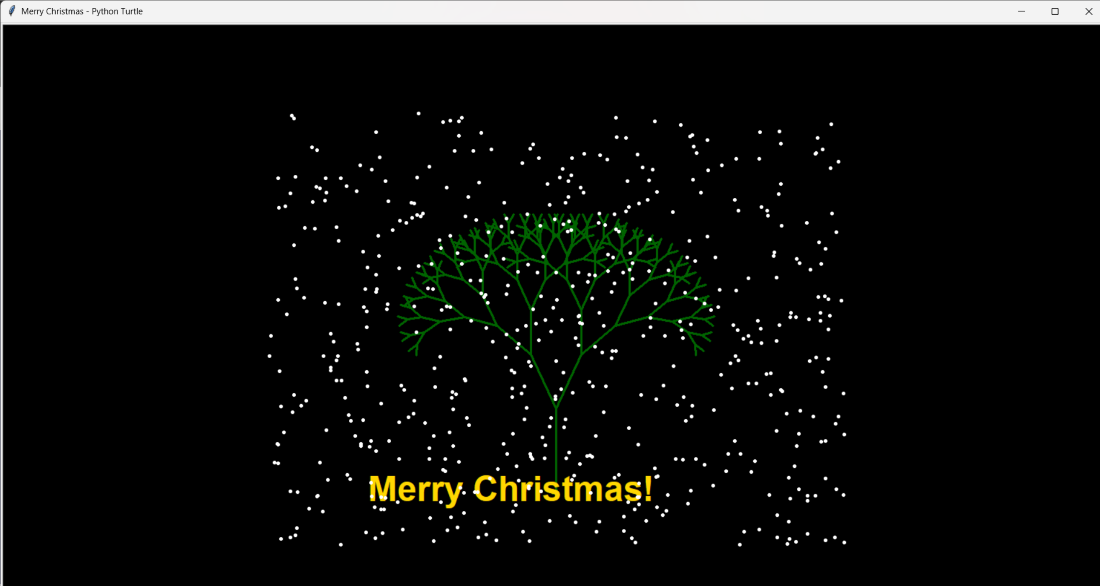
Explanation:
- turtle.Screen() initializes the drawing window, while setup() and bgcolor() configure the screen size and background.
- turtle.left(), penup(), backward(), and pendown() position the turtle at the base of the tree.
- draw_tree() uses recursion to draw branches, where depth controls tree complexity and length reduces at each level.
- turtle.forward(), left(), and right() create symmetrical tree branches.
- A separate turtle (pen) is used with write() to display the Merry Christmas greeting.
- create_snow() generates multiple snowflake turtles at random positions using random.randint().
- snowfall() repositions snowflakes and draws dots to simulate falling snow.
- while True: keeps the snowfall animation running continuously.