JSON (JavaScript Object Notation) is a text format used to store data in key–value pairs inside curly braces, similar to a Python dictionary.
- To work with JSON in Python, we use the built-in json module, which helps convert Python objects into JSON strings and vice versa.
- First, we import the json module, then use dumps() to convert a Python dictionary into JSON format.
import json

a ={"name":"John",
   "age":31,
    "Salary":25000}

b = json.dumps(a)

print(b)
Output:
{"age": 31, "Salary": 25000, "name": "John"}
As you can see, JSON supports primitive types like strings and numbers, as well as nested lists (arrays) and objects
import json

print(json.dumps(['Welcome', "to", "GeeksforGeeks"]))
print(json.dumps(("Welcome", "to", "GeeksforGeeks")))
print(json.dumps("Hi"))

print(json.dumps(123))
print(json.dumps(23.572))
print(json.dumps(True))
print(json.dumps(False))
print(json.dumps(None))
Output:
["Welcome", "to", "GeeksforGeeks"]
["Welcome", "to", "GeeksforGeeks"]
"Hi"
123
23.572
true
false
null
Serializing JSON
Serialization is the process of converting data into a format that can be stored or transmitted. In the context of JSON, it means converting Python objects into JSON format. In Python, this is done using the json module’s dump() function. It converts Python data (like dictionaries or lists) into JSON and writes it to a file.
Refer to the table below for a clearer understanding of how Python objects are converted into JSON format.
| Python object | JSON object |
|---|---|
| dict | object |
| list, tuple | array |
| str | string |
| int, float | numbers |
| True | true |
| False | false |
| None | null |
Example: Consider the given example of a Python object.
import json
var = {
      "Subjects": {
                  "Maths":85,
                  "Physics":90
                   }
      }
- Using Python's context manager, create a file named Sample.json and open it with write mode.
- Here, the dump() function takes two arguments: first, the data object to be serialized and second, the file object to which the JSON data is written in text format.
with open("Sample.json", "w") as p:
     json.dump(var, p)
Deserializing JSON
Deserialization is the reverse of serialization. It converts JSON data back into its corresponding Python objects. In Python, this is done using the json module’s load() or loads() method.
with open("Sample.json", "r") as read_it:
     data = json.load(read_it)
Example: Here we created a JSON object in python and then used .loads method to Deserialize it.
json_var ="""
{
    "Country": {
        "name": "INDIA",
        "Languages_spoken": [
            {
                "names": ["Hindi", "English", "Bengali", "Telugu"]
            }
        ]
    }
}
"""
var = json.loads(json_var)
Encoding and Decoding
Encoding and decoding refer to the process of converting data between Python objects and JSON format. Encoding transforms Python data into JSON so it can be stored or transmitted, while decoding converts JSON data back into usable Python objects.The key concepts involved in this process are outlined below.
- Encoding is also known as Serialization
- Decoding is also known as Deserialization
- The built in json module supports both operations
- External libraries like demjson can be used for extended JSON features
Run the command below in your terminal to install demjson
pip install demjson
Encoding: Encoding in Python JSON is done using json.dumps() (or json.dump() for files), which converts Python objects into JSON format.
demjson.encode(self, obj, nest_level=0)
Example 1: Encoding using demjson package.
import demjson
var = [{"Math": 50, "physics":60, "Chemistry":70}]
print(demjson.encode(var))
Output:
[{"Chemistry":70, "Math":50, "physics":60}]
Decoding: The decode() function is used to convert the JSON object into python format type.
demjson.decode(self, obj)
Example 2: Decoding using demjson package
var = '{"a":0, "b":1, "c":2, "d":3, "e":4}'
text = demjson.decode(var)
Output:
{'a': 0, 'b': 1, 'c': 2, 'd': 3, 'e': 4}
Example 3: Encoding and Decoding using dumps() and loads().
import json

var = {'age':31, 'height':6}
x = json.dumps(var)
y = json.loads(x)

with open("any_file.json", "r") as readit:
    x = json.load(readit)
Command Line Usage
The JSON library can also be used from the command line, to validate and pretty print your JSON.
Example: In this command, echo prints a JSON string directly in the terminal. This JSON data can then be passed to a JSON tool to check whether the format is valid and to display it in a clean, structured way for better readability.
echo '{ "name": "Monty", "age": 45 }'
Output:
{ "name": "Monty", "age": 45 }
Searching through JSON with JMESPath
- JMESPath is a query language designed specifically for JSON data. It allows you to extract specific values from complex or nested JSON structures in a clean and readable way.
- For example, in normal Python access, you might retrieve a nested value like this: doc["person"]["age"]. JMESPath simplifies such queries, especially when working with large or deeply nested JSON documents.
First, install jmespath:
pip install jmespath
After installation, you can import and use it in Python using:
>>> import jmespath
>>> j = {"people": [{"name": "Abhi", "age": 22}]}
>>> jmespath.search("people[*].age", j)
[22]
Practical Example
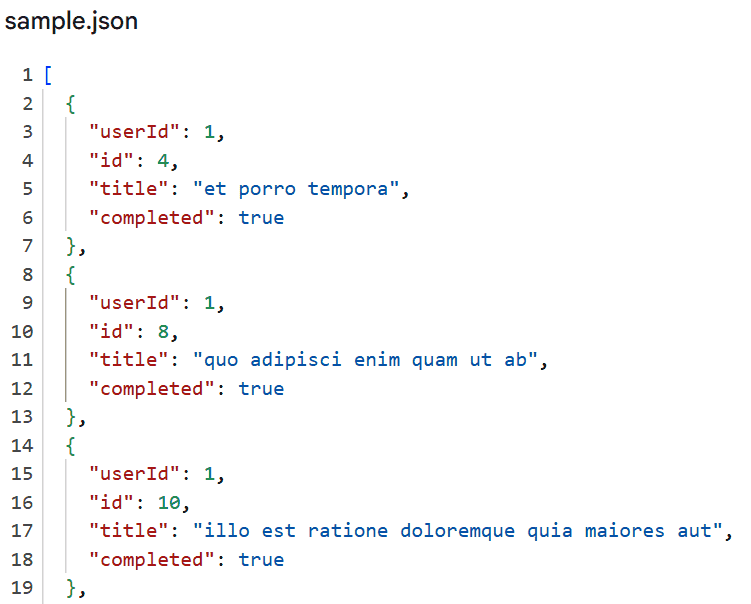
For practice, we use JSONPlaceholder, a free API that provides sample JSON data for learning and testing. We will use the requests library to fetch data from this API and process the JSON response in Python. The following script demonstrates how to fetch JSON data from an API, filter it and store the result in a file.
- requests.get(...) sends a request to the API and retrieves data.
- json.loads(res.text) converts the JSON response into Python objects.
- find() function defines the filtering condition, it checks if a task is completed and if the userId matches.
- filter(find, todos) applies this condition to extract matching records.
- json.dump() writes the filtered data to sample.json with proper formatting.
import requests
import json

res = requests.get("https://jsonplaceholder.typicode.com/todos")
todos = json.loads(res.text)

users = [1, 2, 3]

def find(todo):
    check = todo["completed"]
    max_var = todo["userId"] in users
    return check and max_var

Value = list(filter(find, todos))

with open("sample.json", "w") as data:
    json.dump(Value, data, indent=2)
Output:
In the output, a new file named sample.json is created. This file contains only the filtered records that match the given conditions. The data is stored in proper JSON format and is neatly structured because of indent=2