
componentDidMount() is a React lifecycle method that runs once after a component is rendered and added to the DOM. It is commonly used for performing side effects after the initial render.
- Ideal for fetching data from APIs or initializing subscriptions.
- Useful for DOM interactions and setting up timers or event listeners.
Syntax:
componentDidMount(){
  // code to be executed
}- It does not take any arguments and does not return any value.
- It is automatically called by React after the component’s initial render.
componentDidMount() Execution Timing
componentDidMount() is called after the initial render of a component. Specifically:
- After the component is rendered to the screen for the first time.
- After the component is added to the DOM.
- Before the browser paints the component's content.
Note: It is called once in the component’s lifecycle, meaning it only runs once when the component is first mounted.
Working
In React, a component goes through various phases in its lifecycle, and componentDidMount() is part of the mounting phase. The order of lifecycle methods is as follows:
- Constructor: Initializes state and binds methods.
- render(): Returns the JSX to be rendered.
- componentDidMount(): Called after the first render and after the component is added to the DOM.
- componentWillUnmount(): Cleanup before the component is removed from the DOM.
Implementing componentDidMount() Method
The componentDidMount() method is implemented to perform tasks such as data fetching, setting up subscriptions, or interacting with the DOM after the component has been mounted.
1. Fetching Data
Using the componentDidMount method for fetching the data.
import React from 'react';

class DataFetcher extends React.Component {
    constructor(props) {
        super(props);
        this.state = {
            data: null,
            loading: true,
            error: null,
        };
    }

    componentDidMount() {
        fetch('https://jsonplaceholder.typicode.com/posts') // Replace with valid API URL
            .then(response => {
                if (!response.ok) {
                    throw new Error('Network response was not ok');
                }
                return response.json();
            })
            .then(data => {
                this.setState({ data, loading: false });
            })
            .catch(error => {
                console.error('There was a problem with the fetch operation:', error);
                this.setState({ loading: false, error: error.message });
            });
    }

    render() {
        const { data, loading, error } = this.state;
        return (
            <div>
                {loading && <p>Loading...</p>}
                {error && <p>Error: {error}</p>}
                {data && <pre>{JSON.stringify(data, null, 2)}</pre>}
            </div>
        );
    }
}

export default DataFetcher;
Output:
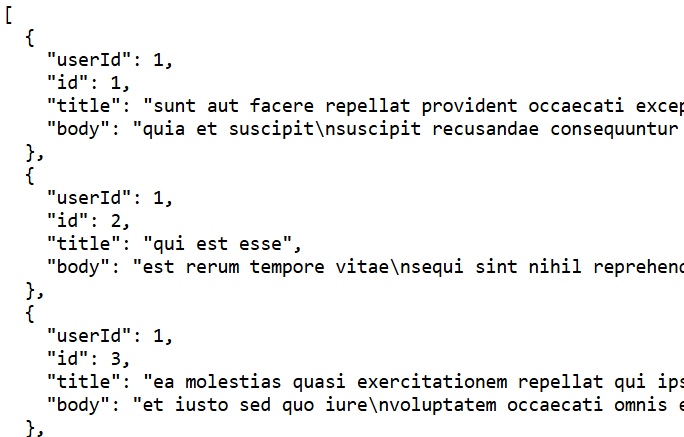
- componentDidMount() is used to fetch data from an API.
- this.setState() updates the component state once the data is fetched, which triggers a re-render.
- The component initially renders a "Loading..." message, and once the data is fetched, it displays the JSON data.
2. Name Color Changer Application
Build a name color application that changes the color of the text when the component is rendered in the DOM tree. So, we will use the componentDidMount() method here.
import React from "react";
class App extends React.Component {
    constructor(props) {
        super(props);
        this.state = { color: "lightgreen" };
    }
    componentDidMount() {
        this.interval = setInterval(() => {
            this.setState({ color: this.getRandomColor() });
        }, 2000);
    }
    getRandomColor = () => {
        const letters = "0123456789ABCDEF";
        let color = "#";
        for (let i = 0; i < 6; i++) {
            color += letters[Math.floor(Math.random() * 16)];
        }
        return color;
    };
    render() {
        return (
            <div
                style={{
                    display: "flex",
                    justifyContent: "center",
                    alignItems: "center",
                    height: "100vh",
                    backgroundColor: "#282c34",
                }}
            >
                <p
                    style={{
                        color: this.state.color,
                        backgroundColor: "#333",
                        textAlign: "center",
                        padding: "20px",
                        borderRadius: "12px",
                        boxShadow: "0px 4px 10px rgba(0, 0, 0, 0.5)",
                        fontFamily: "Arial, sans-serif",
                        fontSize: "1.5rem",
                        width: "300px",
                        margin: "auto",
                    }}
                >
                    GeeksForGeeks
                </p>
            </div>
        );
    }
}
export default App;
Output:
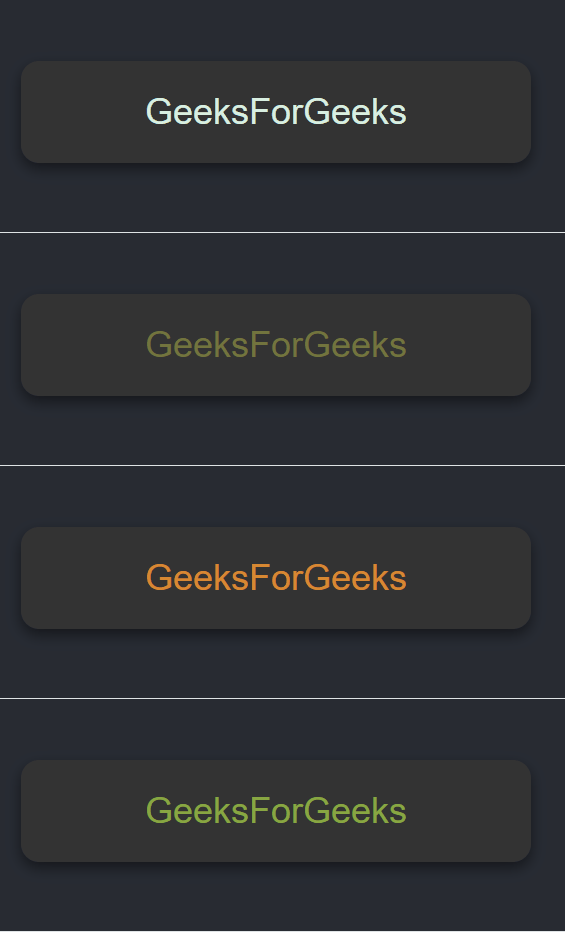
- The App component starts with a color state set to "lightgreen".
- A setInterval is created to call the getRandomColor method every 2 seconds.
- The setState method updates the color state with a new random color generated by getRandomColor().
- The getRandomColor function generates a random color in hexadecimal format.
- The text "GeeksForGeeks" is displayed in the center, and its color changes every 2 seconds.
- The component doesn't clean up the interval when unmounted, which may lead to a memory leak.
Usage componentDidMount()
componentDidMount() is used in the following scenarios:
- Fetching Data: Retrieve data from an API or external source after the component is rendered.
- Setting Up Subscriptions: Subscribe to data streams or WebSocket connections.
- Initializing Third-Party Libraries: Integrate libraries or plugins that require DOM access.
- Event Listeners: Set up events like scroll or resize after the component mounts.
- DOM Manipulations: Perform DOM measurements or updates after rendering.
Best Practices
Use componentDidMount() for one-time setup and side effects while keeping code simple, safe, and properly cleaned up.
- Avoid State Initialization: Use the constructor or getDerivedStateFromProps() for initial state setup; reserve componentDidMount() for side effects like data fetching.
- Use componentWillUnmount() for Cleanup: Always clean up event listeners, subscriptions, or timers in componentWillUnmount() to prevent memory leaks.
- Handle Errors: Use try/catch or .catch() to handle errors in asynchronous operations like data fetching to avoid crashes.
- One-Time Operations: Use componentDidMount() for tasks that should only run once, such as data fetching or initial setup, rather than repeated actions.
- Avoid Heavy Logic: Keep the logic in componentDidMount() minimal to ensure fast rendering and prevent blocking UI updates.
Advantages
The componentDidMount() method offers several benefits:
- Safe DOM Manipulation: The DOM is ready, so you can interact with it.
- Data Fetching: Ideal for making API calls after the component is mounted.
- Setting Up Subscriptions: You can initiate subscriptions or timers.
- Third-Party Libraries: Use it to initialize external libraries that need the DOM.
- State Updates: Safely update state based on data or other actions.
Limitations
componentDidMount() is not needed when no post-render logic or dynamic behavior is required.
- No Post-Render Needs: If everything is handled during initial render.
- Static/Presentational Components: When components only display props or static content.
Difference Between componentDidMount() and componentWillMount() Method
componentWillMount() | componentDidMount() |
|---|---|
Called before the component is mounted to the DOM. | Called after the component is mounted to the DOM. |
Typically used for setting initial state or performing any pre-render tasks. Note: It is now deprecated in newer versions of React. | Used for tasks like data fetching, setting up subscriptions, and initializing third-party libraries once the component is rendered. |
The component is not yet in the DOM, so DOM manipulations or side effects should not be done. | The component is fully rendered and mounted to the DOM, so it is safe to manipulate the DOM and perform side effects. |
Avoid side effects, as they might cause issues with the DOM rendering. | Ideal for side effects such as API calls, initializing external libraries, or setting up timers. |
Updating the state here might cause issues, especially since the component isn't rendered yet. | You can safely update the state here, as the component is already in the DOM and React will trigger a re-render if needed. |
componentWillMount() has been deprecated in React 16.3+ in favor of getDerivedStateFromProps and constructor. | componentDidMount() is still actively used and recommended for handling tasks after the component mounts. |