
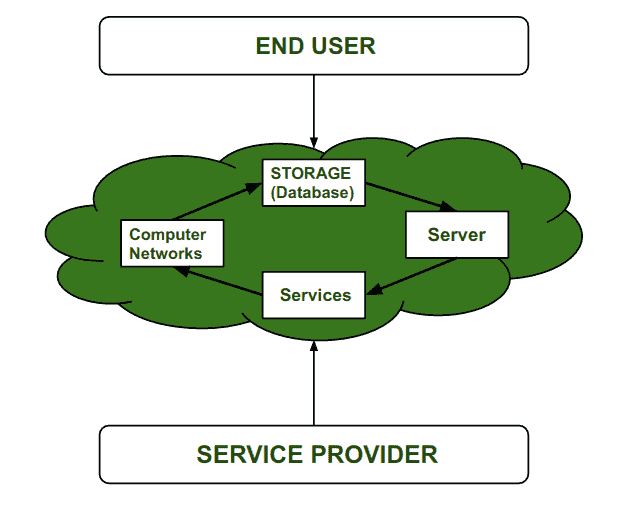
Access to storage, applications, and other IT resources over the internet is known as cloud computing, and protecting these resources, data, and services from threats and unauthorized access is referred to as cloud security.
The Foundation: Shared Responsibility Model
Before planning security controls, it is critical to understand the Shared Responsibility Model, which dictates who is responsible for what in a cloud environment.
- Security OF the Cloud (Provider Responsibility): The cloud service provider (e.g., AWS, Azure, Google Cloud) is responsible for protecting the physical infrastructure, data centers, hardware, and the underlying hypervisor virtualization layer.
- Security IN the Cloud (Customer Responsibility): The customer is responsible for configuring access controls, encrypting their data, managing their applications, and setting up virtual firewalls.
If a data center is physically broken into, that is the provider's fault. If a hacker accesses a database because it was left without a password, that is the customer's fault.
Security Implications of Cloud Deployment Models
The way cloud infrastructure is deployed heavily dictates your security posture and risk profile:
- Public Cloud: Infrastructure is shared among multiple organizations (multi-tenant). While highly cost-effective, you rely heavily on the provider's isolation protocols to ensure your data is separated from other tenants.
- Private Cloud: A dedicated cloud environment for a single organization (single-tenant). It offers the highest level of security, control, and privacy, making it ideal for strict regulatory compliance (e.g., banking, healthcare).
- Hybrid Cloud: A combination of public and private clouds. Security requires managing complex, encrypted network tunnels (like VPNs) to safely pass data between the private and public environments.
- Community Cloud: Shared infrastructure utilized by multiple organizations with similar security requirements, compliance needs, or research goals (e.g., a shared government cloud).
Four Pillars of Cloud Security Controls
Cloud security controls are the specific mechanisms and protocols designed to prevent, detect, and respond to cyber threats. They work together to create a Defense-in-Depth strategy.
1. Deterrent Controls
Deterrent controls do not physically stop an attack; rather, they act as a psychological barrier to discourage malicious activities by warning potential attackers of the consequences.
Goal: Reduce the likelihood of intentional misuse, particularly from insider threats (employees).
Examples:
- Warning banners displayed before logging into a server (Unauthorized access is strictly prohibited and monitored).
- Strict, visibly enforced corporate security policies and legal notices.
- Visible enforcement of Multi-Factor Authentication (MFA).
2. Preventive Controls
Preventive controls are the most critical layer for proactive security. They are designed to block vulnerabilities and stop attacks before they happen.
Goal: Actively prevent unauthorized access and strengthen the overall security posture of the cloud system.
Examples:
- Identity and Access Management (IAM): Enforcing the Principle of Least Privilege so users only have the exact access they need.
- Network Security: Virtual firewalls (like AWS Security Groups) and Web Application Firewalls (WAF) blocking malicious IP addresses.
- Encryption: Scrambling data at rest (in databases/storage) and in transit (over HTTPS/TLS networks) so it remains unreadable even if intercepted.
3. Detective Controls
Because no preventive system is 100% perfect, detective controls act as the alarm system. They are mechanisms used to identify and alert administrators of security incidents in real-time or immediately after they occur.
Goal: Continuously monitor cloud environments for abnormal behavior, ensuring early identification of breaches.
Examples:
- Intrusion Detection Systems (IDS): Monitoring network traffic for known malware signatures.
- Log Monitoring & SIEM: Centralized logging tools (like AWS CloudTrail) that record every single API call and user action for forensic analysis.
- Automated Threat Detection: AI-driven tools that alert administrators if a user suddenly downloads an unusually massive amount of data.
4. Corrective Controls
Corrective controls are the disaster response mechanisms. They are utilized to minimize damage, stop the bleeding, and restore systems back to a normal, secure state after an incident has occurred.
Goal: Focus on recovery, damage control, and business continuity.
Examples:
- Automated Backups: Restoring corrupted or ransomware-locked databases from a secure, isolated backup snapshot.
- Disaster Recovery (DR) Plans: Failing over to a secondary geographic cloud region if the primary region goes offline.
- Automated Patch Management: Automatically applying a security patch to a server the moment a vulnerability is discovered.
Strategic Planning for Cloud Security
Successfully securing a cloud environment requires meticulous planning before migration begins:
- Data Classification: Identify and categorize your data. Understand what is public, what is internal, and what is highly sensitive (like credit card numbers or patient records).
- Risk Assessment: Evaluate the sensitivity of the resources you are moving to the cloud and calculate the potential risks associated with the specific service model (IaaS vs. PaaS vs. SaaS).
- Implement a Zero Trust Architecture: Adopt a "never trust, always verify" mindset. Do not assume users or devices are safe just because they are inside the corporate network. Authenticate every single request.
- Continuous Compliance: Ensure your cloud architecture aligns with mandatory industry regulations, such as GDPR (data privacy), HIPAA (healthcare), or PCI-DSS (payment processing).