
The Network Layer is the third layer of the OSI model responsible for logical addressing, routing, and end-to-end packet delivery across interconnected networks.
- Handles logical (IP) addressing of devices
- Determines optimal routing paths between networks
- Enables host-to-host communication across multiple networks

Note: Unlike the Data Link Layer, which focuses only on node-to-node delivery within a single network segment, the Network Layer ensures that data travels from the source host to the destination host, even if they are located on different networks.
Key Responsibilities of the Network Layer
Some of the key responsibilities of network layer are:
- Logical Addressing: Assigns unique IP addresses to devices, ensuring accurate identification and communication across networks.
- Packetization: Encapsulates transport layer segments into packets for efficient transmission.
- Host-to-Host Delivery: Ensures reliable delivery of packets from the sender to the intended receiver across diverse networks.
- Forwarding: Moves packets from the input interface of a router to the appropriate output interface based on the destination IP.
- Routing: Determines the optimal path for packets to travel across multiple networks using routing algorithms and protocols.
- Fragmentation and Reassembly: Splits large packets into smaller fragments to match the maximum transmission unit (MTU) of a network, and reassembles them at the destination.
- Subnetting: Divides larger networks into smaller subnetworks for efficient addressing and traffic management.
- Network Address Translation (NAT): Maps private IPs to public IPs for internet communication, conserving address space and adding security.
Read more about Functions of Network Layer.
How the Network Layer Works
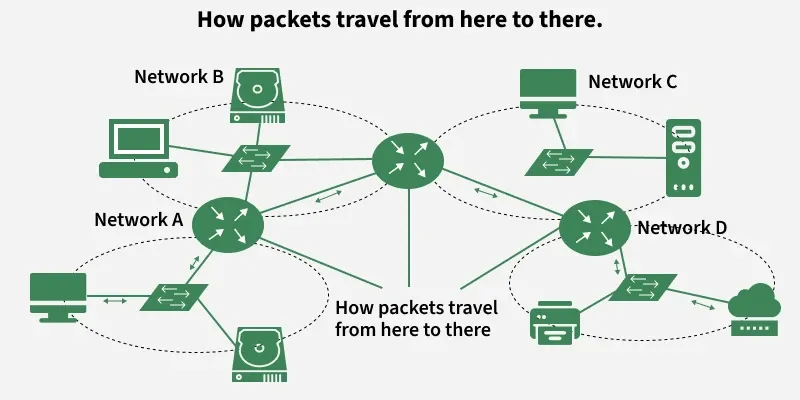
- Each device is assigned a unique logical address (IP address).
- Data from the transport layer is encapsulated into packets, with source and destination IPs attached.
- Routers analyze the destination address and determine the best available path.
- Packets traverse the network hop-by-hop, moving across routers until reaching the destination.
- If the packet size exceeds the MTU, it is fragmented into smaller units.
- At the destination, the fragments are reassembled into the original data.
- If errors occur (e.g., unreachable destination), protocols like ICMP send error messages back to the source.
Protocols Operating at the Network Layer
- IP (Internet Protocol - IPv4/IPv6): Provides logical addressing and delivers packets across networks; IPv6 offers a larger address space and better efficiency.
- ICMP (Internet Control Message Protocol): Sends error reports and diagnostic messages (e.g., destination unreachable, ping).
- ARP (Address Resolution Protocol): Maps IP addresses to MAC addresses within a local network.
- RARP (Reverse Address Resolution Protocol): Retrieves a device’s IP address using its MAC address (largely obsolete).
- NAT (Network Address Translation): Converts private IP addresses to public IPs, conserving addresses and improving security.
- IPSec (Internet Protocol Security): Secures IP communication through encryption and authentication.
- MPLS (Multiprotocol Label Switching): Uses labels to forward packets efficiently and manage traffic.
Routing Protocols
- RIP (Routing Information Protocol): Distance-vector protocol using hop count to select routes.
- OSPF (Open Shortest Path First): Link-state protocol that computes the shortest path using network topology.
- BGP (Border Gateway Protocol): Path-vector protocol that routes data between autonomous systems on the internet.
Advantages of the Network Layer
- Enables end-to-end communication across multiple networks.
- Supports scalability by allowing subnetting and hierarchical addressing.
- Efficiently routes packets using shortest-path and dynamic routing algorithms.
- Provides inter-networking by connecting heterogeneous networks.
Limitations of the Network Layer
- No flow control mechanism; congestion may occur if too many datagrams are in transit.
- Limited error control; mainly relies on upper layers for reliability.
- Routers may drop packets under heavy load, leading to possible data loss.
- Fragmentation increases processing overhead and may affect performance.
Difference Between Routing and Flooding
Routing | Flooding |
|---|---|
A routing table is required. | No Routing table is required |
May give the shortest path. | Always gives the shortest path. |
Routing is less reliable | Flooding is more reliable |
Traffic is less in Routing | Traffic is more in Flooding |
Duplicate packets are not present | Duplicate packet are present |
For practice, solve quiz on Network Layer.