
The continue statement in C++ is a loop control statement that skips the remaining statements of the current iteration and immediately transfers control to the next iteration of the loop.
- Can be used with for, while, and do-while loops.
- Helps skip specific iterations without terminating the entire loop.
#include <iostream>
using namespace std;

int main(){
    for (int i = 1; i <= 10; i++) {
        if (i == 4)
            continue;
        else
            cout << i << " ";
    }
    return 0;
}
Output
1 2 3 5 6 7 8 9 10
Explanation: When i becomes 4, the continue statement skips the cout statement and immediately starts the next iteration. Therefore, 4 is not printed.
Syntax
continue;
The continue statement can only be used inside loops. When encountered, it skips the remaining statements of the current iteration and proceeds to the next iteration.
Working of continue statement
The working of the continue statement is as follows:
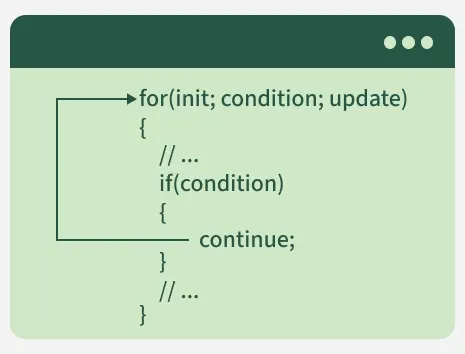
- The loop executes normally.
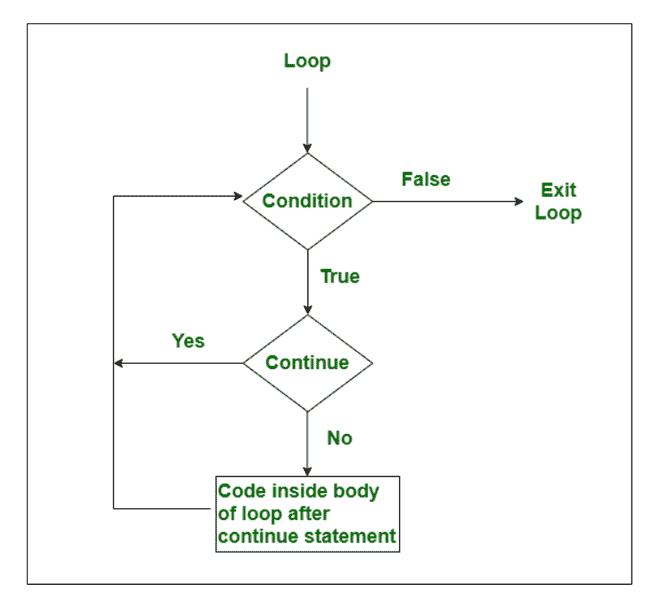
- When continue is encountered, the remaining statements in the current iteration are skipped.
- Control moves to the loop update step (in a for loop) or condition check (in while and do-while loops).
- The next iteration begins.
Flowchart of Continue Statement
continue Statement with Different Loops
The continue statement can be used with all looping constructs in C++, but the point at which control moves to the next iteration differs for each loop type.
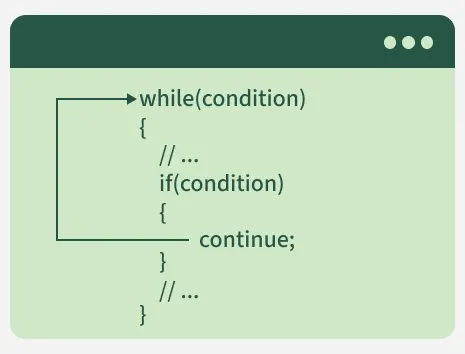
Continue Statement with While Loop
In a while loop, control returns directly to the condition check after encountering continue.
#include <iostream>
using namespace std;

int main(){
    int i = 0;
    while (i < 10) {
          i++;
        if (i == 4) {
            continue;
        }
        else {
            cout << i << " ";
        }
    }
    return 0;
}
Output
1 2 3 5 6 7 8 9 10
Explanation: When i becomes 4, the remaining statements of that iteration are skipped and the loop continues with the next value.
Note: In while loops, update the loop variable before continue; otherwise, the loop may become infinite.
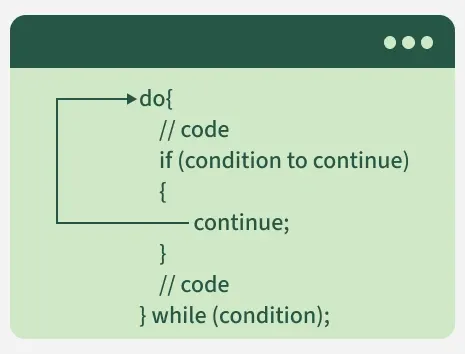
Continue Statement with do-while Loop
In a do-while loop, continue transfers control directly to the condition check.
#include <iostream>
using namespace std;

int main(){
    int i = 0;
    do {
        i++;
        if (i == 4) {
            continue;
        }
        else {
            cout << i << ' ';
        }

    } while (i < 10);
    return 0;
}
Output
1 2 3 5 6 7 8 9 10
Explanation: The value 4 is skipped because continue is executed before the print statement.
Note: In while and do-while loop, we updated the loop variable i before the continue statement or else we will keep encountering continue before updating the loop variable creating an infinite loop.
Continue Statement with Nested Loops
When used inside nested loops, continue affects only the loop in which it appears.
#include <iostream>
using namespace std;

int main(){
    for (int i = 1; i <= 2; i++) {
        for (int j = 0; j <= 4; j++) {
            if (j == 2) {
                continue;
            }
            cout << j << " ";
        }
        cout << endl;
    }
    return 0;
}
Output
0 1 3 4
0 1 3 4
Explanation: The continue statement skips the iteration where j equals 2, so that value is never printed.