
Numpy is a general-purpose array-processing package. It provides a high-performance multidimensional array object and tools for working with these arrays. It is the fundamental package for scientific computing with Python. Besides its obvious scientific uses, Numpy can also be used as an efficient multi-dimensional container of generic data.
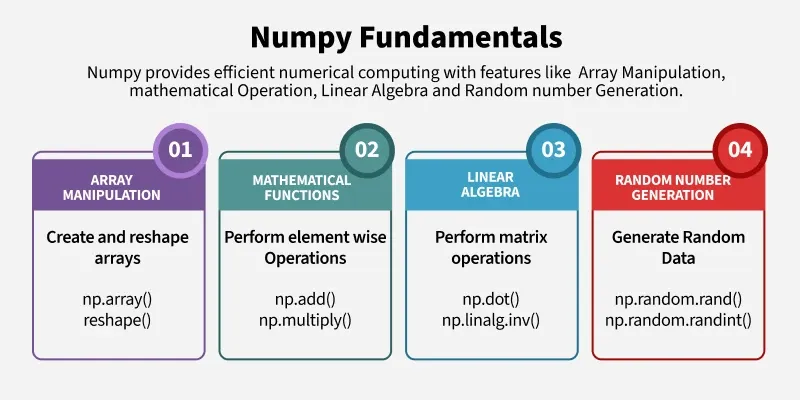
Arrays in Numpy
A NumPy array is a structured collection of elements of the same data type stored in a table format.
- The number of dimensions is called the rank and the size along each dimension is called the shape.
- In NumPy, arrays are called ndarray and elements are accessed using square brackets [], often created from nested Python lists.
Creating a Numpy Array
Arrays in Numpy can be created by multiple ways, with various number of Ranks, defining the size of the Array. Arrays can also be created with the use of various data types such as lists, tuples, etc. The type of the resultant array is deduced from the type of the elements in the sequences.
Note: Type of array can be explicitly defined while creating the array.
import numpy as np

arr = np.array([1, 2, 3])
print(arr)

arr = np.array([[1, 2, 3],
                [4, 5, 6]])
print(arr)

arr = np.array((1, 3, 2))
print(arr)
Output
[1 2 3]
[[1 2 3]
 [4 5 6]]
[1 3 2]
Accessing the Array Index
In a numpy array, indexing or accessing the array index can be done in multiple ways. To print a range of an array, slicing is done. Slicing of an array is defining a range in a new array which is used to print a range of elements from the original array. Since, sliced array holds a range of elements of the original array, modifying content with the help of sliced array modifies the original array content.
import numpy as np

arr = np.array([[-1, 2, 0, 4],
                [4, -0.5, 6, 0],
                [2.6, 0, 7, 8],
                [3, -7, 4, 2.0]])

arr2 = arr[:2, ::2]
print ("first 2 rows and alternate columns(0 and 2):\n", arr2)

arr3 = arr[[1, 1, 0, 3],
                [3, 2, 1, 0]]
print ("\nElements at indices (1, 3), "
    "(1, 2), (0, 1), (3, 0):\n", arr3)
Output
first 2 rows and alternate columns(0 and 2):
 [[-1.  0.]
 [ 4.  6.]]

Elements at indices (1, 3), (1, 2), (0, 1), (3, 0):
 [0. 6. 2. 3.]
Basic Array Operations
In numpy, arrays allow a wide range of operations which can be performed on a particular array or a combination of Arrays. These operations include some basic Mathematical operation as well as Unary and Binary operations.
import numpy as np

a = np.array([[1, 2],
              [3, 4]])

b = np.array([[4, 3],
              [2, 1]])

print ("Adding 1 to every element:", a + 1)
print ("\nSubtracting 2 from each element:", b - 2)
print ("\nSum of all array elements: ", a.sum())
print ("\nArray sum:\n", a + b)
Output
Adding 1 to every element: [[2 3]
 [4 5]]

Subtracting 2 from each element: [[ 2  1]
 [ 0 -1]]

Sum of all array elements:  10

Array sum:
 [[5 5]
 [5 5]]
Data Types in Numpy
A NumPy array is a table of elements (usually numbers) of the same data type, indexed by a tuple of positive integers. Each array has a dtype that defines the type of its elements and how they are stored in memory. NumPy provides many numeric data types and you can either let NumPy guess the type or specify it explicitly when creating an array.
Constructing a Datatype Object
In Numpy, datatypes of Arrays need not to be defined unless a specific datatype is required. Numpy tries to guess the datatype for Arrays which are not predefined in the constructor function.
import numpy as np

x = np.array([1, 2])
print(x.dtype)

x = np.array([1.0, 2.0])
print(x.dtype)

x = np.array([1, 2], dtype = np.int64)
print(x.dtype)
Output
int64
float64
int64
Math Operations on DataType array
In Numpy arrays, basic mathematical operations are performed element-wise on the array. These operations are applied both as operator overloads and as functions. Many useful functions are provided in Numpy for performing computations on Arrays such as sum for addition of Array elements, T for Transpose of elements, etc.
import numpy as np

arr1 = np.array([[4, 7], [2, 6]],
                 dtype = np.float64)

arr2 = np.array([[3, 6], [2, 8]],
                 dtype = np.float64)

Sum = np.add(arr1, arr2)
print(Sum)

Sum1 = np.sum(arr1)
print(Sum1)

Sqrt = np.sqrt(arr1)
print(Sqrt)

Trans_arr = arr1.T
print(Trans_arr)
Output
[[ 7. 13.]
 [ 4. 14.]]
19.0
[[2.         2.64575131]
 [1.41421356 2.44948974]]
[[4. 2.]
 [7. 6.]]
To learn about default numpy methods, refer to Numpy Methods.
Programs on Numpy
- Get unique values from a list
- Multiply all numbers in list
- Transpose a matrix
- Multiplication of two Matrices
- Checkerboard pattern of nxn
- Graph Plotting in Python | Set 1, Set 2, Set 3