
Model fields define what kind of data a database column will store and how that data should be handled.
- Every field represents a specific data type and controls how data is stored and validated.
- Fields also decide the default form widget used for user input.
- Django uses field classes to determine the database column type, form widget, and validation rules.
- Reserved names like save, delete, and clean should not be used as field names to avoid conflicts with Django’s model system.
from django.db import models

class Musician(models.Model):
    first_name = models.CharField(max_length=200)
    last_name = models.CharField(max_length=200)
    instrument = models.CharField(max_length=200)

class Album(models.Model):
    artist = models.ForeignKey(Musician, on_delete=models.CASCADE)
    name = models.CharField(max_length=100)
    release_date = models.DateField()
    num_stars = models.IntegerField()
- CharField is used for short text like names or instruments.
- IntegerField stores numbers (e.g., star ratings).
- DateField holds date values.
- ForeignKey establishes a relationship between two models (Album- Musician).
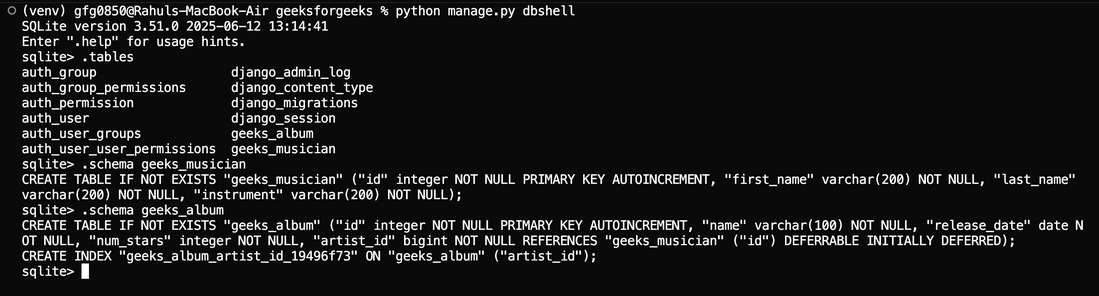
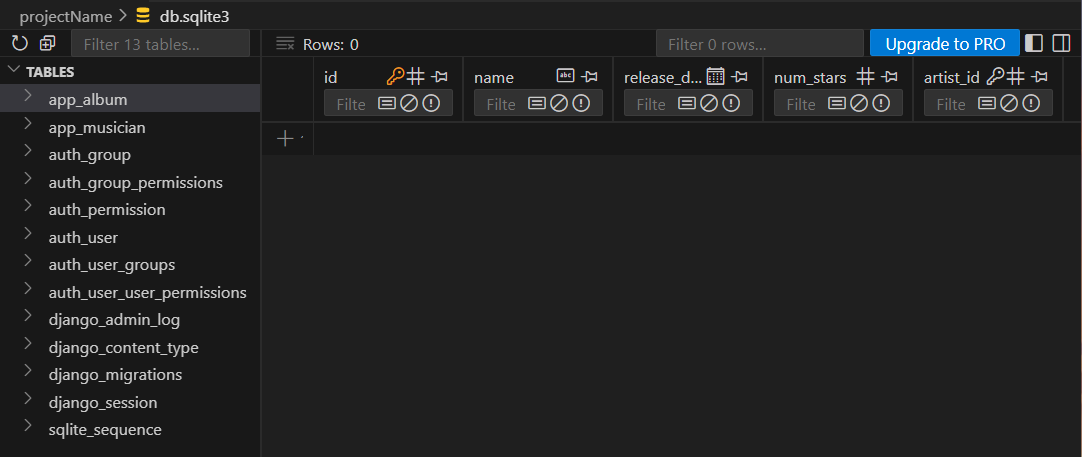
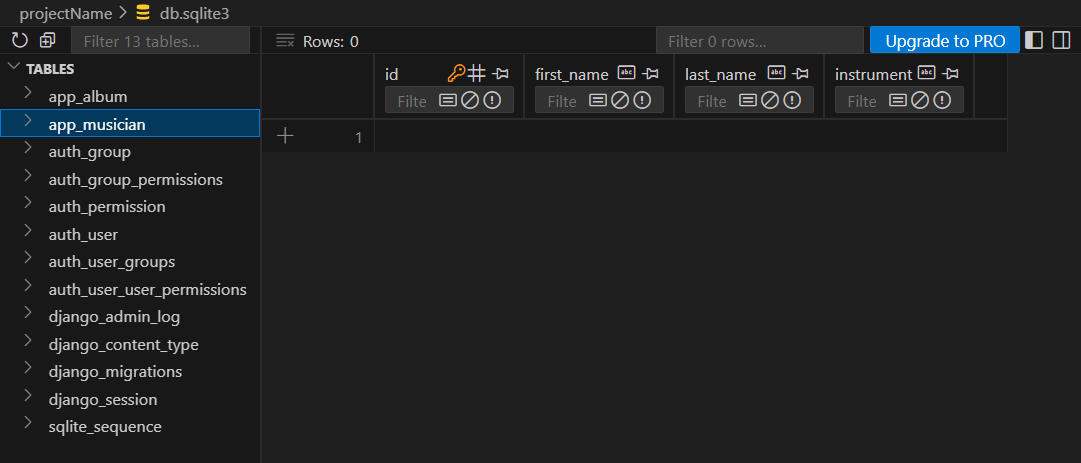
After creating and applying migrations, the above two tables are now created in the database.
Viewing and Inspecting Database Tables
To view the tables and their structure, use Django’s database shell. Open the DB shell by running:
python manage.py dbshell
Then run the SQLite commands:
.tables
.schema geeks_musician
.schema geeks_album
DB Browser for SQLite can also be used to view the database in a clear and easy-to-read interface:
Common Field Types in Django
| Field Name | Description |
|---|---|
| AutoField | It is an IntegerField that automatically increments. |
| BigAutoField | It is a 64-bit integer, much like an AutoField except that it is guaranteed to fit numbers from 1 to 9223372036854775807. |
| BigIntegerField | It is a 64-bit integer, much like an IntegerField except that it is guaranteed to fit numbers from -9223372036854775808 to 9223372036854775807. |
| BinaryField | A field to store raw binary data. |
| BooleanField | A true/false field. The default form widget for this field is a CheckboxInput. |
| CharField | A field to store text-based values. |
| DateField | A date, represented in Python by a datetime.date instance |
| DateTimeField | It is used for date and time, represented in Python by a datetime.datetime instance. |
| DecimalField | It is a fixed-precision decimal number, represented in Python by a Decimal instance. |
| DurationField | A field for storing periods of time. |
| EmailField | It is a CharField that checks that the value is a valid email address. |
| FileField | It is a file-upload field. |
| FloatField | It is a floating-point number represented in Python by a float instance. |
| ImageField | It inherits all attributes and methods from FileField, but also validates that the uploaded object is a valid image. |
| IntegerField | It is an integer field. Values from -2147483648 to 2147483647 are safe in all databases supported by Django. |
| GenericIPAddressField | An IPv4 or IPv6 address, in string format (e.g. 192.0.2.30 or 2a02:42fe::4). |
| PositiveIntegerField | Like an IntegerField, but must be either positive or zero (0). |
| PositiveSmallIntegerField | Like a PositiveIntegerField, but only allows values under a certain (database-dependent) point. |
| SlugField | Slug is a newspaper term. A slug is a short label for something, containing only letters, numbers, underscores or hyphens. They’re generally used in URLs. |
| SmallIntegerField | It is like an IntegerField, but only allows values under a certain (database-dependent) point. |
| TextField | A large text field. The default form widget for this field is a Textarea. |
| TimeField | A time, represented in Python by a datetime.time instance. |
| URLField | A CharField for a URL, validated by URLValidator. |
| UUIDField | A field for storing universally unique identifiers. Uses Python’s UUID class. When used on PostgreSQL, this stores in a uuid datatype, otherwise in a char(32). |
Note: NullBooleanField (a boolean field that allowed True, False, or NULL) is deprecated. Use BooleanField(null=True, blank=True) instead.
