
HTMX allows us to utilize current AJAX methods in HTML directly, while FastAPI is a strong backend framework for quick and efficient API development. This artilce will examine the way of combining HTMX with FastAPI to develop dynamic web applications.
Setting Up FastAPI
Step1. First we need Python installed on your machine.
To check python installed or not run this command
python --versionStep2. Create a new directory for your project and navigate to it.
mkdir fasthtmx
cd fasthtmx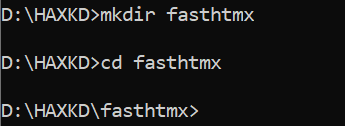
Step3. Create a virtual environment and activate it
python -m venv venv
venv\Scripts\activate
Step4. Install FastAPI and an ASGI server like uvicorn:
pip install fastapi uvicornStep5. Integrating HTMX
HTMX is a lightweight library that allows you to perform AJAX requests from HTML elements. You can include HTMX in your project by adding it to your HTML templates. Download HTMX or use a CDN link:
<script src="https://unpkg.com/htmx.org@1.6.1/dist/htmx.min.js"></script>Step6. Creating a Basic FastAPI Endpoint
Creating a file name main.py and set up a basic FastAPI app:
from fastapi import FastAPI
from fastapi.responses import HTMLResponse

app = FastAPI()

@app.get("/", response_class=HTMLResponse)
async def read_root():
    return """
    <!DOCTYPE html>
    <html>
    <head>
        <title>FastAPI with HTMX</title>
        <script src="https://unpkg.com/htmx.org@1.6.1/dist/htmx.min.js"></script>
    </head>
    <body>
        <h1>Welcome to FastAPI with HTMX</h1>
        <div id="content"></div>
        <button hx-get="/fetch-data" hx-target="#content">Fetch Data</button>
    </body>
    </html>
    """
Step7. Run the app using uvicorn:
uvicorn main:app --reloadVisit http://127.0.0.1:8000 in your browser. You should see a page with a button that will fetch data.
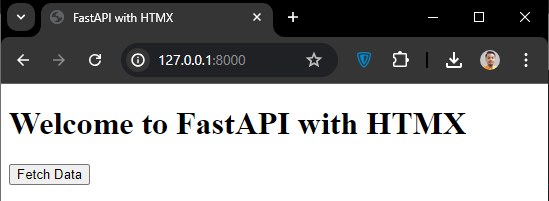
Now, Let's add an endpoint that HTMX will call to fetch data.
Fetching Data with HTMX
Modify main.py to include this endpoint:
@app.get("/fetch-data", response_class=HTMLResponse)
async def fetch_data():
    return "<p>Here is some dynamic data fetched with HTMX!</p>"
Now, when you click the "Fetch Data" button, HTMX will make an AJAX request to /fetch-data and update the #content div with the response.
Displaying Data Dynamically
Now fetch and display more complex data. For instance, fetching a list of items from a database.
Modify main.py to include this endpoint:
@app.get("/items", response_class=HTMLResponse)
async def get_items():
    items = ["Item 1", "Item 2", "Item 3"]
    items_html = "".join(f"<li>{item}</li>" for item in items)
    return f"<ul>{items_html}</ul>"
And modify your HTML to fetch this list:
<button hx-get="/items" hx-target="#content">Fetch Items</button>Handling Form Submissions
We also handle form submissions with HTMX.
Here's an example of a form:
@app.get("/form", response_class=HTMLResponse)
async def form():
    return """
    <form hx-post="/submit" hx-target="#result">
        <input type="text" name="name" />
        <button type="submit">Submit</button>
    </form>
    <div id="result"></div>
    """

@app.post("/submit", response_class=HTMLResponse)
async def submit_form(name: str = Form(...)):
    return f"<p>Hello, {name}!</p>"
Complete Example Code
from fastapi import FastAPI, Form
from fastapi.responses import HTMLResponse
from fastapi.staticfiles import StaticFiles

app = FastAPI()

@app.get("/", response_class=HTMLResponse)
async def read_root():
    return """
    <!DOCTYPE html>
    <html>
    <head>
        <title>FastAPI with HTMX</title>
        <script src="https://unpkg.com/htmx.org@1.6.1/dist/htmx.min.js"></script>
    </head>
    <body>
        <h1>Welcome to FastAPI with HTMX</h1>
        <div id="content">
            <button hx-get="/fetch-data" hx-target="#content">Fetch Data</button>
            <button hx-get="/items" hx-target="#content">Fetch Items</button>
            <button hx-get="/form" hx-target="#content">Show Form</button>
        </div>
    </body>
    </html>
    """

@app.get("/fetch-data", response_class=HTMLResponse)
async def fetch_data():
    return "<p>Here is some dynamic data fetched with HTMX!</p>"

@app.get("/items", response_class=HTMLResponse)
async def get_items():
    items = ["Item 1", "Item 2", "Item 3"]
    items_html = "".join(f"<li>{item}</li>" for item in items)
    return f"<ul>{items_html}</ul>"

@app.get("/form", response_class=HTMLResponse)
async def form():
    return """
    <form hx-post="/submit" hx-target="#result">
        <input type="text" name="name" placeholder="Enter your name" />
        <button type="submit">Submit</button>
    </form>
    <div id="result"></div>
    """

@app.post("/submit", response_class=HTMLResponse)
async def submit_form(name: str = Form(...)):
    return f"<p>Hello, {name}!</p>"

if __name__ == "__main__":
    import uvicorn
    uvicorn.run(app, host="127.0.0.1", port=8000, reload=True)
Output:
Conclusion
By integrating HTMX with FastAPI, dynamic and interactive web applications can be created without much JavaScript. This strategy capitalizes on the advantages of each framework to create an efficient and effective way of building current web applications.