
Creating microservices with FastAPI involves setting up small, independent services that can communicate with each other, usually over HTTP. FastAPI is a modern, fast (high-performance), web framework for building APIs with Python 3.7+ based on standard Python type hints. Here's a step-by-step guide to creating microservices with FastAPI:
Why Use FastAPI for Microservices?
- Speed: FastAPI is one of the fastest Python web frameworks.
- Developer Productivity: With its support for type hints, developers get autocomplete and type-checking, reducing bugs and increasing productivity.
- Asynchronous Support: FastAPI supports asynchronous programming, making it suitable for high-performance applications.
- Ease of Use: Its syntax is simple and intuitive, making it easy to learn and implement.
Setup Environment
First, ensure you have Python and pip installed. You can create a virtual environment for your project:
python -m venv venv
source venv/bin/activate
Install FastAPI and Uvicorn:
pip install fastapi uvicornCreating Your First Microservice
1. Project Structure
Create a directory for your project and navigate into it:
mkdir fastapi-microservice
cd fastapi-microservice
Inside this directory, create the following structure:
fastapi-microservice/
├── app/
│   ├── __init__.py
│   ├── main.py
├── tests/
│   ├── __init__.py
├── requirements.txt
2. Define Your First Microservice
Create a new directory for your microservice and navigate into it. Create a file, main.py, with the following content:
from fastapi import FastAPI

app = FastAPI()

@app.get("/")
def read_root():
    return {"message": "Welcome to FastAPI microservice"}

@app.get("/items/{item_id}")
def read_item(item_id: int, q: str = None):
    return {"item_id": item_id, "q": q}
3. Run Your Microservice
You can run your FastAPI application using Uvicorn:
uvicorn app.main:app --reloadThis command runs the application and watches for code changes, automatically reloading the server.
4. Testing the Application
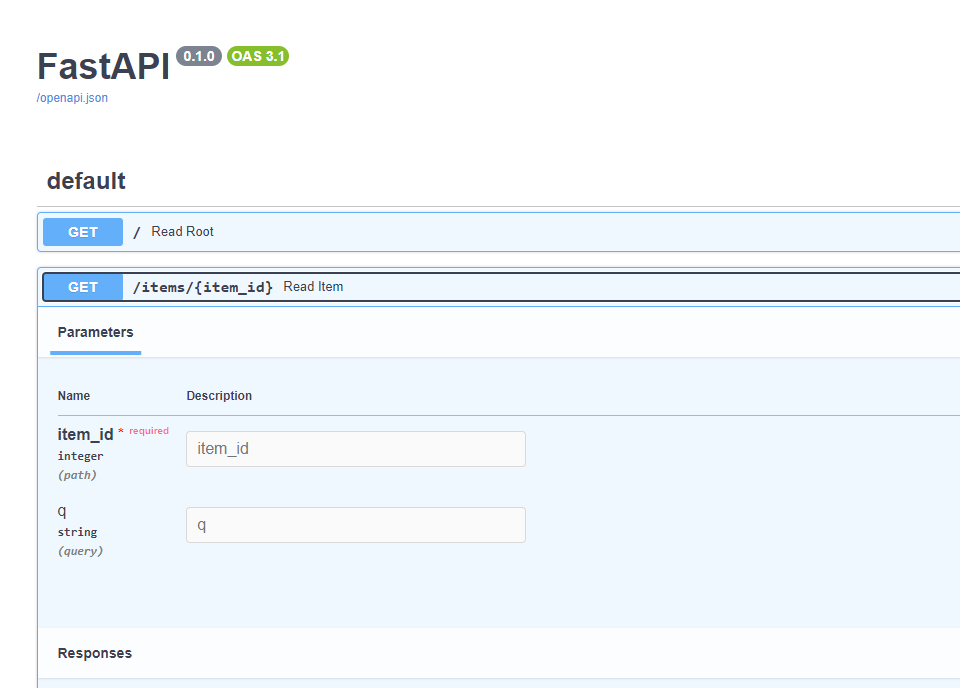
You can test your endpoints by navigating to http://127.0.0.1:8000 in your browser. FastAPI provides an interactive API documentation powered by Swagger UI at http://127.0.0.1:8000/docs.
Testing Your Microservices
Unit testing is essential for microservices to ensure each component works as expected. FastAPI is compatible with the standard unittest framework and other popular testing tools like pytest. Here’s a simple test case using pytest:
Install pytest
pip install pytestCreate a test file in the tests directory
from fastapi.testclient import TestClient
from app.main import app

client = TestClient(app)

def test_read_root():
    response = client.get("/")
    assert response.status_code == 200
    assert response.json() == {"message": "Welcome to FastAPI microservice"}

def test_read_item():
    response = client.get("/items/1")
    assert response.status_code == 200
    assert response.json() == {"item_id": 1, "q": None}
Run your tests
pytestConclusion
This guide covers the basics of creating and running microservices with FastAPI. Each microservice can be developed, tested, and deployed independently. You can expand this setup by adding more features, authentication, and inter-service communication as needed.