
componentWillUnmount() is a React lifecycle method invoked just before a component is removed from the DOM. It is primarily used to clean up resources and prevent memory leaks.
- Remove event listeners or subscriptions to avoid unwanted updates.
- Clear timers or intervals set during the component’s lifecycle.
- Cancel ongoing network requests or asynchronous operations.
- Perform any necessary cleanup to maintain optimal performance.
Syntax:
componentWillUnmount() {
    // Cleanup code goes here
}- This method does not receive any arguments.
- It is called automatically by React before the component is removed from the DOM.
componentWillUnmount() Execution Timing
componentWillUnmount() is called when:
- The component is about to be removed from the DOM.
- This typically happens when a component is no longer needed, such as when it is conditionally rendered and the condition changes, or when navigating away from a page.
It’s important to note that componentWillUnmount() is only called for class components. In modern React applications, functional components are more commonly used, and useEffect() with a cleanup function replaces the need for componentWillUnmount().
Implementing the componentWillUnmount() Method
It Use this method to clean up subscriptions, timers, or any side effects before the component is removed from the DOM, ensuring efficient resource management.
1. Mouse Tracking with Cleanup using componentWillUnmount()
We will use the componentDidMount() and componentWillUnmount() methods for mouse tracking with cleanup.
import React from 'react';

class App extends React.Component {
   constructor() {
      super();
      this.state = {
         showUser: true,
      };
   }

   render() {
      return (
         <div>
            <h1>Mouse Tracking</h1>
            <button onClick={() => this.setState({ showUser: false })}>
               Hide User
            </button>
            {this.state.showUser ? <User /> : null}
         </div>
      );
   }
}

class User extends React.Component {
   constructor() {
      super();
      this.state = {
         mousePosition: { x: 0, y: 0 },
      };
   }

   componentDidMount() {
      window.addEventListener('mousemove', this.trackMouse);
   }

   componentWillUnmount() {
      window.removeEventListener('mousemove', this.trackMouse);
      alert('User component removed and mouse tracking stopped!');
   }

   trackMouse = (event) => {
      this.setState({
         mousePosition: { x: event.clientX, y: event.clientY },
      });
   };

   render() {
      return (
         <div>
            <h3>User: Rahul</h3>
            <h4>Mouse Position</h4>
            <p>X: {this.state.mousePosition.x}, Y: {this.state.mousePosition.y}</p>
         </div>
      );
   }
}

export default App;
Output:
- The App component controls the rendering of the User component using the showUser state.
- When showUser becomes false, the User component unmounts.
- On mount, it adds a mousemove listener to track cursor coordinates.
- On unmount, componentWillUnmount() removes the listener to prevent memory leaks.
- While mounted, it displays the updated mouse position.
2. Component Cleanup with componentWillUnmount()
We will cleanup the component with the help of the componentWillUnmount() method.
import React, { Component } from "react";

class MyComponent extends Component {
    componentWillUnmount() {
        console.log("Component is about to be removed from the DOM.");
    }

    render() {
        return <h1>Hello, I am a Component!</h1>;
    }
}

class App extends Component {
    state = { show: true };

    toggleComponent = () => {
        this.setState({ show: !this.state.show });
    };

    render() {
        return (
            <div>
                <button onClick={this.toggleComponent}>
                    {this.state.show ? "Unmount Component" : "Mount Component"}
                </button>
                {this.state.show && <MyComponent />}
            </div>
        );
    }
}

export default App;
Output: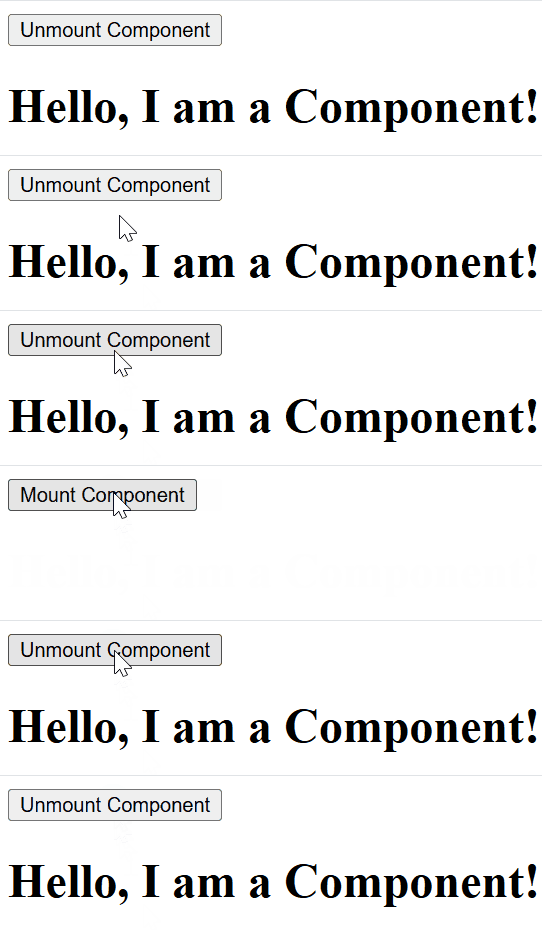
- Initially, the "Hello, I am a Component!" message is displayed.
- Click the "Unmount Component" button.
- MyComponent disappears, and the console logs:
Component is about to be removed from the DOM.- Click the "Mount Component" button again.
- MyComponent reappears.
- You can toggle the component on and off to see componentWillUnmount() in action.
Usage of componentWillUnmount()
componentWillUnmount() is used to execute necessary cleanup tasks before a React component is removed from the DOM.
1. Remove Event Listeners
If you added an event listener using window.addEventListener or document.addEventListener, clean it up here.
componentWillUnmount() {
    window.removeEventListener('resize', this.handleResize);
}
2. Clear Timers or Intervals
If you use setInterval or setTimeout, clear them to prevent unnecessary executions.
componentWillUnmount() {
    clearInterval(this.timer);
}
3. Canceling network requests
If your component is making API calls or network requests, and the component unmounts before the request completes, you should cancel the request to prevent it from affecting the component after it's unmounted
componentWillUnmount() {
    this.controller.abort();  // Cancel fetch request
}
4. Stopping Animations
If the component is running animations or transitions, use componentWillUnmount() to stop them when the component is unmounted, preventing animations from running unnecessarily.
componentWillUnmount() {
    this.animation.stop();
}
5. Unsubscribe from External Services
For instance, when using libraries like Redux, Firebase, or WebSocket connections.
componentWillUnmount() {
    this.unsubscribe();
}
Best Practices
- Remove unnecessary resources (like event listeners and timers) when the component is being removed.
- Avoid calling setState() in componentWillUnmount(), since the component is being unmounted.
- Cancel ongoing requests and clean up any subscriptions.
- Keep the method focused on cleanup to avoid unwanted actions after the component is gone
Limitations
componentWillUnmount() is unnecessary when no cleanup or resource management is required.
- Simple Stateless Components: No need if there are no timers, listeners, or subscriptions.
- Non-Interactive Components: Static components that only display content do not require cleanup.