
The SQL BETWEEN operator is used to retrieve values that fall within a specified range. It works with numbers, dates, and text and makes range-based filtering simple and readable.
- Filters results between two values, including both boundaries.
- Works on numeric, date, and string columns.
- Useful for filtering data within defined ranges.
Example: First, we create a demo SQL database and table, on which we will use the BETWEEN Operator command.

Query:
SELECT * FROM Employees
WHERE Age BETWEEN 26 AND 35;
Output:

Syntax:
SELECT column_name(s)
FROM table_name
WHERE column_name BETWEEN value1 AND value2;
Examples of BETWEEN Operator
To understand the SQL BETWEEN Operator we use the below below employees table with the various examples and their output.
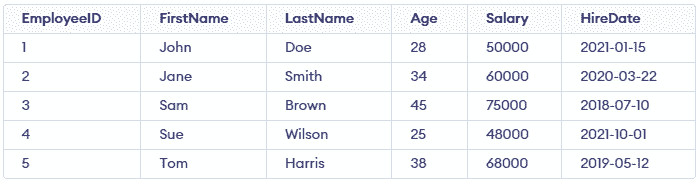
Example 1: NOT BETWEEN Text Values
Find employees whose last names are not alphabetically between 'B' and 'S'.
Query:
SELECT FirstName, LastName
FROM Employees
WHERE LastName NOT BETWEEN 'B' AND 'S';
Output:

- The query selects employees whose last names are lexicographically outside the range 'B' to 'S', based on full string comparison.
- Smith and Wilson are greater than 'S' in string order, so Jane Smith and Sue Wilson appear in the result.
Example 2: BETWEEN Dates
Find employees hired between January 1, 2020 and December 31, 2021.
Query:
SELECT FirstName, LastName, HireDate
FROM Employees
WHERE HireDate BETWEEN '2020-01-01' AND '2021-12-31';
Output:

- This query returns employees who were hired during the years 2020 and 2021.
- The
BETWEENoperator is used to filter theHireDatefield, returning records within the specified date range.
Example 3: NOT BETWEEN
Find employees whose age is not between 30 and 40.
Query:
SELECT FirstName, LastName, Age
FROM Employees
WHERE Age NOT BETWEEN 30 AND 40;
Output:

- This query retrieves employees whose age does not fall between 30 and 40.
- The NOT BETWEEN operator is used here to exclude employees within that age range.
- John, Sam, and Sue meet this condition, as their ages are outside the 30-40 range.
Example 4: BETWEEN with IN
Find employees whose salaries are between 50,000 and 70,000 and whose first names are either 'John', 'Sue', or 'Tom'.
Query:
SELECT FirstName, LastName, Salary
FROM Employees
WHERE Salary BETWEEN 50000 AND 70000
  AND FirstName IN ('John', 'Sue', 'Tom');
Output:

- Filters employees whose salary is between 50,000 and 70,000.
- Checks whether the first name is John, Sue, or Tom.
- Only John and Tom satisfy both conditions and appear in the result