
A trigger in SQL is a special stored procedure that runs automatically when an INSERT, UPDATE, or DELETE operation occurs on a table. It helps automate actions and keep data consistent. Triggers are especially useful when we need to:
- Automatically update related tables
- Enforce business rules and data integrity
- Keep audit logs of data changes
- Perform actions when data is inserted, updated, or deleted
Example: Automatically Track When a User Record Is Updated
Step 1: Create Main Table
CREATE TABLE users (
    id INT PRIMARY KEY,
    name VARCHAR(50),
    email VARCHAR(100),
    updated_at TIMESTAMP
);
Step 2: Create Trigger
This trigger automatically updates the updated_at field whenever the user record is modified.
CREATE TRIGGER update_timestamp
BEFORE UPDATE ON users
FOR EACH ROW
BEGIN
    SET NEW.updated_at = CURRENT_TIMESTAMP;
END;
Step 3: Insert Sample Data
INSERT INTO users (id, name, email) VALUES (1, 'Amit', 'amit@example.com');Output:

Step 4: Update a Record
UPDATE users SET email = 'amit_new@example.com' WHERE id = 1;Output:

Syntax:
create trigger [trigger_name]
[before | after]
{insert | update | delete}
on [table_name]
FOR EACH ROW
BEGIN
END;
- The trigger has a name and runs on a specific table
- It activates before or after an insert, update, or delete action
- It runs SQL code automatically for each affected row
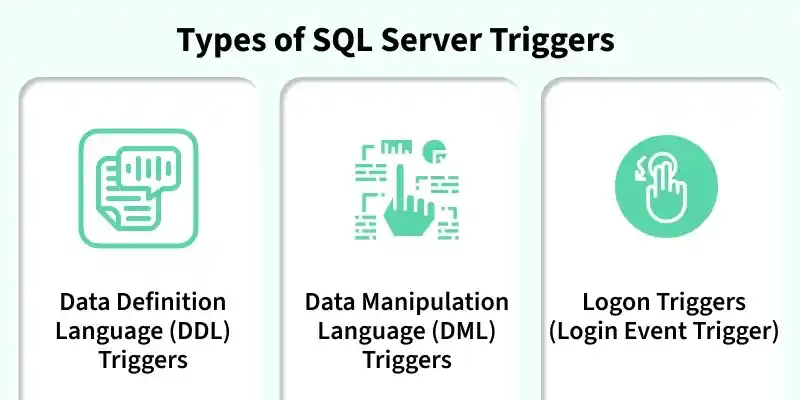
Types of SQL Triggers
Triggers can be categorized into different types based on the action they are associated with:
1. DDL Triggers
Data Definition Language (DDL) triggers run when commands like CREATE, ALTER, or DROP are used. They help track or stop changes to the database structure, such as creating, modifying, or deleting tables.
Example: Prevent Table Deletions
CREATE TRIGGER prevent_table_creation
ON DATABASE
FOR CREATE_TABLE, ALTER_TABLE, DROP_TABLE
AS
BEGIN
   PRINT 'you can not create, drop and alter table in this database';
   ROLLBACK;
END;
Output:

2. DML Triggers
DML triggers fire when we manipulate data with commands like INSERT, UPDATE, or DELETE. These triggers are perfect for scenarios where we need to validate data before it is inserted, log changes to a table, or cascade updates across related tables.
Example: To prevent unauthorized updates in a sensitive students table, we can create a trigger that blocks such changes.
CREATE TRIGGER prevent_update
ON students
FOR UPDATE, INSERT, DELETE
AS
BEGIN
    RAISERROR ('You can not insert, update and delete rows in this table.', 16, 1);
END;
Output:

Note:
ROLLBACK TRANSACTIONcan included for safety, but in most casesRAISERRORitself will prevent the DML from completing.
3. Logon Triggers
Logon triggers run when a user logs in. They are used to track logins, control access, and limit sessions. Messages from these triggers are stored in the SQL Server error log.
Example: Track User Logins
CREATE TRIGGER track_logon
ON LOGON
AS
BEGIN
   PRINT 'A new user has logged in.';
END;
Real-World Use Cases of SQL Triggers
1. Automatically Updating Related Tables (DML Trigger Example)
Triggers can automatically perform tasks when data changes in a table. For example, in a student database, when a student’s grades are updated, the total score should also be updated automatically.
CREATE TRIGGER update_student_score
AFTER UPDATE ON student_grades
FOR EACH ROW
BEGIN
   UPDATE total_scores
   SET score = score + :new.grade
   WHERE student_id = :new.student_id;
END;
2. Data Validation (Before Insert Trigger Example)
Triggers can be used to validate data before insertion. For example, a trigger can check that grades are between 0 and 100 before allowing them to be stored in the table.
CREATE TRIGGER validate_grade
BEFORE INSERT ON student_grades
FOR EACH ROW
BEGIN
   IF :new.grade < 0 OR :new.grade > 100 THEN
      RAISE_APPLICATION_ERROR(-20001, 'Invalid grade value.');
   END IF;
END;
The trigger checks if the inserted grade is valid. If not, it throws an error and prevents the insertion.
Viewing and Managing Triggers in SQL
We can use a query to list all triggers in SQL Server, which helps us manage and track triggers across multiple databases.
SELECT name, is_instead_of_trigger
FROM sys.triggers
WHERE type = 'TR';
- name: The name of the trigger.
- is_instead_of_trigger: Whether the trigger is an INSTEAD OF trigger.
- type = 'TR': This filters the results to show only triggers.
BEFORE and AFTER Triggers
SQL triggers can be specified to run BEFORE or AFTER the triggering event.
- BEFORE Triggers run before an action (INSERT, UPDATE, DELETE) and are used for validation or changing values.
- AFTER Triggers run after the action and are used for logging or updating other tables.
Example: Using BEFORE Trigger for Calculations
In a Student Report Database, a trigger automatically calculates the total and percentage when a new record is added. A BEFORE INSERT trigger does this before saving the data.
Query:
mysql>>desc Student;Output:
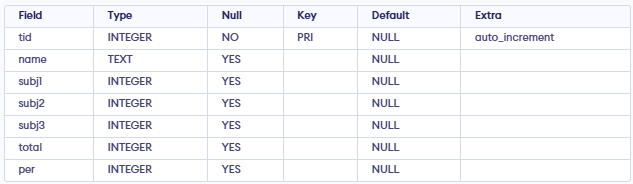
This SQL statement creates a trigger that calculates total and percentage before inserting student marks into the database. The trigger runs automatically whenever new data is added.
CREATE TRIGGER stud_marks
AFTER INSERT ON Student
FOR EACH ROW
BEGIN
    UPDATE Student
    SET
        total = NEW.subj1 + NEW.subj2 + NEW.subj3,
        per = (NEW.subj1 + NEW.subj2 + NEW.subj3) * 60.0 / 100
    WHERE tid = NEW.tid;
END;
Output:
