
MySQL provides built-in date and time functions that allow users to work efficiently with date-related data in databases. These functions help in managing timestamps, scheduling events, and performing calculations on dates, which are essential for applications that rely on time-based information. They are used to:
- Store and handle timestamps and scheduling data.
- Perform date calculations such as adding or subtracting days.
- Extract parts of a date like year, month, or day.
- Format date output for better readability.
Datatypes
MySQL provides the following data types for storing date and time values:
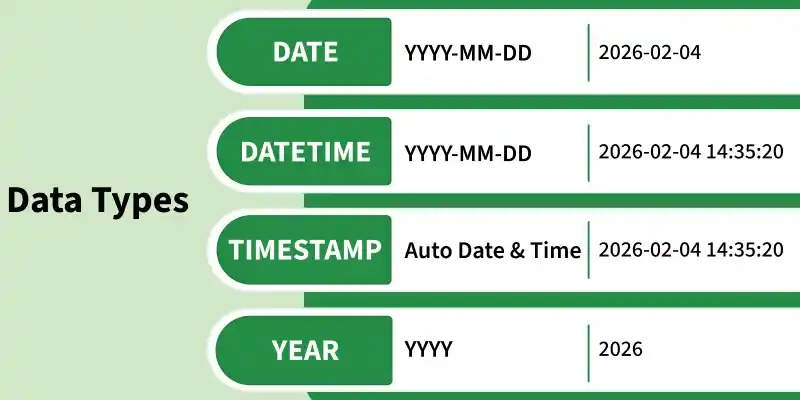
- DATE is used to store days like a person’s birthday or order date.
- DATETIME is used when you need both the day and the exact time.
- TIMESTAMP is used to keep track of when data was added or updated.
- YEAR is used to store only the year, such as 2026 or 2025.
Functions
Now, let's dive into the MySQL date functions that you can use to manipulate and query date and time data effectively.
1. NOW()
The NOW() function retrieves the current date and time in YYYY-MM-DD HH:MI:SS format.
Query:
SELECT NOW();Output:

2. CURDATE()
If we only need the current date without the time portion, we can use CURDATE(), which returns the date in YYYY-MM-DD format.
Query:
SELECT CURDATE();Output:

3. CURTIME()
The CURTIME() function returns the current time in HH:MI:SS format, excluding the date.
Query:
SELECT CURTIME();Output:

4. DATE()
The DATE() function extracts only the date part from a DATETIME or TIMESTAMP value, discarding the time.
Example: Create a table name Test :

Query:
SELECT Name, DATE(BirthTime)
AS BirthDate FROM Test;
Output:

5. EXTRACT()
The EXTRACT() function is used to retrieve a specific part of a date or datetime value, making date-based analysis and comparisons easier.
- Extracts individual date/time units such as YEAR, MONTH, DAY, HOUR, and MINUTE.
- Supports units like MICROSECOND, SECOND, WEEK, and QUARTER.
- Commonly used for filtering, grouping, and analyzing date-related data.
Syntax:
EXTRACT(unit FROM date);Query: To Extract Day
SELECT Name, Extract(DAY FROM
BirthTime) AS BirthDay FROM Test;
Output:

Query: To Extract Year
SELECT Name, Extract(YEAR FROM BirthTime)
AS BirthYear FROM Test;
Output:

Query: To Extract Seconds
SELECT Name, Extract(SECOND FROM
BirthTime) AS BirthSecond FROM Test;
Output:

6. DATE_ADD()
The DATE_ADD() function allows you to add time intervals (e.g., days, months, years) to a date or DATETIME value.
Syntax:
DATE_ADD(date, INTERVAL expr type);Example: For the below table named 'Test'

Query: To Add 1 Year to a Date
SELECT Name, DATE_ADD(BirthTime, INTERVAL
1 YEAR) AS BirthTimeModified FROM Test;
Output:

Query: To Add 30 days to a Date
SELECT Name, DATE_ADD(BirthTime,
INTERVAL 30 DAY) AS BirthDayModified FROM Test;
Output:

Query: To Add 4 Hours to a Date
SELECT Name, DATE_ADD(BirthTime, INTERVAL
 4 HOUR) AS BirthHourModified FROM Test;
Output:

7. DATEDIFF()
This Function returns the number of days between two dates.
Syntax:
DATEDIFF(interval,date1, date2);Query: To Find the Difference Between Two Dates
SELECT DATEDIFF(day, '2017-01-13', '2017-01-03') AS DateDiff;Output:

8. DATE_FORMAT()
DATE_FORMAT() allows us to format a DATE, DATETIME, or TIMESTAMP value into a custom format using placeholders.
Syntax:
DATE_FORMAT(date,format);the date is a valid date and the format specifies the output format for the date/time. The formats that can be used are:
- %a : Abbreviated weekday name (Sun-Sat)
- %b: Abbreviated month name (Jan-Dec)
- %c : Month, numeric (0-12)
- %D : Day of month with English suffix (0th, 1st, 2nd, 3rd)
- %d : Day of the month, numeric (00-31)
- %e : Day of the month, numeric (0-31)
- %f : Microseconds (000000-999999)
- %H : Hour (00-23)
- %h : Hour (01-12)
- %I :Hour (01-12)
- %i : Minutes, numeric (00-59)
- %j : Day of the year (001-366)
- %k : Hour (0-23)
- %l :Hour (1-12)
- %M: Month name (January-December)
- %m: Month, numeric (00-12)
- %p: AM or PM
- %r : Time, 12-hour (hh:mm: ss followed by AM or PM)
- %S: Seconds (00-59)
- %s: Seconds (00-59)
- %T: Time, 24-hour (hh:mm: ss)
- %U: Week (00-53) where Sunday is the first day of the week
- %u: Week (00-53) where Monday is the first day of the week
- %V: Week (01-53) where Sunday is the first day of the week, used with %X
- %v: Week (01-53) where Monday is the first day of the week, used with %x
- %W: Weekday name (Sunday-Saturday)
- %w: Day of the week (0=Sunday, 6=Saturday)
- %X: Year for the week where Sunday is the first day of the week, four digits, used with %V
- %x: Year for the week where Monday is the first day of the week, four digits, used with %v
- %Y: Year, numeric, four digits
- %y: Year, numeric, two digits
Query: To Format a Date
SELECT DATE_FORMAT('2025-04-10 12:34:56', '%W, %M %d, %Y') AS formatted_date;Output:

Date & Time Best Practices in MySQL
Follow best practices when working with date and time in MySQL to ensure accurate data storage, efficient querying, and consistent handling across different time zones and applications.
- Use proper date format: Always use YYYY-MM-DD or YYYY-MM-DD HH:MM:SS while inserting or updating dates so MySQL reads them correctly.
- Use TIMESTAMP for time-zones: TIMESTAMP stores timezone-based values, while DATETIME does not.
- Filter date ranges correctly: Use BETWEEN in the WHERE clause to get records from a specific period. Example:
SELECT * FROM orders
WHERE order_date BETWEEN '2025-01-01' AND '2025-01-31';
- Avoid functions in WHERE clause: Using NOW() or CURDATE() in WHERE slows queries. Use fixed date values for better performance.