
The Connection interface in Java JDBC represents a session between a Java application and a database. It is used to establish communication, execute SQL queries, and manage transactions. It acts as a bridge that enables interaction with the database.
- Used to establish a connection with the database
- Acts as a bridge between Java application and database
- Supports transaction management (commit, rollback)
- Provides methods to create statement objects
Architecture Flow
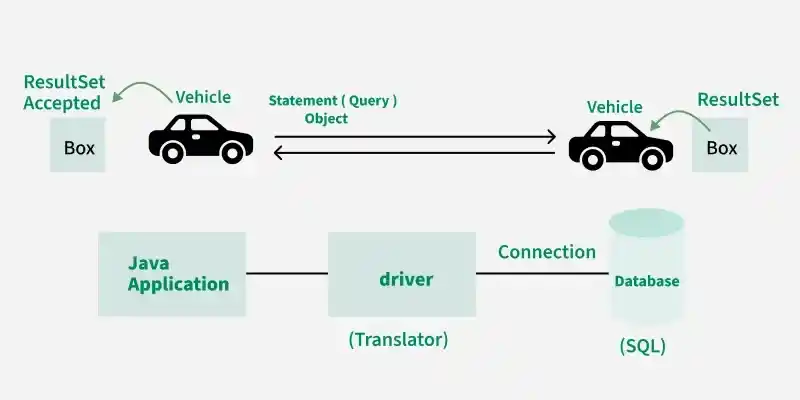
This diagram illustrates how a Java application interacts with a database using JDBC components:
- The Java Application sends a SQL query using a Statement object
- The JDBC Driver acts as a translator and converts Java calls into database-specific commands
- The Connection establishes a link between the application and the database
- The Database executes the SQL query and returns the result
- The result is stored in a ResultSet, which is then sent back to the application
How to Obtain a Connection?
A Connection object is created using the DriverManager class:
Connection con = DriverManager.getConnection(url, username, password);
Important Methods of Connection Interface
1. createStatement(): Creates a Statement object to execute SQL queries.
Statement stmt = con.createStatement();
2. prepareStatement(String sql): Creates a PreparedStatement for parameterized queries.
PreparedStatement ps = con.prepareStatement("SELECT * FROM student WHERE id = ?");
3. prepareCall(String sql): Creates a CallableStatement for stored procedures.
CallableStatement cs = con.prepareCall("{call procedure_name()}");
4. setAutoCommit(boolean status): Controls auto-commit mode.
con.setAutoCommit(false);
5. commit(): Saves the transaction permanently.
con.commit();
6. rollback(): Reverts changes in case of failure.
con.rollback();
7. close(): Closes the database connection.
con.close();
Example Code:
import java.sql.Connection;
import java.sql.DriverManager;

class ConnectionDemo {
    public static void main(String[] args) {
        try {
            Connection con = DriverManager.getConnection(
                "jdbc:mysql://localhost:3306/test",
                "root",
                "password"
            );

            System.out.println("Connection Established Successfully!");

            con.close();
        } catch (Exception e) {
            e.printStackTrace();
        }
    }
}
Working of Connection Interface
- The Java application sends a request (SQL query)
- The Connection establishes a link with the database
- The JDBC driver translates the request
- The database processes the query
- The result is returned to the application