
In object-oriented programming, object copying refers to creating a new object using an existing object’s data. In Java, this is commonly done using constructors, the clone() method, or custom logic, and is closely related to cloning and reference handling.
Based on how data is copied, object copying is classified into:
1. Shallow Copy
A shallow copy creates a new object but does not duplicate referenced objects; instead, it copies their references. As a result, both the original and copied objects point to the same memory location for reference fields.
- Default behavior of the Object.clone() method.
- Primitive fields are copied, while reference fields are shared.
- Fast and memory-efficient since no deep object creation occurs.
- Risk of unintended side effects due to shared references.
- Changes made through one object are reflected in all copies sharing the reference.
import java.util.Arrays;

class Ex {
    private int[] data;
    // Shallow copy
    public Ex(int[] values) {
        this.data = values;
    }
    public void showData() {
        System.out.println(Arrays.toString(data));
    }
}
Explanation:
- In the constructor Ex(int[] values), the statement this.data = values; assigns the same array reference to data.
- No new array is created, so both data and vals point to the same memory location.
- When vals[0] is modified in UsesEx, the change is reflected in data, producing the updated output.
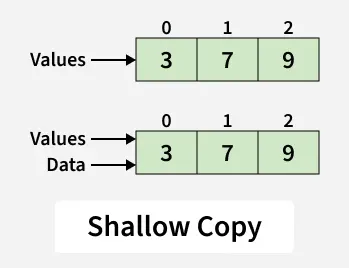
This can lead to unpleasant side effects if the elements of values are changed via some other reference.
class UsesEx {
    public static void main(String[] args) {
        int[] vals = {3, 7, 9};
        Ex e = new Ex(vals);

        e.showData();   // [3, 7, 9]

        vals[0] = 13;
        e.showData();   // [13, 7, 9]
    }
}
Output:
[3, 7, 9]
[13, 7, 9]
Explanation: Both vals and data refer to the same array. Any modification through one reference affects the other.
2. Deep Copy
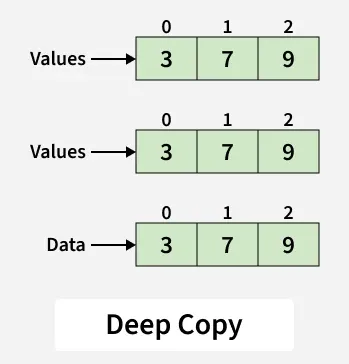
A deep copy creates a new object along with separate copies of all referenced objects, ensuring complete independence between the original and copied objects. Any change made to one object does not affect the other.
- Achieved by writing custom copying logic.
- When cloning is used, all referenced objects must also be cloned.
- Provides a safe and fully independent copy of the object.
- Requires higher memory usage compared to shallow copy.
- More complex to implement due to recursive copying of references.
import java.util.Arrays;

class Ex {
    private int[] data;

    // Deep copy
    public Ex(int[] values) {
        data = new int[values.length];
        for (int i = 0; i < values.length; i++) {
            data[i] = values[i];
        }
    }
    public void showData() {
        System.out.println(Arrays.toString(data));
    }
}
Explanation:
- Inside the constructor, a new array is created using new int[values.length].
- A for loop copies each element from values into the new data array.
- Modifying vals[0] in UsesEx does not affect data because both arrays refer to different memory locations.
class UsesEx {
    public static void main(String[] args) {
        int[] vals = {3, 7, 9};
        Ex e = new Ex(vals);

        e.showData();   // [3, 7, 9]
        vals[0] = 13;
        e.showData();   // [3, 7, 9]
    }
}
Output:
[3, 7, 9]
[3, 7, 9]
Explanation: A new array is created and values are copied individually. Changes to vals do not affect data.
3. Lazy Copy
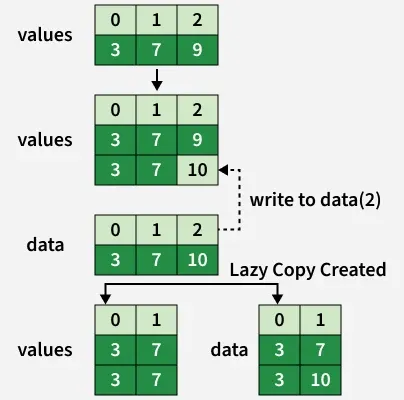
Lazy copy is a hybrid approach of shallow copy and deep copy. Initially, multiple objects share the same data using a shallow copy. A deep copy is created only when a write operation is performed on any one of the objects. This technique is also known as copy-on-write.
- Uses shallow copy during object creation
- Maintains a reference count for shared data
- Performs deep copy only when modification is required
class SharedData {
    int[] data;
    int refCount;

    SharedData(int[] values) {
        data = values;
        refCount = 1;
    }
}
class LazyCopy {
    private SharedData shared;

    // Constructor
    LazyCopy(int[] values) {
        shared = new SharedData(values);
    }

    // Shallow copy
    LazyCopy(LazyCopy other) {
        this.shared = other.shared;
        this.shared.refCount++;
    }
    // Copy-on-write
    void setValue(int index, int value) {
        if (shared.refCount > 1) {
            shared.refCount--;
            shared = new SharedData(shared.data.clone());
        }
        shared.data[index] = value;
    }
    void showData() {
        for (int x : shared.data) {
            System.out.print(x + " ");
        }
        System.out.println();
    }
}
Explanation:
- In the copy constructor LazyCopy(LazyCopy other), the shared reference is copied and refCount is incremented.
- When setValue() is called, the condition shared.refCount > 1 triggers creation of a new copy using shared.data.clone().
- The modification is applied only to the new copy, so obj1 remains unchanged while obj2 reflects the update.
public class Main {
    public static void main(String[] args) {
        int[] values = {3, 7, 9};

        LazyCopy obj1 = new LazyCopy(values);
        LazyCopy obj2 = new LazyCopy(obj1);

        obj2.setValue(2, 10);
        obj1.showData(); // 3 7 9
        obj2.showData(); // 3 7 10
    }
}
Output:
3 7 9
3 7 10
Explanation:
- obj1 and obj2 initially share the same data
- On modification, obj2 creates its own copy
- Changes do not affect the original object
When to Use Which?
Scenario | Recommended Copy |
|---|---|
Only primitive fields | Shallow Copy |
Mutable reference fields | Deep Copy |
Performance-critical systems | Lazy Copy |
Immutable objects | Shallow Copy |
Note:
- Shallow copy is faster but unsafe for mutable objects
- Deep copy ensures isolation but costs memory
- Lazy copy balances performance and safety