
HashSet in Java implements the Set interface of the Collections Framework. It is used to store the unique elements, and it doesn't maintain any specific order of elements.
- HashSet does not allow duplicate elements.
- Uses HashMap internally which is an implementation of hash table data structure.
- Also implements Serializable and Cloneable interfaces.
- HashSet is not thread-safe. To make it thread-safe, synchronization is needed externally.
- Does not support primitive types directly; requires wrapper classes (Integer, Character, etc.).
import java.util.*;

class GFG
{
    public static void main(String[] args)
    {
        // Instantiate an object of HashSet
        HashSet<Integer> hs = new HashSet<>();

      	// Adding elements
        hs.add(1);
        hs.add(2);
        hs.add(1);

        System.out.println("HashSet Size: " + hs.size());
        System.out.println("Elements in HashSet: " + hs);
    }
}
Output
HashSet Size: 2
Elements in HashSet: [1, 2]
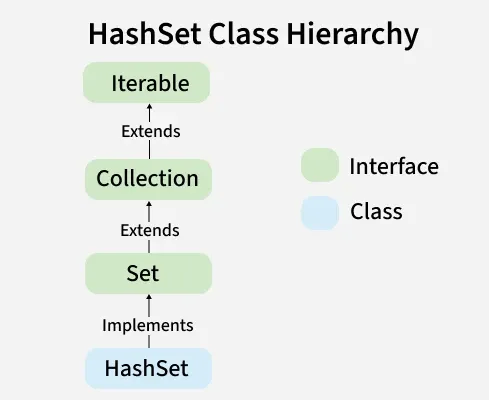
Hierarchy Diagram of HashSet
It implements the Set interface, which is a sub-interface of the Collection interface.
Capacity of HashSet
Capacity refers to the number of buckets in the hash table. The default capacity of a HashSet is 16 and the load factor is 0.75.
When the number of elements exceeds the threshold, the capacity automatically increases
new capacity = old capacity × 2
Collision in HashSet
HashSet internally uses a hash table (via HashMap), where elements are stored based on their hash codes. Sometimes, different elements may produce the same hash code, leading to a collision.
Note: HashSet handles collisions using chaining (LinkedList) and converts it into a balanced tree (Red-Black Tree) when the number of elements in a bucket exceeds a threshold (Java 8+).
Load Factor
Load Factor is a measure that controls how full the HashSet can get before resizing. Default Load Factor = 0.75. If the number of elements exceeds the threshold, the capacity is doubled.
Threshold = capacity × load factor
Constructors of HashSet class
To create a HashSet, we need to create an object of the HashSet class. The HashSet class consists of various constructors that allow the possible creation of the HashSet. The following are the constructors available in this class.
1. HashSet()
Creates a new empty HashSet with default capacity (16) and load factor (0.75).
HashSet<String> set = new HashSet<>();
2. HashSet(int initialCapacity)
Creates an empty HashSet with the specified initial capacity and default load factor (0.75).
HashSet<Type> set = new HashSet<>(int initialCapacity);
3. HashSet(int initialCapacity, float loadFactor)
Creates an empty HashSet with the given initial capacity and load factor.
HashSet<Type> set = new HashSet<>(int initialCapacity, float loadFactor);
4. HashSet(Collection<? extends E> c)
Creates a new HashSet containing the elements of the specified collection (removes duplicates automatically).
HashSet<Type> set = new HashSet<>(c);
Performing Various Operations on HashSet
Let’s see how to perform a few frequently used operations on the HashSet.
1. Adding Elements in HashSet
To add an element to the HashSet, we can use the add() method. However, the insertion order is not retained in the HashSet. We need to keep a note that duplicate elements are not allowed and all duplicate elements are ignored.
import java.util.*;

class GFG
{
    public static void main(String[] args)
    {
        // Creating an empty HashSet of string entities
        HashSet<String> hs = new HashSet<String>();

        // Adding elements using add() method
        hs.add("Geek");
        hs.add("For");
        hs.add("Geeks");

        System.out.println("HashSet : " + hs);
    }
}
Output
HashSet : [Geek, For, Geeks]
2. Removing Elements in HashSet
The values can be removed from the HashSet using the remove() method.
import java.util.*;

class GFG
{
    public static void main(String[] args)
    {

        HashSet<String> hs = new HashSet<String>();

        // Adding elements to above Set using add() method
        hs.add("Geek");
        hs.add("For");
        hs.add("Geeks");
        hs.add("A");
        hs.add("B");
        hs.add("Z");

        System.out.println("HashSet : " + hs);

        // Removing the element B
        hs.remove("B");

        // Printing the updated HashSet elements
        System.out.println("HashSet after removing element : " + hs);

        // Returns false if the element is not present
        System.out.println("B exists in Set : " + hs.remove("B"));
    }
}
Output
HashSet : [A, B, Geek, For, Geeks, Z]
HashSet after removing element [A, Geek, For, Geeks, Z]
B exists in Set : false
3. Iterating through the HashSet
Iterate through the elements of HashSet using the iterator() method. Also, the most famous one is to use the enhanced for loop.
import java.util.HashSet;
import java.util.Iterator;

public class GFG
{
    public static void main(String[] args)
    {
        // Create a HashSet of Strings
        HashSet<String> hs = new HashSet<>();

        // Add elements to the HashSet
        hs.add("A");
        hs.add("B");
        hs.add("Geeks");
        hs.add("For");
        hs.add("Geeks");
        hs.add("Z");

        // Using iterator() method to iterate Over the HashSet
        System.out.print("Using iterator : ");
        Iterator<String> iterator = hs.iterator();

      	// Traversing HashSet
        while (iterator.hasNext())
            System.out.print(iterator.next() + ", ");

        System.out.println();

        // Using enhanced for loop to iterate Over the HashSet
        System.out.print("Using enhanced for loop : ");
        for (String element : hs)
            System.out.print(element + " , ");
    }
}
Output
Using iterator : A, B, Geeks, For, Z,
Using enhanced for loop : A , B , Geeks , For , Z ,
Methods of HashSet
Method | Description |
|---|---|
| add(E e) | Used to add the specified element if it is not present, if it is present then return false. |
| clear() | Used to remove all the elements from the set. |
| contains(Object o) | Used to return true if an element is present in a set. |
| remove(Object o) | Used to remove the element if it is present in set. |
| iterator() | Used to return an iterator over the element in the set. |
| isEmpty() | Used to check whether the set is empty or not. Returns true for empty and false for a non-empty condition for set. |
| size() | Used to return the size of the set. |
| clone() | Used to create a shallow copy of the set. |
Differences between HashSet and HashMap.
Basis | HashSet | HashMap |
|---|---|---|
| Implementation | HashSet implements a Set interface. | HashMap implements a Map interface. |
| Duplicates | HashSet doesn't allow duplicate values. | HashMap stores key-value pairs and doesn’t allow duplicate keys. A duplicate key replaces the old value. |
| Number of objects during storing objects | HashSet requires only one object add(Object o). | HashMap requires two objects put(K key, V Value) to add an element to the HashMap object. |
| internal working | Uses HashMap internally (stores elements as keys with dummy values) | Uses hashing mechanism to store key-value pairs |
| Performance | Almost same as HashMap (uses HashMap internally) | Almost same as HashSet (based on hashing) |
| Insertion | HashSet uses the add() method for adding or storing data. | HashMap uses the put() method for storing data. |