
The hasNext() method is provided by both the Iterator and ListIterator interfaces in Java. It is used to check whether the iteration has more elements before calling the next() method.
Syntax
public boolean hasNext()
Return type: boolean
Return value:
- true -> if the iteration has more elements.
- false -> if no elements remain in the collection.
Exception: This method does not throw any exception; it simply checks the availability of the next element.
Example 1: Using hasNext() in Iterator
import java.util.*;

public class GFG{

    public static void main(String[] args){

        List<String> fruits = Arrays.asList("Apple", "Banana", "Cherry");

        Iterator<String> iterator = fruits.iterator();

        // checks if element exists
        while (iterator.hasNext()) {
            // fetches next element
            String fruit = iterator.next();
            System.out.println(fruit);
        }
    }
}
Output
Apple
Banana
Cherry
Explanation
- The iterator() method returns an Iterator for the list.
- The hasNext() method checks if another element exists in the collection.
- As long as it returns true, the loop continues.
- The next() method retrieves the element and advances the cursor.
Example 2: Using hasNext() in ListIterator
import java.util.*;

public class GFG{

    public static void main(String[] args){

        List<String> animals = Arrays.asList("Dog", "Cat", "Elephant");
        ListIterator<String> listItr = animals.listIterator();

        System.out.println("Forward Traversal:");
        while (listItr.hasNext()) {
            System.out.println(listItr.next());
        }
    }
}
Output
Forward Traversal:
Dog
Cat
Elephant
Explanation
- The listIterator() method returns a ListIterator for the list.
- The hasNext() method checks if the list has another element in the forward direction.
- The loop runs until hasNext() returns false.
- Each call to next() retrieves the next element and moves the cursor forward.
Working of hasNext() Method
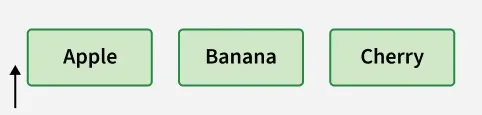
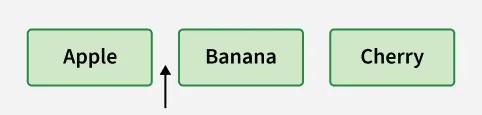
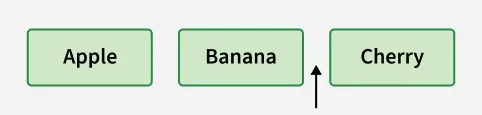
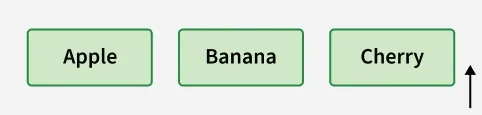
The Iterator cursor lies between elements, not directly on them. The hasNext() method checks if an element exists after the cursor before proceeding. To understand how hasNext() works, let’s take a list containing “Apple”, “Banana”, and “Cherry”.
Step 1: Before Iteration
- The cursor lies before the first element.
- hasNext() -> Return true (since the next element exists).
- Calling next() returns "Apple" and moves the cursor after Apple.
Step 2: After Fetching “Apple”
- Cursor lies between Apple and Banana.
- hasNext() -> Return true (since another element exists).
- Calling next() returns "Banana" and moves the cursor after Banana.
Step 3: After Fetching “Banana”
- Cursor lies between Banana and Cherry.
- hasNext() -> Return true (since another element exists).
- Calling next() returns "Cherry" and moves the cursor after Cherry.
Step 4: After Fetching “Cherry”
- Cursor now lies after the last element.
- hasNext() -> Return false (no more elements exist).
- Iteration ends because all elements have been traversed.
Iterator.hasNext() vs ListIterator.hasNext()
| Feature | Iterator.hasNext() | ListIterator.hasNext() |
|---|---|---|
| Direction | Checks for next element in forward direction | Checks for next element in forward direction |
| Interface | Iterator | ListIterator |
| Applicable To | All collections | Only list-based collections |
| Backward Support | Not supported | Supported using hasPrevious() |