Canvas class is a part of Java AWT. Canvas is a blank rectangular area where the user can draw or trap input from the user. Canvas class inherits the Component class.
Constructor of the Canvas class are :
- Canvas(): Creates a new blank canvas.
- Canvas(GraphicsConfiguration c): Creates a new canvas with a specified graphics configuration.
Commonly used Methods in Canvas Class
| Method | Explanation |
|---|---|
| addNotify() | Creates the peer of the canvas. |
| createBufferStrategy(int n) | Creates a new strategy for multi-buffering on this component. |
| createBufferStrategy(int n, BufferCapabilities c) | Creates a new strategy for multi-buffering on this component with the required buffer capabilities |
| getBufferStrategy() | Returns the BufferStrategy used by this component. |
| paint(Graphics g) | paints this component. |
| update(Graphics g) | updates this canvas. |
Below programs illustrate the use of Canvas Class :
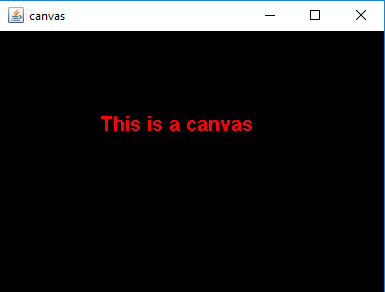
Program 1: To create a canvas and paint the canvas.
// Java Program to create a to create
// a canvas and paint the canvas
import java.awt.*;
import javax.swing.*;
class canvas extends JFrame {

    // constructor
    canvas()
    {
        super("canvas");

        // create a empty canvas
        Canvas c = new Canvas() {

            // paint the canvas
            public void paint(Graphics g)
            {
                // set color to red
                g.setColor(Color.red);

                // set Font
                g.setFont(new Font("Bold", 1, 20));

                // draw a string
                g.drawString("This is a canvas", 100, 100);
            }
        };

        // set background
        c.setBackground(Color.black);

        add(c);
        setSize(400, 300);
        show();
    }

    // Main Method
    public static void main(String args[])
    {
        canvas c = new canvas();
    }
}
Output:
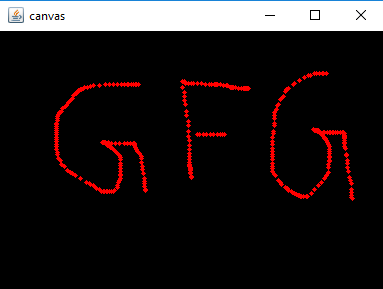
- Program 2: To create a canvas and add mouse listener to the canvas(a circle of radius 5 will appear at the points where mouse are clicked or dragged on the canvas).
// Java Program to create a
// canvas and mouse listener to the
// canvas ( a circle of radius 5 will appear
// at the points where mouse are clicked or
//  dragged on the canvas)
import java.awt.*;
import javax.swing.*;
import java.awt.event.*;

class canvas extends JFrame implements MouseListener, MouseMotionListener {

    // create a canvas
    Canvas c;

    // constructor
    canvas()
    {
        super("canvas");

        // create a empty canvas
        c = new Canvas() {
            public void paint(Graphics g)
            {
            }
        };

        // set background
        c.setBackground(Color.black);

        // add mouse listener
        c.addMouseListener(this);
        c.addMouseMotionListener(this);

        add(c);
        setSize(400, 300);
        show();
    }

    // mouse listener  and mouse motion listener methods
    public void mouseClicked(MouseEvent e)
    {
        Graphics g = c.getGraphics();

        g.setColor(Color.red);

        // get X and y position
        int x, y;
        x = e.getX();
        y = e.getY();

        // draw a Oval at the point
        // where mouse is moved
        g.fillOval(x, y, 5, 5);
    }

    public void mouseMoved(MouseEvent e)
    {
    }

    public void mouseDragged(MouseEvent e)
    {
        Graphics g = c.getGraphics();

        g.setColor(Color.red);

        // get X and y position
        int x, y;
        x = e.getX();
        y = e.getY();

        // draw a Oval at the point where mouse is moved
        g.fillOval(x, y, 5, 5);
    }

    public void mouseExited(MouseEvent e)
    {
    }

    public void mouseEntered(MouseEvent e)
    {
    }

    public void mouseReleased(MouseEvent e)
    {
    }

    public void mousePressed(MouseEvent e)
    {
    }
    // main class
    public static void main(String args[])
    {
        canvas c = new canvas();
    }
}