
Spring Boot is a popular Java framework used to build stand-alone and production-ready applications quickly.Spring Boot Kafka Consumer is used to receive and process messages from Apache Kafka topics within a Spring Boot application. It enables applications to listen to Kafka topics and handle real-time data efficiently. Using Spring Kafka, developers can easily integrate Kafka consumers with minimal configuration.
- Processes messages instantly.
- Handles large message volumes.
Apache Kafka
Apache Kafka is a distributed publish–subscribe messaging system used to send and receive messages between applications, servers, and processes. It allows applications to exchange data through topics, enabling real-time data streaming and event-driven communication.
- Topic-Based Messaging : Messages are organized and sent through Kafka topics.
- Application Communication : Enables data exchange between different applications and services.
- Real-Time Processing :Supports fast and efficient real-time data streaming.
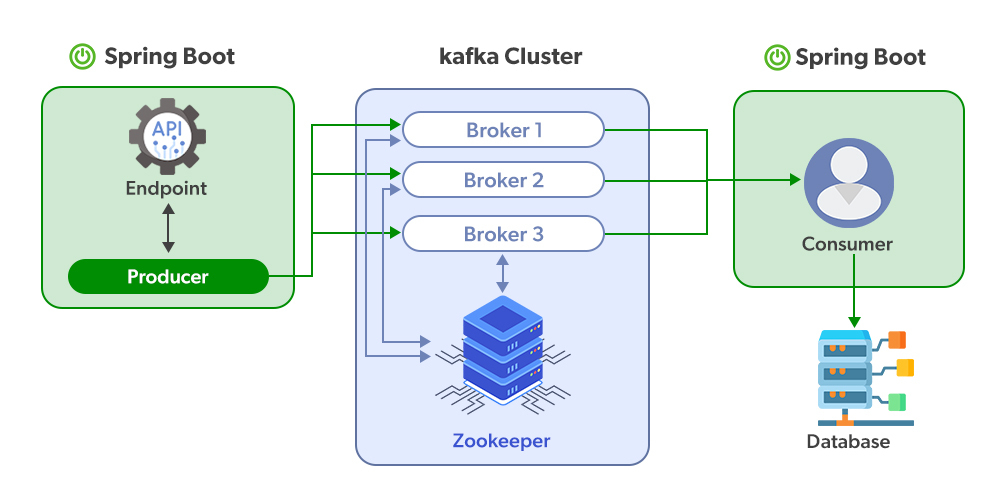
Prerequisite: Make sure you have installed Apache Kafka in your local machine for which one should know How to Install and Run Apache Kafka on Windows?
Steps for Implementation of Spring Boot Kafka Consumer
Step 1: Create Spring Boot Project
- Go to Spring Initializr and create a new Spring Boot project.
- Add the dependency Spring for Apache Kafka.
- Download and open the project in your IDE.

Step 2: Create Kafka Configuration Class
- Create a configuration file named KafkaConfig.java.
- Configure Kafka consumer properties such as bootstrap server, group ID, and deserializers.
- Define ConsumerFactory and Kafka Listener Container Factory.
package com.amiya.kafka.apachekafkaconsumer.config;

// Importing required classes
import java.util.HashMap;
import java.util.Map;
import org.apache.kafka.clients.consumer.ConsumerConfig;
import org.apache.kafka.common.serialization.StringDeserializer;
import org.springframework.context.annotation.Bean;
import org.springframework.context.annotation.Configuration;
import org.springframework.kafka.annotation.EnableKafka;
import org.springframework.kafka.config.ConcurrentKafkaListenerContainerFactory;
import org.springframework.kafka.core.ConsumerFactory;
import org.springframework.kafka.core.DefaultKafkaConsumerFactory;

// Annotations
@EnableKafka
@Configuration

// Class
public class KafkaConfig {

    @Bean
    public ConsumerFactory<String, String> consumerFactory()
    {

        // Creating a Map of string-object pairs
        Map<String, Object> config = new HashMap<>();

        // Adding the Configuration
        config.put(ConsumerConfig.BOOTSTRAP_SERVERS_CONFIG,
                   "127.0.0.1:9092");
        config.put(ConsumerConfig.GROUP_ID_CONFIG,
                   "group_id");
        config.put(
            ConsumerConfig.KEY_DESERIALIZER_CLASS_CONFIG,
            StringDeserializer.class);
        config.put(
            ConsumerConfig.VALUE_DESERIALIZER_CLASS_CONFIG,
            StringDeserializer.class);

        return new DefaultKafkaConsumerFactory<>(config);
    }

    // Creating a Listener
    public ConcurrentKafkaListenerContainerFactory
    concurrentKafkaListenerContainerFactory()
    {
        ConcurrentKafkaListenerContainerFactory<
            String, String> factory
            = new ConcurrentKafkaListenerContainerFactory<>();
        factory.setConsumerFactory(consumerFactory());
        return factory;
    }
}
Step 3: Create Kafka Consumer Class
- Create a class named KafkaConsumer.java.
- Use the @KafkaListener annotation to listen to messages from a Kafka topic.
- Print the received messages in the console.
package com.amiya.kafka.apachekafkaconsumer.consumer;

// Importing required classes
import org.springframework.kafka.annotation.KafkaListener;
import org.springframework.stereotype.Component;

@Component

// Class
public class KafkaConsumer {

    @KafkaListener(topics = "NewTopic",
                   groupId = "group_id")

    // Method
    public void
    consume(String message)
    {
        // Print statement
        System.out.println("message = " + message);
    }
}
Step 4: Start Required Kafka Services
- Start the Apache Zookeeper Server using the command:
C:\kafka>.\bin\windows\zookeeper-server-start.bat .\config\zookeeper.properties
Start the Apache Kafka Server using the command:
C:\kafka>.\bin\windows\kafka-server-start.bat .\config\server.properties
Send messages to the Kafka topic using the console producer:
C:\kafka>.\bin\windows\kafka-console-producer.bat --broker-list localhost:9092 --topic NewTopic
Step 5: Run the Spring Boot Application
- Open the application.properties file and set the server port:
server.port=8081
Let's run the Spring boot application inside the ApacheKafkaConsumerApplication file

Output: In the output, you can see when you are sending the message from Kafka Topics it is displayed on the console in real-time.
