
Java provides primitive data types with fixed memory sizes, and when assigning values between them, compatible types are converted automatically, while incompatible types require explicit casting.
- Java has 8 primitive data types, each with a fixed memory size.
- Automatic type conversion happens when assigning a smaller type to a larger type (e.g., int -> long).
- Explicit type casting is required when converting a larger type to a smaller type (e.g., double -> int).
- Automatic conversion is safe, while explicit casting may cause data loss.
Data Types and Their Memory Allocation
| Datatype | Bits Acquired In Memory |
|---|---|
| boolean | size - JVM Dependent |
| byte | 8 (1 byte) |
| char | 16 (2 bytes) |
| short | 16(2 bytes) |
| int | 32 (4 bytes) |
| long | 64 (8 bytes) |
| float | 32 (4 bytes) |
| double | 64 (8 bytes) |
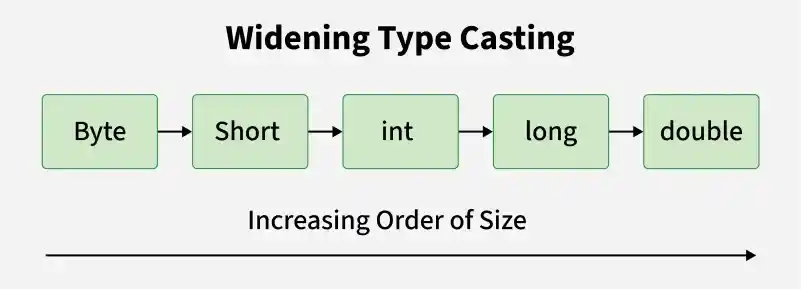
Widening or Automatic Type Conversion
Widening conversion takes place when two data types are automatically converted. This happens when:
- The two data types are compatible.
- When we assign a value of a smaller data type to a bigger data type.
For Example, in java, the numeric data types are compatible with each other but no automatic conversion is supported from numeric type to char or boolean. Also, char and boolean are not compatible with each other.
 class GFG {

    // Main driver method
    public static void main(String[] args)
    {
        int i = 100;

        // Automatic type conversion
        // Integer to long type
        long l = i;

        // Automatic type conversion
        // long to float type
        float f = l;

        // Print and display commands
        System.out.println("Int value " + i);
        System.out.println("Long value " + l);
        System.out.println("Float value " + f);
    }
}
Output
Int value 100
Long value 100
Float value 100.0
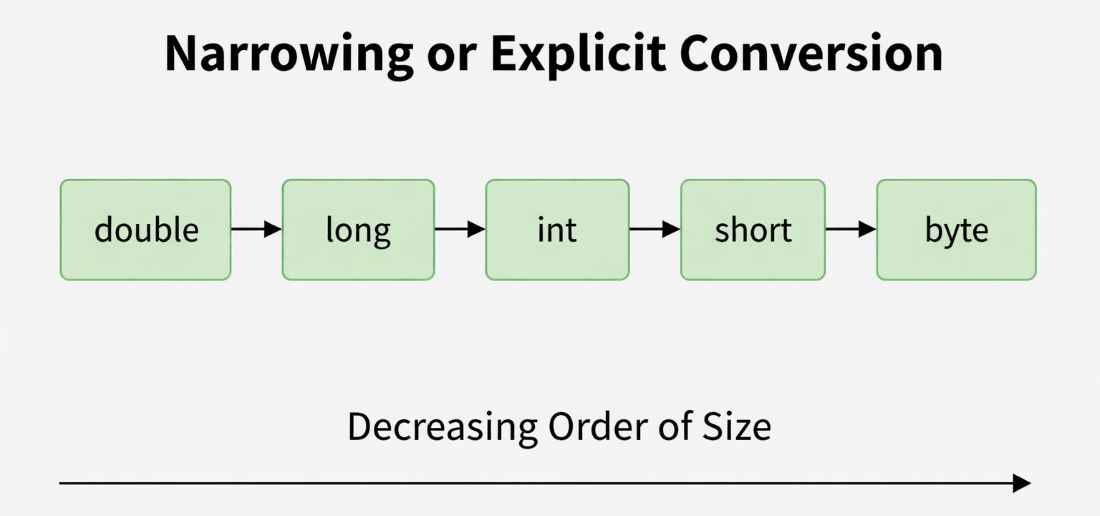
Narrowing or Explicit Conversion
If we want to assign a value of a larger data type to a smaller data type we perform explicit type casting or narrowing.
- This is useful for incompatible data types where automatic conversion cannot be done.
- Here, the target type specifies the desired type to convert the specified value to.
char and number are not compatible with each other. Let's see when we try to convert one into another.
public class GFG {

    // Main driver method
    public static void main(String[] argv)
    {

        // Declaring character variable
        char ch = 'c';
        // Declaringinteger variable
        int num = 88;
        // Trying to insert integer to character
        ch = num;
    }
}
Output: An error will be generated
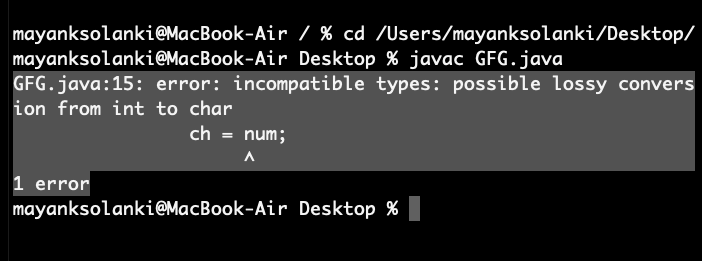
How To Solve The Error:
This error occurs because Java does not allow implicit narrowing conversion from int to char, even if the value can fit. To assign an int to a char, explicit casting is required:
char ch = (char) num; // Now valid
How to do Explicit Conversion?
public class GFG {

    // Main driver method
    public static void main(String[] args)
    {

        // Double datatype
        double d = 100.04;

        // Explicit type casting by forcefully getting
        // data from long datatype to integer type
        long l = (long)d;

        // Explicit type casting
        int i = (int)l;

        // Print statements
        System.out.println("Double value " + d);

        // While printing we will see that
        // fractional part lost
        System.out.println("Long value " + l);

        // While printing we will see that
        // fractional part lost
        System.out.println("Int value " + i);
    }
}
Output
Double value 100.04
Long value 100
Int value 100
Note: While assigning value to byte type the fractional part is lost and is reduced to modulo 256(range of byte).
class GFG {

    // Main driver method
    public static void main(String args[])
    {
        // Declaring byte variable
        byte b;

        // Declaring and initializing integer and double
        int i = 257;
        double d = 323.142;

        // Display message
        System.out.println("Conversion of int to byte.");

        // i % 256
        b = (byte)i;

        // Print commands
        System.out.println("i = " + i + " b = " + b);
        System.out.println(
            "\nConversion of double to byte.");

        // d % 256
        b = (byte)d;

        // Print commands
        System.out.println("d = " + d + " b= " + b);
    }
}
Output
Conversion of int to byte.
i = 257 b = 1

Conversion of double to byte.
d = 323.142 b= 67
Type Promotion in Expressions
While evaluating expressions, the intermediate value may exceed the range of operands and hence the expression value will be promoted. Some conditions for type promotion are:
- Java automatically promotes each byte, short, or char operand to int when evaluating an expression.
- If one operand is long, float or double the whole expression is promoted to long, float, or double respectively.
class GFG {

    // Main driver method
    public static void main(String args[])
    {

        // Declaring and initializing primitive types
        byte b = 42;
        char c = 'a';
        short s = 1024;
        int i = 50000;
        float f = 5.67f;
        double d = .1234;

        // The Expression
        double result = (f * b) + (i / c) - (d * s);

        // Printing the result obtained after
        // all the promotions are done
        System.out.println("result = " + result);
    }
}
Output
result = 626.7784146484375
Explicit Type Casting in Expressions
While evaluating expressions, the result is automatically updated to a larger data type of the operand. But if we store that result in any smaller data type it generates a compile-time error, due to which we need to typecast the result.
class GFG {

    // Main driver method
    public static void main(String args[])
    {

        // Declaring byte array
        byte b = 50;

        // Type casting int to byte
        b = (byte)(b * 2);

        // Display value in byte
        System.out.println(b);
    }
}
Output
100
Note: In case of single operands the result gets converted to int and then it is typecast accordingly, as in the above example.
Difference Between Explicit and Implicit Conversion
The below table demonstrates the key difference between Explicit and Implicit Conversion
Aspect | Implicit Conversion | Explicit Conversion |
|---|---|---|
Syntax | No additional syntax required. | Requires explicit type casting (e.g., (int)). |
Data Compatibility | Only works with compatible types (e.g., numeric). | Works with both compatible and incompatible types. |
Risk of Data Loss | No risk of data loss. | May result in data loss (e.g., truncation). |
Direction | Smaller type to larger type. | Larger type to smaller type. |
Note:
- Use implicit conversion when assigning a smaller data type to a larger one (e.g., int → long).
- Use explicit conversion when assigning a larger data type to a smaller one (e.g., double → int) or for incompatible types.