
Text processing is a key component of Natural Language Processing (NLP). It helps us clean and convert raw text data into a format suitable for analysis and machine learning.
- Involves lowercasing, tokenisation and removing noise
- Handles punctuation, stopwords and extra spaces
- Improves model accuracy and consistency
- Commonly done using Python and NLP libraries
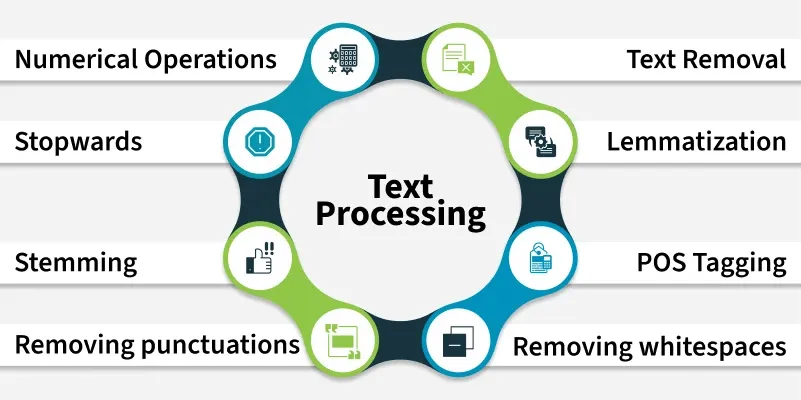
Below are some common text preprocessing techniques in Python.
1. Convert Text to Lowercase
We convert the text lowercase to reduce the size of the vocabulary of our text data.
s1 = "Hey, did you know that the summer break is coming? Amazing right !! It's only 5 more days !!"
print(s1.lower())
Output
hey, did you know that the summer break is coming? amazing right !! it's only 5 more days !!
2. Remove Numbers
We can either remove numbers or convert the numbers into their textual representations. To remove the numbers we can use regular expressions.
import re

s1 = "There are 3 balls in this bag, and 12 in the other one."
print(re.sub(r'\d+', '', s1))
Output
There are balls in this bag, and in the other one.
3. Convert Numbers to Words
We can also convert the numbers into words. This can be done by using the inflect library.
import inflect
p = inflect.engine()

s1 = "There are 3 balls in this bag, and 12 in the other one."
temp = s1.split()
s2 = []

for word in temp:
    if word.isdigit():
        s2.append(p.number_to_words(word))
    else:
        s2.append(word)
res = ' '.join(s2)
print(res)
Output
There are three balls in this bag and twelve in the other one.
4. Remove Punctuation
We remove punctuations so that we don't have different forms of the same word. For example if we don't remove the punctuation then been. been, been! will be treated separately.
import string

s1 = "Hey, did you know that the summer break is coming? Amazing right !! It's only 5 more days !!"

trans = str.maketrans('', '', string.punctuation)
s2 = s1.translate(trans)
print(s2)
Output
Hey did you know that the summer break is coming Amazing right Its only 5 more days
5. Remove Extra Whitespace
We can use the join and split functions to remove all the white spaces in a string.
s1 = "we don't need   the given   questions"
s2 = " ".join(s1.split())
print(s2)
Output
we don't need the given questions
6. Removing Stopwords
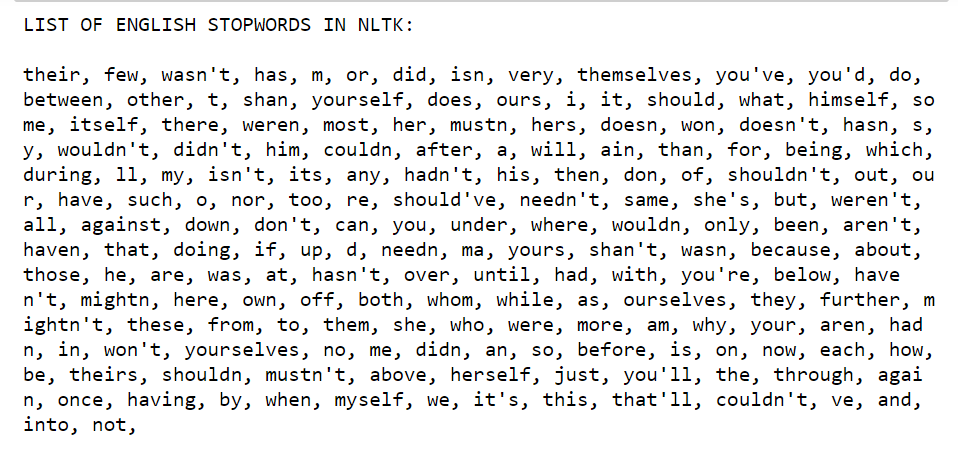
Stopwords are words that do not contribute much to the meaning of a sentence hence they can be removed. The NLTK library has a set of stopwords and we can use these to remove stopwords from our text. Below is the list of stopwords available in NLTK.
import nltk
from nltk.corpus import stopwords
from nltk.tokenize import word_tokenize

nltk.download('punkt')
nltk.download('stopwords')

text = "This is a sample sentence and we will remove stopwords."
tokens = word_tokenize(text)
f1 = [w for w in tokens if w.lower() not in stopwords.words('english')]
print(f1)
Output
['sample', 'sentence', 'going', 'remove', 'stopwords', '.']
7. Stemming
Stemming is the process of getting the root form of a word. Stem or root is the part to which affixes like -ed, -ize, -de, -s, etc are added. The stem of a word is created by removing the prefix or suffix of a word.
Examples:
books --> book
looked --> look
denied --> deni
flies --> fli
There are mainly three algorithms for stemming. These are the Porter Stemmer, the Snowball Stemmer and the Lancaster Stemmer. Porter Stemmer is the most common among them.
from nltk.stem import PorterStemmer
from nltk.tokenize import word_tokenize

s1 = PorterStemmer()
text = "data science uses scientific methods algorithms and many types of processes"

w1 = word_tokenize(text)
stems = [s1.stem(word) for word in w1]

print(stems)
Output
['data', 'scienc', 'use', 'scientif', 'method', 'algorithm', 'and', 'mani', 'type', 'of', 'process']
8. Lemmatization
Lemmatization is an NLP technique that reduces a word to its root form. This can be helpful for tasks such as text analysis and search as it allows us to compare words that are related but have different forms.
import nltk
from nltk.tokenize import word_tokenize
from nltk.stem import WordNetLemmatizer
nltk.download('wordnet')

le = WordNetLemmatizer()
text = "data science uses scientific methods algorithms"

words = word_tokenize(text)
lemmas = [le.lemmatize(w) for w in words]
print(lemmas)
Output
['data', 'science', 'use', 'scientific', 'method', 'algorithm']
9. POS Tagging
POS tagging assigns each word its grammatical role like noun, verb, adjective, etc hence helping machines understand sentence structure and meaning for tasks like parsing, information extraction and text analysis.
import nltk
from nltk.tokenize import word_tokenize
from nltk import pos_tag

nltk.download('averaged_perceptron_tagger')

text = "Data science combines statistics, programming, and machine learning."
tokens = word_tokenize(text)
tags = pos_tag(tokens)
print(tags)
Output
[('Data', 'NNP'), ('science', 'NN'), ('combines', 'VBZ'),
('statistics', 'NNS'), (',', ','), ('programming', 'NN'),
(',', ','), ('and', 'CC'), ('machine', 'NN'), ('learning', 'NN'), ('.', '.')]
POS Tags Reference:
- NNP: Proper noun
- NN: Noun (singular)
- VBZ: Verb (3rd person singular)
- CC: Conjunction