
In MongoDB, query operators filter documents based on conditions, while projection operators control which fields are returned in the query result. Together, they help retrieve only the required data efficiently.
- Query operators: Filter documents using conditions (e.g., $eq, $gt, $in).
- Projection operators: Select specific fields to include or exclude in results.
- Improves performance: Fetches only needed fields, reducing data transfer.
- Supports nested fields: Can query and project fields inside embedded documents.
- Works with relational database concepts: Similar to WHERE (filtering) and SELECT columns (projection) in a relational database.
MongoDB Query Operators
MongoDB query operators are used to filter documents based on specific conditions by comparing values, matching patterns, and working with arrays or geospatial data.
- Condition-based filtering: Selects documents that match given criteria.
- Value comparison: Supports operators like $eq, $gt, $lt, $in.
- Pattern matching: Enables text and regex-based searches.
- Array handling: Queries elements within arrays.
- Geospatial support: Filters data using location-based queries.
- Logical comparison: Combines multiple conditions across fields.
Setting Up an Environment
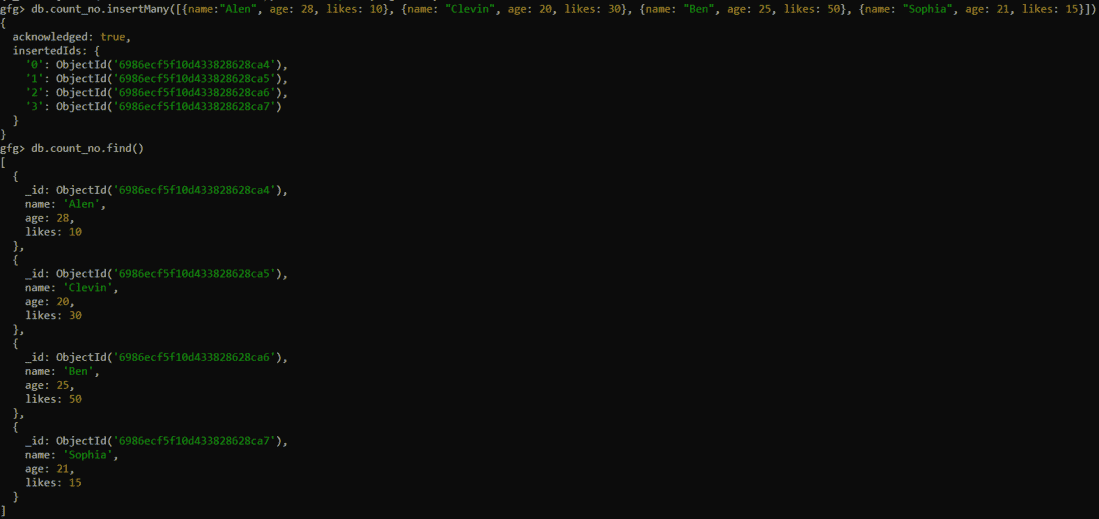
We have created a collection called count_no with the help of the db.createCollection( ) function. After containing some data, the count_no collections look like this:
Types of Query Operators in MongoDB
The Query operators in MongoDB can be further classified into 8 more types. The 8 types of Query Operators in MongoDB are:
1. Comparison Operators
The Comparison Operators in MongoDB are used to perform value-based comparisons in queries. The comparison operators in the MongoDB are shown as below:
Example 1: Using $gte Operator
Find all those records in which the age of the person is equal to or greater than 23.
Query:
db.count_no.find( { "age": {$gte:25} }, {"_id":0} )Output:
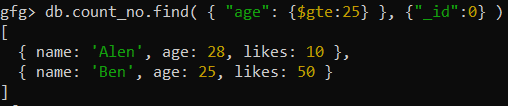
- Filters documents where age ≥ 25.
- Excludes the _id field using projection (_id: 0).
Example 2: Using $gt Operator
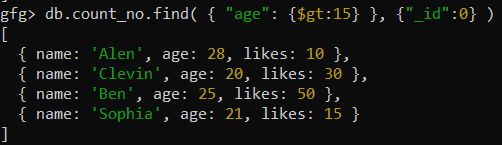
Find out those people whose age is greater than 15.
Query:
db.count_no,find( { "age": {$gt:15} }, {"_id":0} )Output:
Example 3: Using $eq Operator
Let's find out if the person named Krishnais present in our Collections or not.
Query:
db.count_no.find( { "name": {$eq:"Alen"} }, {"_id":0} )Output:

2. Logical Operators
The Logical Operators in MongoDB are used to filter data based on expressions that evaluate to true or false. The Logical operators in MongoDB are shown in the table below:
Example 1: Using $and Operator
Find out the name of the Personwhose likes are 5and whose ageis 25.
Query:
db.count_no.find({$and : [ {"likes":50} , {"age":25} ] } ) Output:
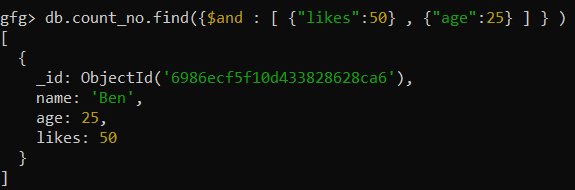
- The $and operator are used and it will return the documents whose likes are 50 and the age is 25.
- If the condition is not satisfied it will not return anything.
Example 2: Using $or Operator
Find out the Person whose ageis either 21 or 40.
Query:
db.count_no.find({$or: [ {"age":21}, {"age":40} ] } ) Output:
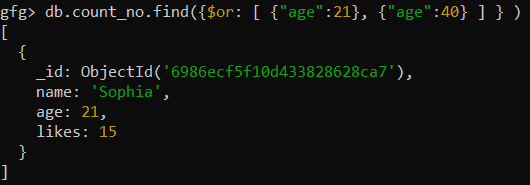
- It returns the documents whose age is 21 or age is 40.
- It returns the documents if either of any conditions is satisfied.
3. Array Operators
The Array Operators in the MongoDB return the result based on the Multiple conditions specified in the array using the array operators. The Array Operators in the MongoDB are:
Example 1: Using $all Operator
Find out the Person whose age is 25.
Query:
db.count_no.find( {"age" :{$all : [25] } }, {_id:0} )Output:

Example 2: Using $elemMatch Operator
First make some updates in our demo collection. Here we will Insert some data into the count_no database
Query:
db.count_no.insertOne( {"name" : "Harry", "age": 24,"likes" : 2,"colors":["Red","Green","Blue"] } )Output:
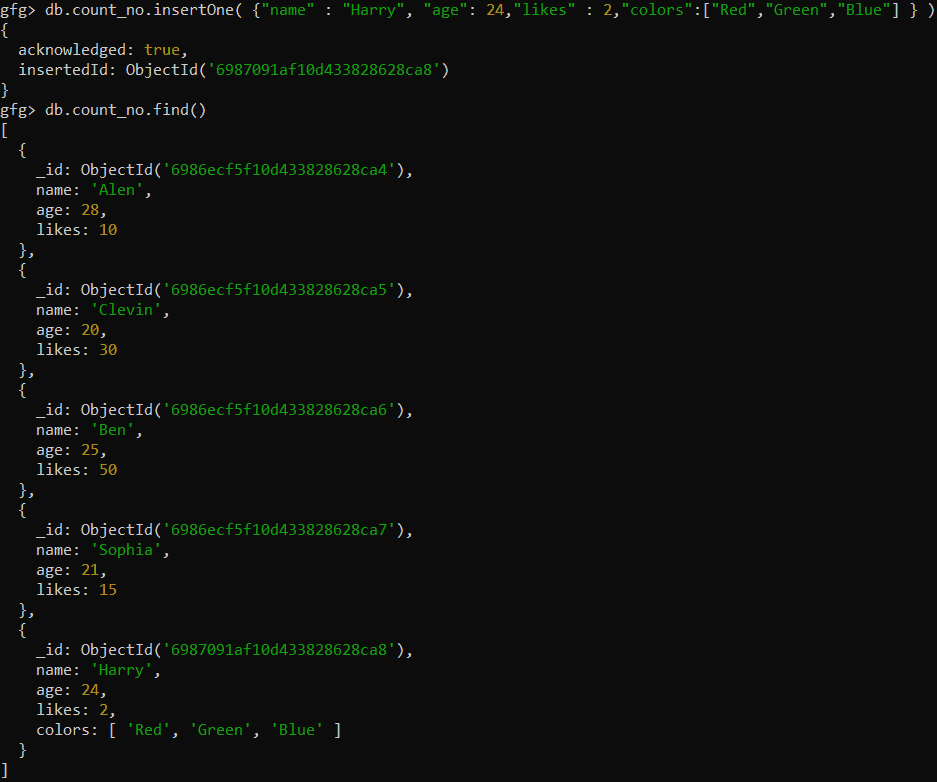
Now, using the $elemMatchoperator in MongoDB let's match the Red colors from a set of Colors.
Query:
db.count_no.find( {"colors": {$elemMatch: {$eq: "Red" } } },{_id: 0 } )Output:
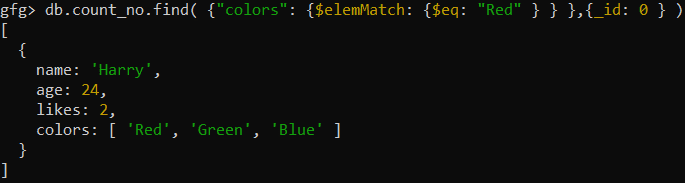
- The $elemMatch operator is used with the field colorswhich is of type array.
- It returns the documents that have the field Colors and if any of the values in the colors field has "Red" in it.
4. Evaluation Operators
The Evaluation Operators in the MongoDB are used to return the documents based on the result of the given expression. Some of the evaluation operators present in the MongoDB are:
1. $mod Operator:
The $mod operator in MongoDB performs a modulo operation on the value of a field and selects documents where the modulo equals a specified value. It only works with numerical fields.
Syntax:
{ field: { $mod: [ divisor, remainder ] } }2. $expr Operator:
The $expr operator in MongoDB allows aggregation expressions to be used as query conditions. It returns documents that satisfy the conditions of the query.
Syntax:
{ $expr: { <aggregation expression> } }3. $where Operator:
The $where operator in MongoDB uses JavaScript expression or function to perform queries. It evaluates the function for every document in the database and returns the documents that match the condition.
Syntax:
{ $where: <JavaScript expression> }5. Element Operators
The Element Operators in the MongoDB return the documents in the collection which returns true if the keys match the fields and datatypes. There are mainly two Element operators in MongoDB:
1. $exists Operator:
Filters documents based on whether a specified field is present or missing, helping handle optional fields and validate schema-less data in MongoDB.
Syntax:
{ field: { $exists: <boolean> } }2. $type Operator:
Filters documents by matching the BSON data type of a field’s value (e.g., string, number, array), useful for validating schema-less data in MongoDB.
Syntax:
{ field: { $type: <BSON type> } }Example: Find out how many documents are in the count_no whose type is 16.
Query:
db.count_no.find({"age":{$type:16}},{_id:0 } )Output:
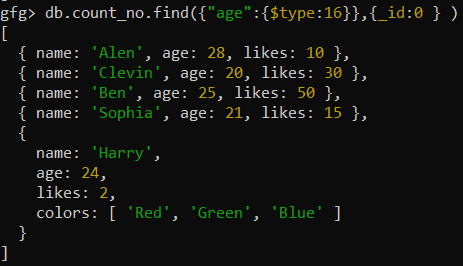
- It checks if the age is of type Int and returns True if it is of Integer data type.
- It uses BSON code to return the document. The BSON code for integers is 16.
- The type operator generally takes the BSON which is nothing but the number that is given to the datatype.
6. Bitwise Operators
The Bitwise Operators in the MongoDB return the documents in the MongoDB mainly on the fields that have numeric values based on their bits similar to other programming languages.
1. $bitsAllClear Operator:
Returns documents where all specified bit positions in a numeric or binary field are set to 0, useful for filtering records based on bitmask or flag values in MongoDB.
Syntax:
{ field: { $bitsAllClear: <bitmask> } }2. $bitsAnySet Operator:
Returns documents where at least one of the specified bit positions in a numeric or binary field is set to 1, useful for checking if any flag is enabled in MongoDB.
Syntax:
{ field: { $bitsAnySet: <bitmask> } }3. $bitsAnyClear Operator:
Returns documents where at least one of the specified bit positions in a numeric or binary field is 0, useful for checking if any flag is disabled in MongoDB.
Syntax:
{ field: { $bitsAnyClear: <bitmask> } }4. $bitsAllSet Operator:
Returns documents where all specified bit positions in a numeric or binary field are set to 1, useful for querying bitmask/flag-based data in MongoDB.
Example: Find the Person whose age has bit 1 from position 0 to 4.
Query:
db.count_no.find({"age":{$bitsAllSet: [0,4] } },{_id:0 } )Output:
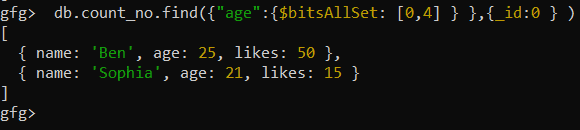
- In the above query, we have used $bitsAllSetand it returns documents whose bits position from 0 to 4 are only ones.
- It works only with the numeric values.
- The numeric values will be converted into the bits and the bits numbering takes place from the right.
7. Geospatial Operators
The Geospatial Operators in the MongoDB are used mainly with the terms that relate to the data which mainly focuses on the directions such as latitude or longitudes. The Geospatial operators in the MongoDB are:
1. $near Operator:
The $near operator finds geospatial objects near a specified point and requires a geospatial index.
Syntax:
{ $near: { geometry: <point_geometry>, maxDistance: <distance> (optional) } }2. $center Operator:
The $center operator (used with $geoWithin for planar geometry) specifies a circular area around a center point.
Syntax:
{ $geoWithin: { $center: [<longitude>, <latitude>], radius: <distance> } }3. $maxDistance Operator:
The $maxDistance operator limits the results of $near and $nearSphere queries to a maximum distance from the given point.
Syntax:
{ $near: { geometry: <point_geometry>, maxDistance: <distance> } }4. $minDistance Operator:
The $minDistance operator limits the results of $near and $nearSphere queries to a minimum distance from the given point.
Syntax:
{ $near: { geometry: <point_geometry>, minDistance: <distance> } }8. Comment Operators
The Comment Operator in MongoDB is used to write the comments along with the query in the MongoDB which is used to easily understand the data.
Example: Apply some comments in the queries using the $comment Operator.
Query:
db.count_no.find(filter).comment("your comment here")Output:
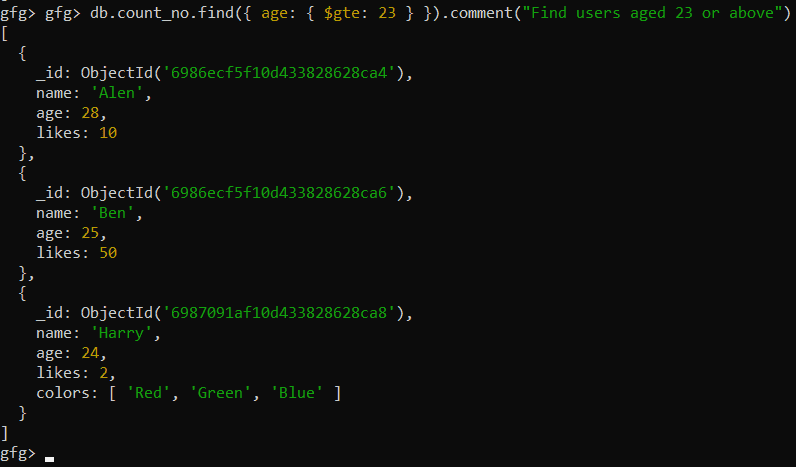
- We used the $comment operator to mention the comment.
- We have used "Find users aged 23 or above" with $comment to specify the comment.
- The comment operator in the MongoDB is used to represent the comment and it increases the understandibility of the code.
MongoDB Projection Operators
The Projection Operator in MongoDB controls which fields are included or excluded in query results. By returning only required fields, it improves query performance and reduces data transfer.
- Selective fields: Choose exactly which fields to return.
- Efficient queries: Minimizes unnecessary data retrieval.
- Faster responses: Smaller result sets improve response time.
- Works with nested fields: Can project fields inside embedded documents.
Syntax
db.collection_name.find({},{<field> : <value>})Projection Operators
1. $include: Returns only specified fields.
{ field1: 1, field2: 1 }2. $exclude: Excludes specific fields from the results.
{ field: 0 }3. $elemMatch: Projects only the first array element that matches a condition.
{ grades: { $elemMatch: { score: { $gt: 80 } } } }4. $slice: Limits the number of array elements returned.
{ comments: { $slice: 3 } }5.$meta: Projects document metadata (e.g., text score).
{ score: { $meta: "textScore" } }Example: Using Projection Operators
Query: Retrieve only the name and age fields
db.count.find({}, {name: 1, age: 1, _id: 0})Output:
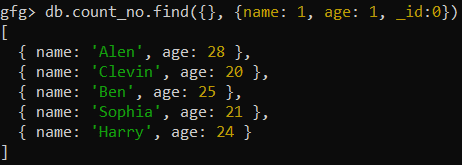
- Selects all documents ({} as filter).
- Returns only name and age.
- Excludes _id.