
Page Object Model (POM) and Page Factory are design patterns that enhance the maintainability, reusability, and readability of test automation code.
Page Object Model in Selenium
Page Object Model (POM) is a design pattern in Selenium that helps organize and manage the web elements and actions associated with a particular web page or component. The primary goal of POM is to enhance maintainability, reusability, and readability of your test automation code by promoting a clear separation between the test scripts and the underlying page details.
Here are the Advantages of the Page Object Model:
- Code Reusability: Encapsulate web elements and actions in page classes for reuse across test cases, minimizing duplication.
- Code Maintainability: Changes to UI elements are confined to their respective page classes, simplifying updates and reducing errors.
- Separation of Concerns: Keep test scripts focused on logic while page classes manage UI interactions, enhancing clarity.
- Readability: Use descriptive method names in page classes to make test scripts intuitive for testers and developers.
- Enhanced Test Structure: Organize scripts by page to mirror the application’s structure, improving navigation.
- Improved Collaboration: Clear separation fosters better communication between testers and developers.
Implementing Page Object Model (POM) in Selenium
To implement POM, follow these steps:
- Create a separate class for each web page.
- Define web elements and actions within these classes.
- Use these page classes in your test scripts.
Step 1: Set Up Your Eclipse Project
Create a new Maven project in Eclipse and configure the pom.xml file with Selenium and TestNG dependencies for effective test automation.
<dependencies>
    <dependency>
        <groupId>org.seleniumhq.selenium</groupId>
        <artifactId>selenium-java</artifactId>
        <version>4.25.0</version>
    </dependency>
    <dependency>
        <groupId>org.testng</groupId>
        <artifactId>testng</artifactId>
        <version>7.10.2</version>
        <scope>test</scope>
    </dependency>
</dependencies>
Step 2: Create a Package for Page Objects
To create a new package in Eclipse, right-click src/main/java in Package Explorer, select New > Package, name it pages, and click Finish.
Step 3: Create a Page Class
Right-click on the pages package, select New > Class, and name it LoginPage and define web elements and methods to interact with them.
- LoginPage.java (POM Implementation):
package pages;

import org.openqa.selenium.By;
import org.openqa.selenium.WebDriver;
import org.openqa.selenium.WebElement;

public class LoginPage {
    private WebDriver driver;
    private final String url = "https://www.saucedemo.com/";

    // Locators
    private By usernameField = By.id("user-name");
    private By passwordField = By.id("password");
    private By loginButton = By.id("login-button");
    private By errorMessage = By.cssSelector("h3[data-test='error']");

    // Constructor
    public LoginPage(WebDriver driver) {
        this.driver = driver;
    }

    // Navigate to login page
    public void navigateTo() {
        if (!driver.getCurrentUrl().equals(url)) {
            driver.get(url);
        }
    }

    // Perform login action
    public void login(String username, String password) {
        driver.findElement(usernameField).sendKeys(username);
        driver.findElement(passwordField).sendKeys(password);
        driver.findElement(loginButton).click();
    }

    // Get error message (for invalid login)
    public String getErrorMessage() {
        return driver.findElement(errorMessage).getText();
    }
}
Step 4: Create a Package for Tests
Right-click on src/test/java, select New > Package, name it tests, and click Finish.
Step 5: Create a Test Class
Right-click on the tests package, select New > Class, and name it LoginPageTest and write test methods using the LoginPage class.
- LoginPageTest.java (POM Test Class):
package tests;

import org.openqa.selenium.WebDriver;
import org.openqa.selenium.chrome.ChromeDriver;
import org.testng.Assert;
import org.testng.annotations.AfterMethod;
import org.testng.annotations.BeforeMethod;
import org.testng.annotations.Test;
import pages.LoginPage;

public class LoginPageTest {
    private WebDriver driver;
    private LoginPage loginPage;

    @BeforeMethod
    public void setUp() {
        System.setProperty("webdriver.chrome.driver", "C:\\Users\\path of chromedriver\\drivers\\chromedriver.exe");
        driver = new ChromeDriver();
        loginPage = new LoginPage(driver);
    }

    @Test
    public void testValidLogin() {
        loginPage.navigateTo();
        loginPage.login("standard_user", "secret_sauce");

        // Verify successful login by checking URL
        String expectedUrl = "https://www.saucedemo.com/inventory.html";
        Assert.assertEquals(driver.getCurrentUrl(), expectedUrl, "Login failed: URL mismatch");
    }

    @Test
    public void testInvalidLogin() {
        loginPage.navigateTo();
        loginPage.login("invalid_user", "wrong_password");

        // Verify error message
        String expectedError = "Epic sadface: Username and password do not match any user in this service";
        Assert.assertEquals(loginPage.getErrorMessage(), expectedError, "Error message mismatch");
    }

    @AfterMethod
    public void tearDown() {
        if (driver != null) {
            driver.quit();
        }
    }
}
Step 6: Run Your Tests
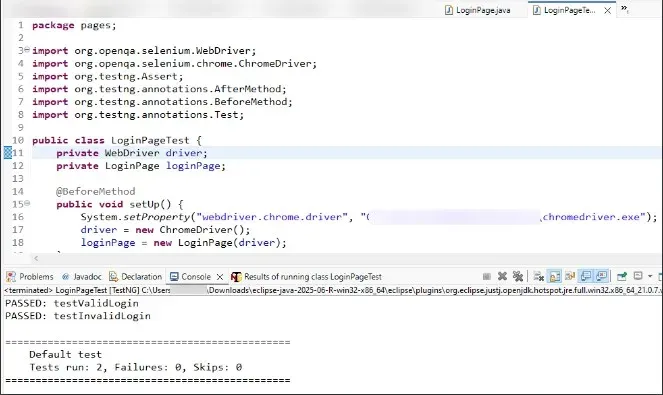
Right-click on LoginPageTest.java, select Run As > TestNG Test. Verify results in the Eclipse console or TestNG reports to ensure tests executed successfully.
Page Factory in Selenium
Page Factory is a design pattern in Selenium used to create Page Object Model (POM) implementations more efficiently. It is part of the Selenium library and offers a way to initialize web elements in a Page Object class with less boilerplate code.
Here are the advantages of Page Factory:
- Automatic Element Initialization: Simplifies and reduces the need for repetitive
findElementcalls. - Cleaner Code: Enhances readability and maintainability by separating locators from test logic.
- Improved Organization: Keeps locators organized within page classes.
- Enhanced Maintainability: Centralizes updates to locators, reducing changes in test scripts.
- Efficient Resource Usage: Promotes lazy loading of elements, improving performance.
Implementing Page Factory in Selenium
We use the same Project for the implementation of the page factory using selenium. Implement a LoginPageFactory class within the package.
package pages;

import org.openqa.selenium.WebDriver;
import org.openqa.selenium.WebElement;
import org.openqa.selenium.support.FindBy;
import org.openqa.selenium.support.PageFactory;

public class LoginPageFactory {
    private WebDriver driver;
    private final String url = "https://www.saucedemo.com/";

    // Web elements using @FindBy
    @FindBy(id = "user-name")
    private WebElement usernameField;

    @FindBy(id = "password")
    private WebElement passwordField;

    @FindBy(id = "login-button")
    private WebElement loginButton;

    @FindBy(css = "h3[data-test='error']")
    private WebElement errorMessage;

    // Constructor
    public LoginPageFactory(WebDriver driver) {
        this.driver = driver;
        PageFactory.initElements(driver, this);
    }

    // Navigate to login page
    public void navigateTo() {
        if (!driver.getCurrentUrl().equals(url)) {
            driver.get(url);
        }
    }

    // Perform login action
    public void login(String username, String password) {
        usernameField.sendKeys(username);
        passwordField.sendKeys(password);
        loginButton.click();
    }

    // Get error message (for invalid login)
    public String getErrorMessage() {
        return errorMessage.getText();
    }
}
Create a class named LoginPageFactoryTest.
package pages;


import org.openqa.selenium.WebDriver;
import org.openqa.selenium.chrome.ChromeDriver;
import org.testng.Assert;
import org.testng.annotations.AfterMethod;
import org.testng.annotations.BeforeMethod;
import org.testng.annotations.Test;

public class LoginPageFactoryTest {
    private WebDriver driver;
    private LoginPageFactory loginPage;

    @BeforeMethod
    public void setUp() {
        System.setProperty("webdriver.chrome.driver", "C:\\Users\\change the path of the chromedriver\\drivers\\chromedriver.exe");
        driver = new ChromeDriver();
        loginPage = new LoginPageFactory(driver);
    }

    @Test
    public void testValidLogin() {
        loginPage.navigateTo();
        loginPage.login("standard_user", "secret_sauce");

        // Verify successful login by checking URL
        String expectedUrl = "https://www.saucedemo.com/inventory.html";
        Assert.assertEquals(driver.getCurrentUrl(), expectedUrl, "Login failed: URL mismatch");
    }

    @Test
    public void testInvalidLogin() {
        loginPage.navigateTo();
        loginPage.login("invalid_user", "wrong_password");

        // Verify error message
        String expectedError = "Epic sadface: Username and password do not match any user in this service";
        Assert.assertEquals(loginPage.getErrorMessage(), expectedError, "Error message mismatch");
    }

    @AfterMethod
    public void tearDown() {
        if (driver != null) {
            driver.quit();
        }
    }
}
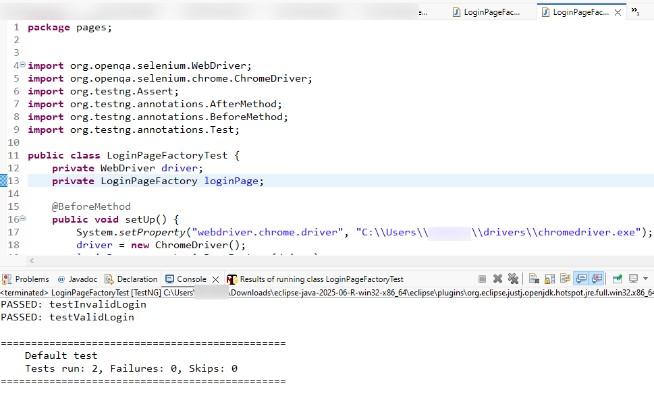
Select Run As > TestNG Test and verify results in the Eclipse console or TestNG reports.
Output:
Page Object Model Vs. Page Factory in Selenium
Here are the difference between Page Object Model and Page Factory in Selenium.
Aspect | Page Object Model (POM) | Page Factory |
|---|---|---|
Initialization | Uses traditional methods to initialize web elements. | Utilizes PageFactory.initElements for initializing web elements. |
Element Locators | Web elements are typically located using methods like findElement. | Web elements are defined using @FindBy annotations. |
Code Readability | Can be less concise due to manual element initialization. | More concise and cleaner due to annotation-based element definitions. |
Performance | Web elements are loaded when the page class is instantiated. | Lazy initialization; elements are loaded only when they are used. |
Ease of Maintenance | Requires manual updates to element locators and initialization. | Easier to maintain with annotations and centralized initialization. |
Syntax | Standard Java syntax for defining and interacting with web elements. | Uses annotations (@FindBy) to define element locators. |
Error Handling | Errors in element locating are more immediately visible. | May defer errors until elements are actually interacted with. |
Test Script Structure | Typically requires more boilerplate code for element definitions. | Reduces boilerplate with annotation-based element initialization. |
Use Case | Suitable for projects where explicit control over element initialization is needed. | Ideal for projects requiring cleaner and more concise code with annotation support. |
Page Object Model (POM) and Page Factory are powerful design patterns in Selenium that enhance test automation efficiency. POM organizes web elements into page classes, improving maintainability and readability, while Page Factory simplifies their initialization with annotations. Adopting these patterns leads to modular, reusable, and scalable test scripts, making your test automation projects more effective and easier to manage.