
Performance Testing is a type of software testing that evaluates how well an application performs under expected and peak workloads. It ensures that the system remains responsive, stable and scalable when multiple users access it simultaneously, helping identify performance issues before release.
- Measures system speed, responsiveness and stability
- Identifies performance bottlenecks under different load conditions
- Ensures the application can handle expected user traffic efficiently
Types of Performance Testing
The types of performance testing are as follows:
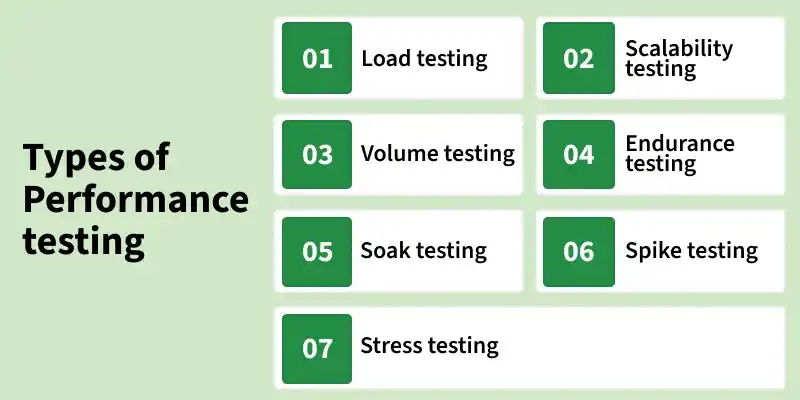
1. Load testing
Load testing simulates expected real-world user load on a system to evaluate its performance. It helps identify performance bottlenecks and verifies whether the application can handle anticipated users or transactions. The objective is to ensure smooth performance before releasing the product.
2. Stress testing
Stress testing evaluates the system’s behavior beyond normal operating limits. It helps identify the breaking point of the application and observes how the system recovers after failure under extreme load conditions.
3. Spike testing
Spike testing checks how the system responds to sudden and sharp increases in user traffic. It helps identify performance issues caused by unexpected spikes in load.
4. Soak testing
Soak testing evaluates system performance under a continuous load for an extended period. It helps detect issues such as memory leaks, resource exhaustion or performance degradation over time.
5. Endurance testing
Endurance testing focuses on the system’s long-term stability under a steady load. It ensures the application can handle expected workloads for long durations without failure.
6. Volume testing
Volume testing examines system performance by processing large volumes of data in the database. The objective is to verify system behavior as data size increases.
7. Scalability testing
Scalability testing determines the system’s ability to scale up or down with increasing user load. It helps in capacity planning and ensures consistent performance as demand grows.
Importance of Performance Testing
- Identifies performance bottlenecks and system congestion
- Evaluates application speed, stability, and scalability
- Ensures the system can handle expected users and transactions
- Improves reliability and prevents failures in production
- Helps optimize the application before market release
Process of Performance Testing
Performance testing follows a structured approach to ensure that a software application performs efficiently under expected and peak workloads.
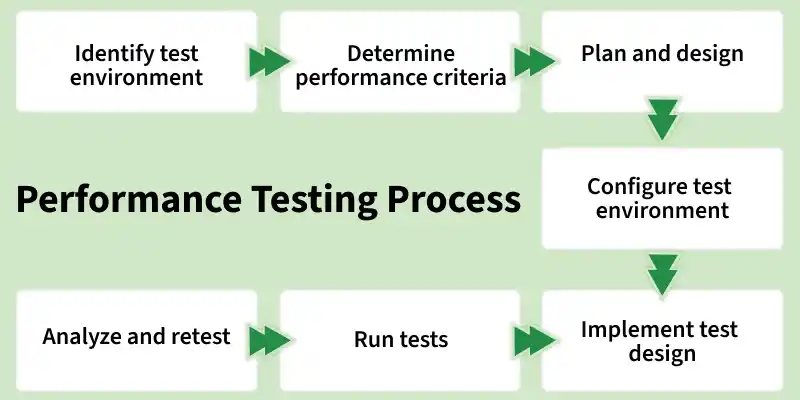
Step 1: Set Up the Test Environment: Prepare a testing environment that closely resembles the production setup. Ensure required hardware, software, tools, and network configurations are in place.
Step 2: Define Performance Metrics: Identify key performance metrics such as response time, throughput, resource usage, and error rate. Set benchmarks based on business requirements or similar systems.
Step 3: Design Test Scenarios: Create realistic test scenarios by considering user behavior, data volume, and usage patterns. Decide what data needs to be collected during the tests.
Step 4: Configure Testing Tools: Set up performance testing tools and monitoring systems to track application behavior, server health, and system resources.
Step 5: Execute Performance Tests: Develop and run performance test scripts based on the planned scenarios. Capture and store all test results for analysis.
Step 6: Analyze Test Results: Evaluate test outcomes to identify bottlenecks, failures, or performance degradation. Compare results against defined benchmarks.
Step 7:Optimize and Retest: Fix identified issues, optimize the system, and rerun tests. Repeat the process until the desired performance level is achieved.
Advantages of Performance Testing
- Identifies performance bottlenecks such as slow database queries, memory leaks, and network issues
- Improves scalability by determining how the system performs as user load increases
- Enhances reliability and stability under normal and peak workloads
- Reduces production risks by detecting performance issues early
- Cost-effective compared to fixing performance problems after deployment
- Improves user experience by ensuring fast and responsive application behavior
- Supports future growth by preparing the system for traffic spikes
- Helps meet industry and compliance standards
- Provides deeper system insight by revealing behavior under different load conditions
Disadvantages of Performance Testing
- Resource-intensive, requiring significant hardware, tools, and infrastructure
- Complex to design and execute, requiring skilled professionals
- Limited coverage, as it focuses mainly on performance issues
- Results may be inaccurate if the test environment differs from production
- Difficult to simulate real-world user behavior accurately
- Time-consuming analysis due to large volumes of test data
- High dependency on expertise for scripting, monitoring, and debugging
- Cannot guarantee zero performance issues in real production environments
Cloud-based Performance Testing
Cloud-based Performance Testing uses cloud infrastructure to simulate real-world user traffic and evaluate application performance at scale.
- Uses cloud platforms to generate large-scale user loads
- Simulates users from multiple geographic locations
- Enables on-demand scalability and flexible test execution
- Reduces infrastructure and maintenance costs
- Provides real-time performance monitoring and analytics
- Supports continuous testing and faster feedback cycles
- Helps identify performance bottlenecks early
- Improves application reliability and scalability
- Ideal for modern web and cloud-native applications
Performance Testing Tools
- Apache JMeter: An open-source tool used for load and performance testing by simulating multiple users and measuring system performance under different load conditions.
- OpenSTA (Open System Testing Architecture): An open-source tool for testing the load and stress of web applications by simulating concurrent user activity.
- LoadRunner: A commercial performance testing tool that simulates virtual users to identify performance bottlenecks and measure response times under varying loads.
- WebLOAD: A performance testing tool used to evaluate the scalability and reliability of web applications by generating user requests to the server.
- Gatling: An open-source load testing tool designed for high-performance web applications, simulating large user traffic to detect performance issues.
- BlazeMeter: A cloud-based performance testing platform that enables large-scale load testing and continuous performance monitoring.
Performance Testing Attributes
- Speed: It determines whether the software product responds rapidly.
- Scalability: It determines the amount of load the software product can handle at a time.
- Stability: It determines whether the software product is stable in case of varying workloads.
- Reliability: It determines whether the software product performs consistently without failures over time.