
Git provides tools to help debug issues by analyzing commit history and identifying changes that introduced bugs.
- Helps track and identify bugs in commit history.
- Provides tools like git bisect for efficient debugging.
- Enables faster issue resolution by narrowing down problematic commits.
Git Bisect
Git bisect is a Git debugging tool used to identify the exact commit that introduced a bug. It uses a binary search approach to quickly narrow down the faulty commit in the history.
- Starts by marking commits as good and bad to define the search range.
- Automatically checks intermediate commits for testing during the process.
- Repeats the process until the exact buggy commit is identified.
Working of Git Bisect
Git Bisect works by repeatedly narrowing down the commit range using binary search to find the exact commit that introduced a bug.
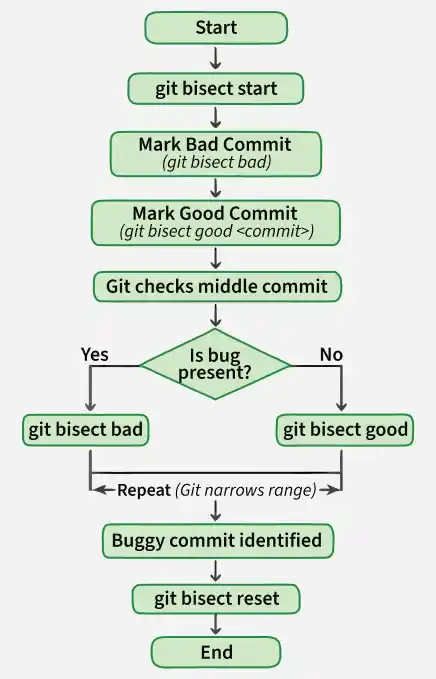
- Start the bisecting process: Use git bisect start to begin the search.
- Mark the bad commit: Run git bisect bad to indicate the commit where the bug is present.
- Mark the good commit: Use git bisect good <commit> to specify a commit where everything was working fine.
- Git finds the middle commit: Git automatically checks out the commit in the middle of the selected range.
- Test and mark: After testing, mark the commit as good or bad.
- Repeat: This process continues, narrowing down the range each time.
- Final result: Git selects commits in the middle range, checks them out, and continues until the exact buggy commit is identified.
Note: If no commit is specified, Git uses the current (HEAD) commit by default, and marking the same commit as both good and bad causes an error.
Git Bisect Commands
- git bisect reset: Returns the repository to its original state and ends the bisect process after the bug is found.
- Undo / alternate state tracking (old vs new): It can find changes between old and new states using git bisect start, git bisect old <revision>, and git bisect new <revision>.
- git bisect log: Displays a log of all the steps taken during the bisect process.
- git bisect skip <version1>..<version2>: Skips a specific commit or range of commits so they are not tested
Additional Git Troubleshooting Tips
Apart from git bisect, Git offers several tools to troubleshoot and fix issues:
1. Broken pipe error on git push: Occurs during push operations when you see "Write failed: Broken pipe".
Fix: git config http.postBuffer 524288000 , git repack
2. ssh_exchange_identification error: Happens due to too many unauthenticated SSH attempts.
Fix: Increase the MaxStartups limit in /etc/ssh/sshd_config.
3. Timeouts on git push or git pull: Occurs due to slow or unstable network.
Fix: Check your network connection and use traceroute for diagnosis.
4. Error “transfer closed with outstanding read data remaining”: Common in large repositories.
Fix: Use Git LFS (Large File Storage) to handle large files efficiently.
Using Git Clean to Manage Untracked Files
The git clean command is used to delete untracked files from git project. This command completely removes files from the working tree and cannot be recovered again. So this command should be carefully used.
git clean options:
- -n or --dry-run: Shows what files will be deleted without actually removing them. Used for testing.

- -f or --force: Deletes untracked files from the current directory. Required unless clean.requireforce is set to false.

- -d: Removes untracked directories along with files.
- -i or --interactive: Opens interactive mode to choose what should be deleted.
Interactive Mode:
In interactive mode, you can select which untracked files or directories to delete, filter them, or exit without making changes.
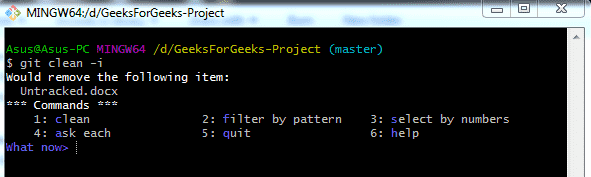
- clean: Deletes the selected untracked files or directories.
- filter by pattern: Excludes files using patterns like "*.py".
- select by number: Allows selecting files using ranges:
"3-5" deletes files 3, 4, 5
"3-5, 8, 9" deletes files 3, 4, 5, 8, 9
"3-" deletes from file 3 to the last
"*" deletes all files - ask each: Prompts before deleting each file.
- quit: Exits without deleting any files.
Usage of Git Bisect
Here are some reasons why git bisect is an essential tool for debugging:
- Efficiency: Quickly narrows down the problematic commit, saving time compared to manually checking each commit.
- Precision: Accurately identifies the commit that introduced the bug, making it easier to understand and fix the issue.
- Automation: Can be automated with scripts for consistent testing, reducing the likelihood of human error.