
Git Flow and GitHub Flow are two popular Git branching strategies that help teams manage development efficiently and streamline collaboration.
- Git Flow is suited for structured, release-based workflows.
- GitHub Flow is lightweight and ideal for continuous delivery.
- Both improve team collaboration and code management.
- Choice depends on project size, release cycle, and team workflow.
GitHub Flow
GitHub Flow is a simple workflow with no release branches, using only a master branch and short-lived feature branches for continuous deployment.
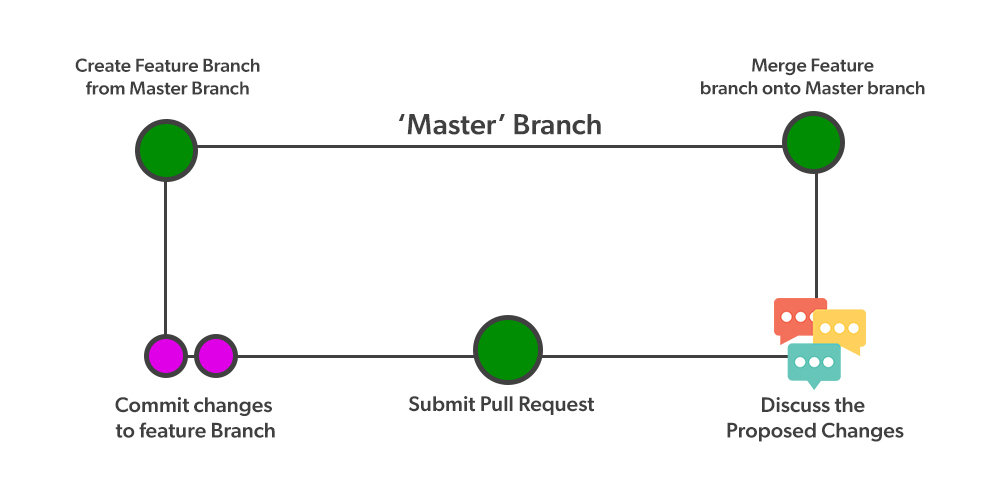
- Create a feature branch from the master branch.
- Develop and test the feature in isolation.
- Open a pull request to the master branch.
- Review and approve the changes.
- Merge the feature branch into master.
Features of GitHub Flow
GitHub Flow provides a lightweight, continuous workflow that enables frequent deployments and simple branch management.
- Main branch: Always contains production-ready code.
- Feature branches: Used for individual features or bug fixes.
- Pull requests: Review and approve changes before merging into main.
Creating Feature branch out of the master branch using checkout
To create a new Feature branch from master, use:
git checkout -b <branch-name>
- git checkout -b creates and switches to a new branch.
- Create a feature branch from master for new work or bug fixes.
- Commit and push changes to the feature branch.
- Open a pull request when the feature is ready.
- Review and approve the pull request.
- Merge into master and deploy immediately.
Pros and Cons of GitHub Flow
Pros and Cons of GitHub Flow are discussed below:
Pros | Cons |
|---|---|
Simple and easy to use for small to medium projects | Lacks structure for complex, long-term projects. |
Ideal for fast, continuous delivery of features. | Not suitable for heavy branching or release-based workflows. |
Encourages collaboration through pull requests. | Can cause versioning issues if not managed carefully. |
Git Flow
Git Flow is more structured than GitHub Flow and is suited for release-based, large projects with multiple developers collaborating.
 Features of Git Flow
Main Branches in Git Flow
- Master: Represent the production-ready state of code.
- Develop: Represents the latest development changes.
Supporting Branches
- Feature branches: Created from develop and merged back after completion.
- Release branches: Used for release preparation and merged into develop and master.
- Hotfix branches: Created from master for urgent fixes and merged into master and develop.
In CI/CD, the develop branch is deployed to dev or test environments, while the master branch is deployed to production.
Pros and Cons of Git Flow
Pros | Cons |
|---|---|
Clear branch roles (feature, release, hotfix). | Complex to manage multiple branches. |
Supports parallel development and urgent fixes. | Extra effort needed to maintain releases. |
Well-organized and easy to track changes. | Rigid structure for Agile workflows. |
Use Cases
Choose Git Flow when:
- Your project has multiple planned releases and needs a structured workflow.
- You work in a large or complex team where releases and hotfixes require strict control.
Choose GitHub Flow when:
- You need rapid deployment and continuous integration.
- You prefer a simple workflow with minimal branching and fast collaboration.
Difference between Git Flow and GitHub Flow
Here is a detailed comparison of Git Flow and GitHub Flow based on various features:
Git Flow | GitHub Flow |
|---|---|
Uses multiple branches (feature, develop, release, hotfix). | Uses one main branch with short-lived feature branches. |
Best suited for large teams and structured release management. | Ideal for small to medium teams and CI/CD workflows. |
Less flexible due to strict branching rules. | Highly flexible for rapid changes. |
Uses dedicated release branches. | Releases occur immediately after merge. |
More complex workflow with clear role separation. | Simple workflow focused on short cycles. |
Merges happen during feature, release, and hotfix stages. | Merges occur once features are ready. |
Focuses on stability and version control. | Focuses on continuous integration and delivery. |
Best for projects needing stable versions and planned releases. | Best for fast updates and frequent deployments. |