
React components are reusable UI units that handle their own logic, accept data through props, manage state, and efficiently update only the parts of the UI that change.
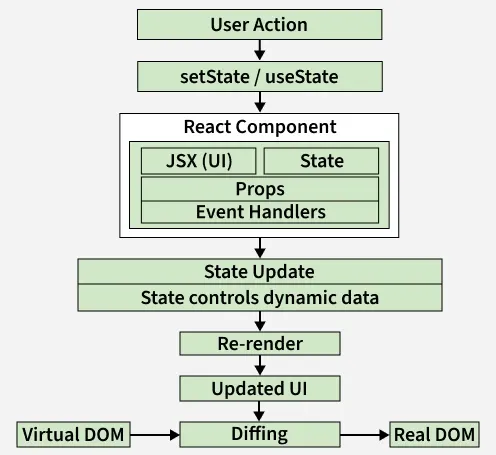
- User Action triggers an event (click, input, etc.).
- setState / useState updates the component’s state.
- React Component uses props, state, JSX, and event handlers to define UI logic.
- State Update changes dynamic data inside the component.
- Re-render is triggered for the affected component.
- Updated UI is generated as a new Virtual DOM.
- Diffing compares the new Virtual DOM with the previous one.
- Real DOM updates only the changed parts for better performance.
import React from 'react';

// Creating a simple functional component
function Greeting() {
  return (
    <h1>Hello, welcome to React!</h1>
  );
}

export default Greeting;
Output:
Hello, welcome to React!- Greeting is a React functional component.
- It returns JSX: <h1>Hello, welcome to React!</h1>.
- ReactDOM.render mounts it to the DOM at an element with id root.
Syntax:
function ComponentName() {
  return (
    <JSX />
  );
}
Types of React Components
There are two primary types of React components:
1. Functional Components
Functional components are JavaScript functions that return React elements and are the preferred way to build modern React applications.
- Can manage state and lifecycle logic using React Hooks.
- Use a simpler syntax, making them ideal for reusable components.
- Offer better performance by avoiding the use of the this keyword.
function Greet(props) {
    return <h1>Hello, {props.name}!</h1>;
}
2. Class Components
Class components are ES6 classes in React that extend React.Component and support state and lifecycle handling.
- Manage component data using the this.state property.
- Use lifecycle methods such as componentDidMount and componentDidUpdate.
class Greet extends React.Component {
    render() {
        return <h1>Hello, {this.props.name}!</h1>;
  }
}
Core Concepts in React Components
These concepts explain how components manage data, update UI, and work together in a React application.
1. Props in React Components
Props (short for properties) are read-only inputs passed from a parent component to a child component. They enable dynamic data flow and reusability.
- Props are immutable.
- They enable communication between components.
- They allow components to be configured and customized from outside.
function Greet(props) {
    return <h2>Welcome, {props.username}!</h2>;
}

// Usage
<Greet username="Adam" />;
2. State in React Components
State is a component-controlled JavaScript object used to store and manage dynamic data over time.
- Updating state automatically triggers a re-render.
- Functional components manage state using the useState hook.
function Counter() {
    const [count, setCount] = React.useState(0);

    return (
        <div>
            <p>Count: {count}</p>
            <button onClick={() =>
                setCount(count + 1)}>Increment</button>
        </div>
    );
}
3. Rendering a Component
Rendering in React means displaying a component in the browser’s DOM, and React automatically updates the UI when a component’s props or state change.
- Components must be imported before they can be rendered
- ReactDOM.render() is typically used in the root file to mount the app
ReactDOM.render(<Greeting name="Emma" />, document.getElementById('root'));
4. Components in Components
In React, you can nest components inside other components to build a modular and hierarchical structure.
- Components can be reused multiple times within the same or different components.
- Props can be passed to nested components for dynamic content.
- Promotes code reusability and better component organization.
function Header() {
    return <h1>Welcome to My Site</h1>;
}

function Footer() {
    return <p>© 2024 My Company</p>;
}

function App() {
    return (
        <div>
            <Header />
            <p>This is the main content.</p>
            <Footer />
        </div>
    );
}

export default App;
Best Practices for React Components
- Keep components small and focused on a single responsibility.
- Prefer functional components unless class-specific features are needed.
- Validate props using PropTypes for reliability.
- Lift state to a common parent when multiple components share data.