
PropTypes in ReactJS validate the types of props passed from parent to child components, helping catch errors early, improve debugging, and ensure consistent data handling.
- Helps catch type-related issues early during development.
- Provides console warnings for easier debugging.
- Serves as self-documentation for component props.
- Enforces consistent data types across components.
Note: In the latest version of the react 19 the proptypes has been removed. It was deprecated in react version 15.5.
Using PropTypes in React Components
Below are the steps to use PropTypes in React:
Step 1: Install the prop-types Package
npx create-react-app react-app
cd react-app
npm install prop-typesProject Structure
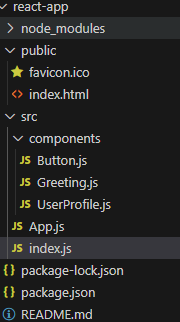
//src/components/Button.js

import React from 'react';
import PropTypes from 'prop-types';

const Button = ({ label, type }) => {
    return <button className={`btn btn-${type}`}>{label}</button>;
};

Button.propTypes = {
    label: PropTypes.string.isRequired,
    type: PropTypes.oneOf(['primary', 'secondary', 'danger']).isRequired,
};

export default Button;
//src/components/Greeting.js
import React from 'react';
import PropTypes from 'prop-types';

const Greeting = ({ name, age }) => {
    return (
        <div>
            <h1>Hello, {name}!</h1>
            <p>You are {age} years old.</p>
        </div>
    );
};

Greeting.propTypes = {
    name: PropTypes.string.isRequired,
    age: PropTypes.number,
};

Greeting.defaultProps = {
    age: 25,
};

export default Greeting;
//src/components/UserProfile.js
import React from 'react';
import PropTypes from 'prop-types';

const UserProfile = ({ user }) => {
    return (
        <div>
            <h2>{user.name}</h2>
            <p>Age: {user.age}</p>
            <p>Email: {user.email}</p>
        </div>
    );
};

UserProfile.propTypes = {
    user: PropTypes.shape({
        name: PropTypes.string.isRequired,
        age: PropTypes.number.isRequired,
        email: PropTypes.string.isRequired,
    }).isRequired,
};

export default UserProfile;
//App.js
import React from 'react';
import Greeting from './components/Greeting';
import Button from './components/Button';
import UserProfile from './components/UserProfile';

const App = () => {
    const user = { name: 'Ben', age: 25, email: 'gfg@example.com' };

    return (
        <div>
            <Greeting name="GFG" age={22} />
            <Button label="Click Me" type="primary" />
            <UserProfile user={user} />
        </div>
    );
};

export default App;
// index.js
import React from 'react';
import ReactDOM from 'react-dom/client'; // Import createRoot from react-dom/client
import App from './App';

const root = ReactDOM.createRoot(document.getElementById('root')); // Create root
root.render(
    <React.StrictMode>
        <App />
    </React.StrictMode>
);
Output

- Greeting shows a personalized message with an age (default 25) using PropTypes for validation.
- Button accepts a type prop restricted to ['primary', 'secondary', 'danger'].
- UserProfile expects a user object containing name, age, and email.
- App & index.js render all components with props, using ReactDOM.createRoot() inside <React.StrictMode> for best practices and error handling.
Common PropTypes Validators
Here's a list of common PropTypes validators:
| PropType | Description |
|---|---|
| PropTypes.string | Confirms the prop is a string. |
| PropTypes.number | Confirms the prop is a number. |
| PropTypes.bool | Confirms the prop is a boolean (true or false). |
| PropTypes.func | Confirms the prop is a function. |
| PropTypes.array | Confirms the prop is an array. |
| PropTypes.object | Confirms the prop is an object. |
| PropTypes.node | Confirms the prop can be anything that can be rendered (e.g., numbers, strings, elements, or an array of elements). |
| PropTypes.element | Confirms the prop is a React element. |
| PropTypes.instanceOf(Class) | Confirms the prop is an instance of a particular class. |
| PropTypes.oneOf([value1, value2]) | Confirms the prop matches one of the provided values. |
| PropTypes.oneOfType([type1, type2]) | Confirms the prop matches one of the provided types. |
| PropTypes.arrayOf(type) | Confirms the prop is an array of a specific type. |
| PropTypes.objectOf(type) | Confirms the prop is an object where all values are of a specific type. |
| PropTypes.shape({}) | Confirms the prop is an object with a specific shape. |
Advanced PropTypes Usage
Below are some of the advanced PropTypes usage:
Default Props
By using the defaultProps we can also specify the default values for props. This is used when certain props are optional and we want to set a default value in case they are not passed.
Greeting.defaultProps = {
    name: 'Guest',
    age: 18,
};
With this, if no name or age is provided, the component will use 'Guest' and 18 as default values.
Note: defaultProps is deprecated for functional components in React 18+, so prefer using default parameters it is still valid for class components
PropTypes with Arrays and Objects
PropTypes in React can validate arrays, objects, and even custom rules to ensure components receive the correct data types.
Array of specific types: Use PropTypes.arrayOf(type) to enforce all items in an array to be of a specific type.
Component.propTypes = {
  items: PropTypes.arrayOf(PropTypes.string).isRequired,
};
Object with specific shape: Use PropTypes.shape({}) to define required fields and their types within an object.
Component.propTypes = {
  user: PropTypes.shape({
    id: PropTypes.number.isRequired,
    name: PropTypes.string.isRequired,
  }).isRequired,
};
PropTypes with Custom Validation: You can write a function to enforce complex rules, such as minimum values, beyond standard type checks.
Component.propTypes = {
  age: (props, propName, componentName) => {
    if (props[propName] < 18) {
      return new Error(`${componentName}: ${propName} should be at least 18.`);
    }
    return null;
  },
};
PropTypes with Enum (One of Specific Values)
We can use oneOf restrict a prop to set of predefined values.
Button.propTypes = {
  type: PropTypes.oneOf(['primary', 'secondary', 'danger']).isRequired,
};
PropTypes with One of Multiple Types
oneOfType allows a prop to accept multiple data types.
Component.propTypes = {
  value: PropTypes.oneOfType([
    PropTypes.string,
    PropTypes.number,
  ]).isRequired,
};
PropTypes Vs TypeScript
Below is the difference between PropTypes and TypeScript based on their features:
| PropTypes | TypeScript |
|---|---|
| Performs runtime type-checking, validating prop types while the app runs. | Performs compile-time type-checking, catching type errors before running the app. |
| Built into React and mainly used with JavaScript projects. | Fully integrates into the development environment and supports advanced tooling. |
| Validates props only for React components. | Validates props, variables, functions, and more, providing broader type safety. |
| Suitable for small or legacy projects with JavaScript. | Ideal for large-scale projects that need strict type safety. |
| Default values are defined using defaultProps. | Default values can be defined directly within type definitions. |