
The React component lifecycle describes the different stages a component goes through, allowing code to run at specific moments during its existence.
- Covers phases like creation, update, and removal of a component.
- Helps manage side effects and resources efficiently.
- Improves application performance through controlled execution.
Here are the three main phases of the React component lifecycle:
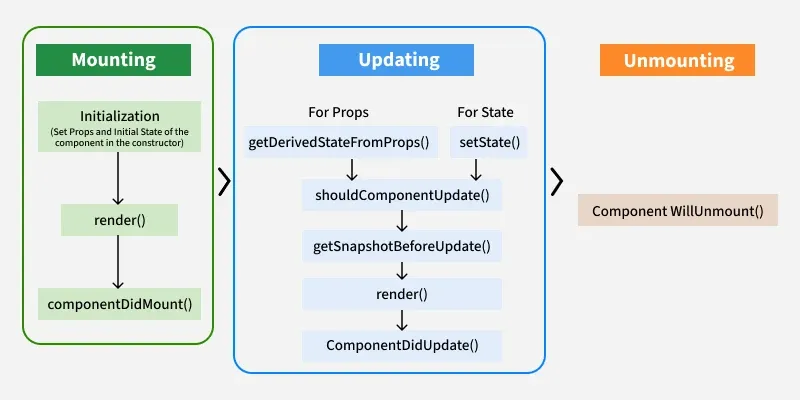
- Mounting: Initializes, renders, and mounts the component (componentDidMount()).
- Updating: Handles state/prop changes, re-renders, and updates (componentDidUpdate()).
- Unmounting: Cleans up before removal (componentWillUnmount()).
Phases of Lifecycle in React Components
1. Mounting
Mounting refers to the process of creating and inserting a component into the DOM for the first time in a React application. During mounting, React initializes the component, sets up its internal state (if any), and inserts it into the DOM.
- constructor
- getDerivedStateFromProps
- render()
- componentDidMount()
constructor()
Method to initialize state and bind methods. Executed before the component is mounted.
constructor(props) {
    super(props); // Always call super(props) before using this.props
    this.state = {
        count: 0, // Initial state
    };
    console.log("Constructor called");
}
- Initializes the component’s state and prepares it for rendering.
- Calls super(props) to enable access to this.props and logs when the component is created.
getDerivedStateFromProps(props, state)
Used for updating the state based on props. Executed before every render.
static getDerivedStateFromProps(props, state) {
    if (props.value !== state.value) {
        return { value: props.value }; // Update state based on new props
    }
    return null; // No changes to state
}
- Syncs the component’s state with updated props before rendering.
- Returns a new state object when props change, or null if no update is needed.
render() method
Responsible for rendering JSX and updating the DOM.
render() {
    return (
        <div>
            <h1>Hello, React Lifecycle!</h1>
        </div>
    );
}
- Returns JSX that defines what should be displayed on the screen.
- Executes during every render phase to update the UI based on current state and props.
componentDidMount() Function
This function is invoked right after the component is mounted on the DOM, i.e. this function gets invoked once after the render() function is executed for the first time.
componentDidMount() {
    console.log("Component has been mounted");

    // Example: Fetch data from an API
    fetch("https://api.example.com/data")
        .then(response => response.json())
        .then(data => this.setState({ data }));
}
- Runs once after the component is mounted to the DOM.
- Commonly used for side effects like API calls and initializing data.
2. Updating
Updating is the phase where a component re-renders in response to changes in its state or props, ensuring the UI reflects the latest data.
- getDerivedStateFromProps()
- setState() Function
- shouldComponentUpdate()
- getSnapshotBeforeUpdate()
- componentDidUpdate()
getDerivedStateFromProps()
getDerivedStateFromProps(props, state) is a static method that is called just before the render() method in both the mounting and updating phase in React. It takes updated props and the current state as arguments.
static getDerivedStateFromProps(props, state) {
    if (props.name !== state.name) {
        return { name: props.name }; // Update state with new props
    }
    return null; // No state change
}
- Compares incoming props with the current state to decide if state should be updated
- Returns a new state object when synchronization is required, otherwise returns
null
setState()
This is not particularly a Lifecycle function and can be invoked explicitly at any instant. This function is used to update the state of a component.
this.setState((prevState, props) => ({
      counter: prevState.count + props.diff
}));
- Updates the component’s state explicitly and can be called at any time.
- Uses previous state and props to calculate the new state safely.
shouldComponentUpdate()
shouldComponentUpdate() is a React class lifecycle method that controls whether a component re-renders by comparing current and next props or state and returning true or false.
shouldComponentUpdate(nextProps, nextState)It returns true or false, if false, then render(), componentWillUpdate(), and componentDidUpdate() method does not get invoked.
getSnapshotBeforeUpdate()
The getSnapshotBeforeUpdate() method is invoked just before the DOM is being rendered. It is used to store the previous values of the state after the DOM is updated.
getSnapshotBeforeUpdate(prevProps, prevState)componentDidUpdate()
Similarly, this function is invoked after the component is rendered, i.e., this function gets invoked once after the render() function is executed after the updation of State or Props.
componentDidUpdate(prevProps, prevState, snapshot)3. Unmounting
This is the final phase of the lifecycle of the component, which is the phase of unmounting the component from the DOM. The following function is the sole member of this phase.
componentWillUnmount()
This function is invoked before the component is finally unmounted from the DOM, i.e., this function gets invoked once before the component is removed from the page, and this denotes the end of the lifecycle.
Implementing the Component Lifecycle methods
Implementing component lifecycle methods allows developers to control a React component’s behavior at different stages such as mounting, updating, and unmounting.
Create a react app and edit your index.js file from the src folder.
// Filename - src/index.js:
import React from "react";
import ReactDOM from 'react-dom';
class Test extends React.Component {
    constructor(props) {
        super(props);
        this.state = { hello: "World!" };
    }
    componentDidMount() {
        console.log("componentDidMount()");
    }
    changeState() {
        this.setState({ hello: "Geek!" });
    }
    render() {
        return (
            <div>
                <h1>
                    GeeksForGeeks.org, Hello
                    {this.state.hello}
                </h1>
                <h2>
                    <a
                        onClick={this.changeState.bind(
                            this
                        )}
                    >
                        Press Here!
                    </a>
                </h2>
            </div>
        );
    }
    shouldComponentUpdate(nextProps, nextState) {
        console.log("shouldComponentUpdate()");
        return true;
    }
    componentDidUpdate() {
        console.log("componentDidUpdate()");
    }
}
const root = ReactDOM.createRoot(
    document.getElementById("root")
);
root.render(<Test />);
Output:

- The Test component starts with a state value hello set to "World!".
- componentDidMount() runs after the component is added to the DOM and logs a message.
- changeState() updates the state to "Geek!" when triggered.
- render() displays the current hello value and includes a link to update it.
- During updates, shouldComponentUpdate() controls re-rendering and componentDidUpdate() logs after the update completes.
React Lifecycle Methods Table
Lifecycle Method | Phase | Purpose |
|---|---|---|
Mounting | Initialize state, bind methods | |
Mounting & Updating | Sync state with props | |
Mounting & Updating | Returns JSX to be displayed | |
Mounting | Run side effects (API calls) | |
Updating | Control re-rendering | |
Updating | Capture values before update | |
Updating | Run side effects after the update | |
Unmounting | Cleanup before unmounting |
Significance of React Component Lifecycle
It provides a structured way to handle specific tasks at various points in a component’s life, such as when it is created, updated, or destroyed.
- Data Fetching: Lifecycle methods let you fetch data and update external resources at the right time.
- Performance Optimization: Prevents unnecessary re-renders to improve performance.
- Resource Management: Cleans up listeners, requests, and timers to prevent memory leaks.
- State & Props Handling: Lifecycle hooks manage state or props changes smoothly.
- Component Removal: Cleans up resources when a component is removed.
React lifecycle method in class component vs functional component
Functional components use hooks for simpler, cleaner state and side-effect management, while class components rely on multiple lifecycle methods, making them more complex.
Class Components | Functional Components |
|---|---|
State initialized using constructor() | State managed using useState() |
Uses lifecycle methods like componentDidMount(), componentDidUpdate(), componentWillUnmount() | Uses useEffect() for lifecycle handling |
Updates handled with shouldComponentUpdate() and componentDidUpdate() | Updates handled using useEffect() dependency array |
Cleanup done in componentWillUnmount() | Cleanup returned from useEffect() |
Logic tied to lifecycle methods | Uses hooks like useState, useEffect, useCallback, useMemo |
